Just wondering if anyone has tried this out.
The next eeePC will feature an Intel Atom CPU, hopefully running over 1Ghz, which shouldn't have any problems playing the game on low detail @ 1024x600, though the current eeePC is only sporting a 630Mhz (900Mhz Celeron underclocked) and 800x480.
Has anyone gotten this to play ok? (detail levels? FPS?)
I'm still hanging out for the new one, but I quite eager to know if it's playable on the original!
Cheers
Asus eeePC and Nexuiz
Moderators: Nexuiz Moderators, Moderators
15 posts
• Page 1 of 1
Fri Mar 14, 2008 11:53 pm
-
-

TehTux - Member
- Posts: 31
- Joined: Sat Jun 24, 2006 5:57 am
-
-
supposedly someone has gotten crysis and cod4 to run on the original eeePC.
http://www.linuxactionshow.com/forum/comments.php?DiscussionID=2224&page=1-

Psychcf - Forum addon
- Posts: 1554
- Joined: Sun Dec 03, 2006 11:38 pm
- Location: NY, USA
-

-
[TSA] Psychcf wrote:supposedly someone has gotten crysis and cod4 to run on the original eeePC.
http://www.linuxactionshow.com/forum/comments.php?DiscussionID=2224&page=1
That's a fake (a very good fake - it's either a video or he's streaming) - as Crysis cannot play with the eeePC. It pulls up this error: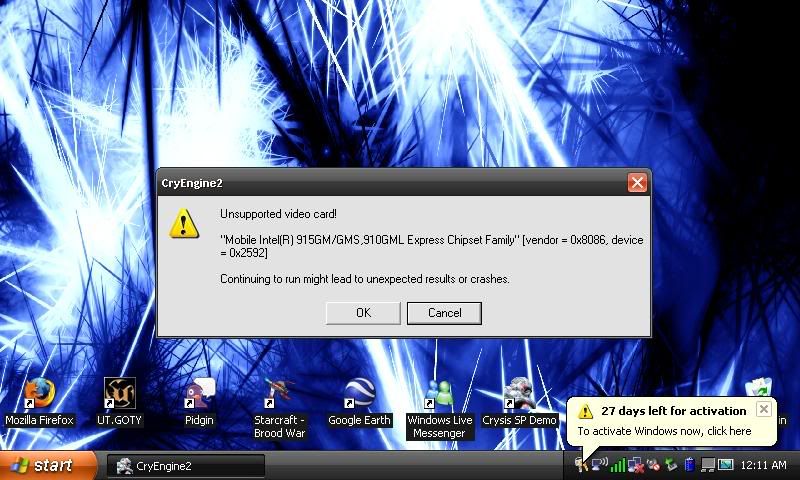
But with the eeePC 900 (or whatever they're going to call the Atom version) the hardware *may* be at a level where this might work with COD4 et al.
I'm eager to kow how Nexuiz goes though!![/img][/url]-
TehTux - Member
- Posts: 31
- Joined: Sat Jun 24, 2006 5:57 am
-
-
How about that Everex Cloudbook?1.2.1 Forever-

kozak6 - Alien trapper
- Posts: 418
- Joined: Wed Mar 01, 2006 9:22 pm
- Location: AZ
-
-
with such a graphics card you can not run nexuiz with over .. dunno ? 10 fps ? No matter how fast the CPU is.IRC quote:
[kojn] I've been coming a bit more recently
[kojn] she took it the dirty way- GreEn`mArine
- Forum addon
- Posts: 1509
- Joined: Tue Feb 28, 2006 9:33 pm
- Location: Germany
-
What make nexuiz impossible to play on the eeepc is not really the gfx card ( you can get around 10-30 fps with appropriate setting), but the small keyboard give an absolutely awful gaming experience.- Ronan
- Alien trapper
- Posts: 292
- Joined: Tue Mar 20, 2007 10:25 pm
- Location: France
-
I can't understand how people believe that crysis will play on a machine with an integrated graphics card and a CPU @ 1.2ghz. Hell, it crawls along on my machine, which has a C2D-M @ 2.23, and a dedicated radeon, even on the lowest settings.
-

torus - Forum addon
- Posts: 1341
- Joined: Sun Dec 24, 2006 6:59 am
- Location: USA
-
-
Ronan wrote:What make nexuiz impossible to play on the eeepc is not really the gfx card ( you can get around 10-30 fps with appropriate setting), but the small keyboard give an absolutely awful gaming experience.
Wow .. this IS unplayable, or do you wanna tell me that 20fps on avg is any good. But maybe I didnt see the sarcasm ... you can plug in a keyboard at usb or?
-

Bundy - Alien
- Posts: 230
- Joined: Sat Jun 23, 2007 10:47 am
-
-
Ronan wrote:What make nexuiz impossible to play on the eeepc is not really the gfx card ( you can get around 10-30 fps with appropriate setting), but the small keyboard give an absolutely awful gaming experience.
As much as I found the keyboard ok to type on (after you learn to adapt to the small layout), you might be right and the WASD + bindings might be too cramped.
A usb keyboard would solve the problem, but then that little screen is even further away-
TehTux - Member
- Posts: 31
- Joined: Sat Jun 24, 2006 5:57 am
-
-
Ok - an update.
I recently bought a eeePC (AUD$399 - bargin!) and copied the Nexuiz 2.4 directory onto a high speed USB thumb drive.
On my eeeXubuntu (the default Xandros lasted less than 24 hours) it took a long time to get going and had a few issues:
1. With the default res of 800x480, you cannot select 'Appy now' buttons etc as they're off the screen. Luckily I had Nexuiz on another machine so I could just count down the 'tabs' and press enter - setting res to 640x480. This freezes X. Restart X with Ctrl+Alt+Backspace.
2. Restart Nexuiz, it will be all visible now at 800x480. Choosing 'lowest' doesn't actually set everything to the lowest. You still have to manually set some items to 'off' or lower.
3. Because the menu system is openGL, everything is in slow motion. Just refreshing the server list is a long process and you get inflated pings as a result (as my other machine was getting pings of 50 to the Aussie servers and it was 800+ on the eeePC.
4. Everything set lower than the lowest, 2FPS was what I received.
Full list of eeePC playable games here: http://wiki.eeeuser.com/list:games
Anyway - begs the question - could we have an option to load up a 'simple' menu system without the openGL wizz bangery and have an even 'lower' setting so sub par games run ok? Open Arena is playable - which is based of Quake 3! Would be great to somehow cut down Nexuiz for really really slow machines (especially the ultra portable laptops that are coming out). Maybe I'm asking too much.
Cheers-
TehTux - Member
- Posts: 31
- Joined: Sat Jun 24, 2006 5:57 am
-
-
I spoke way too soon.
Seems that Xandros (default eeePC distro) has 3d enabled, eeeXubuntu does not.
Follow the instructions here for setting up 3d in eeeXubuntu:
http://wiki.eeeuser.com/ubuntu:eeexubuntu:customization
Went from 2FPS to around 18FPS. Dips into single figures in open areas with people.
Open Arena now seems to be 40+ FPS constant - and looks better. Just calling it how I see it.
Maybe with some more hacking I can get this 630Mhz beast to play Nexuiz online and smooth.-
TehTux - Member
- Posts: 31
- Joined: Sat Jun 24, 2006 5:57 am
-
-
LOW is NOT intended to disable all features.. just the resource hogging ones so it can still look ok but offering more speed..
The menu is opengl? well in a sense yes the whole engine is.. but the menu does not use special ogl features i do not see what should be changed there.
I suppose OA has fewer/lower size textures so maybe gl_picmip or r_compressedtextures does help some.
What mouse driver do you have? Maybe the slowness from the menu is just the mouseacceleration doing strange things. There is a menu option to turn it off.-

esteel - Site admin and forum addon
- Posts: 3924
- Joined: Wed Mar 01, 2006 8:27 am
-

-
Set all settings as low as possible (also texture compression and quality as esteel said) and try again. Maybe even a lower resolution? Try setting vid_width and vid_height manually in the autoexec.cfg if you cant do it from the menu. Also set vid_bitsperpixel 16
r_glsl 0 might help, too
I'm interested in the results, considering buying the eeepc 2nd generation when (if) they ever release it.
-

FruitieX - Keyboard killer
- Posts: 588
- Joined: Mon Nov 13, 2006 4:47 pm
- Location: Finland
-
-
FruitieX wrote:Set all settings as low as possible (also texture compression and quality as esteel said) and try again. Maybe even a lower resolution? Try setting vid_width and vid_height manually in the autoexec.cfg if you cant do it from the menu. Also set vid_bitsperpixel 16
r_glsl 0 might help, too
I'm interested in the results, considering buying the eeepc 2nd generation when (if) they ever release it.
Great idea, as Open Arena is 640x480 (there wasn't a 800x480 option) so maybe with Nexuiz @ 640x480 it'll be more playable.
As for the mouse driver, I'm at a loss, I'm using whatever Xubuntu 7.10 comes with
Really want to get Nexuiz playable. There's another person at my work with an eeePC, want to get some lunchtime mini-lans going-
TehTux - Member
- Posts: 31
- Joined: Sat Jun 24, 2006 5:57 am
-
-
Also try messing around with gl_vbo values. The default is 1, 0 shouldn't be faster but 2 may.-

SavageX - Site Admin
- Posts: 442
- Joined: Wed Mar 01, 2006 9:34 am
-
15 posts
• Page 1 of 1
Return to Nexuiz - General Discussion
Information
-
- Who is online
- Users browsing this forum: No registered users and 1 guest