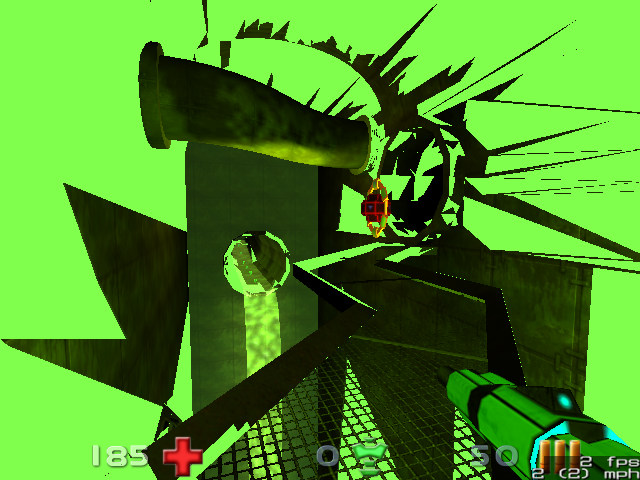
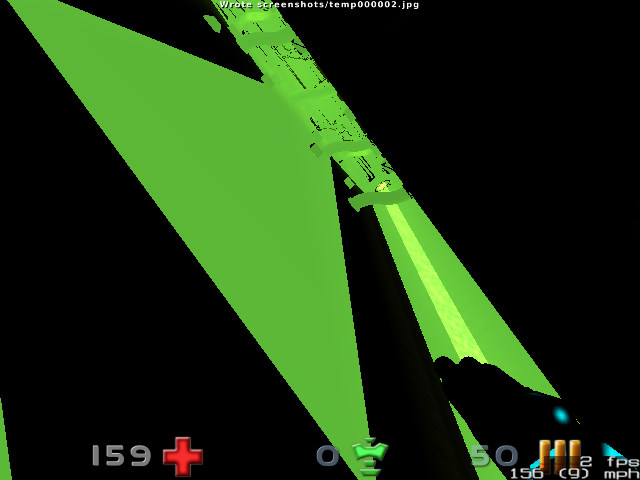
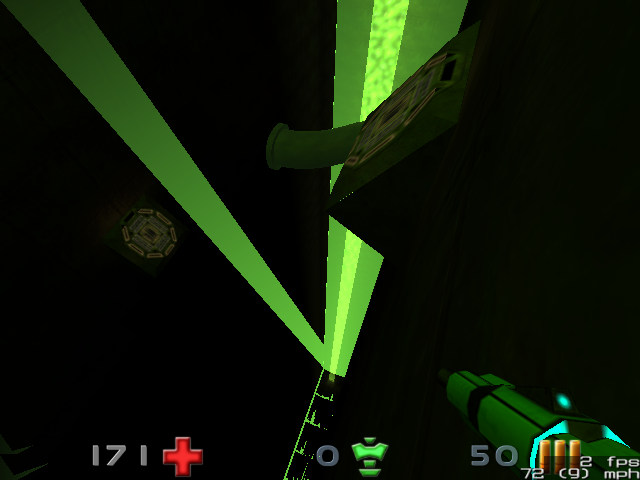
Nexuiz on i950 intel graphix card (screenshots)

Discuss anything to do with Nexuiz here.

Moderators: Nexuiz Moderators, Moderators


  • Here's what nexuiz looks like on i950 intel graphix cards:
    Image

    Image

    Image
    take_this_cup_of_poison
    Banned
     
    Posts: 198
    Joined: Sun Jan 20, 2008 2:25 am

Fri Oct 24, 2008 2:23 pm

  • Epic, some of the textures actually show.

    I remember one time me and my friends "modified" Doom 3 to run on an old pentium 3 machine with an onboard graphics chip. Changed the config files so it ran in 320*480 and turned off all sorts of stuff. It got like 10fps at most.
    Possibly not the worst mapper in the world.

    A blog of random pish:
    http://xeno.planetnexuiz.com/blog/?author=5
    User avatar
    Sepelio
    Forum addon
     
    Posts: 1101
    Joined: Tue Jun 27, 2006 7:57 pm
    Location: Scotland

Fri Oct 24, 2008 4:05 pm

  • I think that if you cut out the first screenshot properly, you can sell it as modern art. :)
    freefang
    Member
     
    Posts: 36
    Joined: Fri Feb 22, 2008 4:48 pm


  • take_this_cup_of_poison wrote:Here's what nexuiz looks like on i950 intel graphix cards:

    I just did a quick test and i couldn't reproduce any of those render bugs... The framerate on default settings is abysmal, except for the animated logos on reslimed i couldn't find any rendering errors (using low setting fixed that bug and resulted in almost playable framerated (without bots or players)).

    The test system was my Sony SZ1M/B laptop with GMA950/i945GM and debian sid (xserver-xorg-video-intel 2:2.4.2-1).
    User avatar
    KadaverJack
    Site admin and forum addon
     
    Posts: 1102
    Joined: Tue Feb 28, 2006 9:42 pm

Fri Oct 24, 2008 4:33 pm


  • KadaverJack wrote:
    take_this_cup_of_poison wrote:Here's what nexuiz looks like on i950 intel graphix cards:

    I just did a quick test and i couldn't reproduce any of those render bugs... The framerate on default settings is abysmal, except for the animated logos on reslimed i couldn't find any rendering errors (using low setting fixed that bug and resulted in almost playable framerated (without bots or players)).

    The test system was my Sony SZ1M/B laptop with GMA950/i945GM and debian sid (xserver-xorg-video-intel 2:2.4.2-1).


    The errors do not occur immediatly.
    On slimepit it takes a few seconds and is in a certain spot.
    On slimepipe it also takes a few seconds: https://cat2.optus.nu/nexuizserv/slimepipesmallctf6.pk3

    On most other maps it doesn't happen.
    On some other maps it doesn't completely chop, just other "lighter' triangles appear to flicker over the real triangles. (framerates halve).

    This has been happening since 2.3 I think.

    Before that it didn't happen.

    Debian etch system.
    take_this_cup_of_poison
    Banned
     
    Posts: 198
    Joined: Sun Jan 20, 2008 2:25 am

Fri Oct 24, 2008 7:37 pm

  • something's wrong with the NexuizNinja server, is it? The thumbnails just won't load up :?
    uncomfortable
    random
    mean
    embarrassing
    limited
    User avatar
    Urmel
    Forum addon
     
    Posts: 1744
    Joined: Fri Mar 03, 2006 10:06 am
    Location: Offline

Fri Oct 24, 2008 7:41 pm

  • Urmel wrote:something's wrong with the NexuizNinja server, is it? The thumbnails just won't load up :?


    Yes, NN seems to be down.
    Imagine modern art.
    take_this_cup_of_poison
    Banned
     
    Posts: 198
    Joined: Sun Jan 20, 2008 2:25 am

Fri Oct 24, 2008 7:54 pm

  • hehe :mrgreen:
    uncomfortable
    random
    mean
    embarrassing
    limited
    User avatar
    Urmel
    Forum addon
     
    Posts: 1744
    Joined: Fri Mar 03, 2006 10:06 am
    Location: Offline

Tue Oct 28, 2008 3:18 pm

  • Have you upgraded to the latest drivers for your graphics card? Somtimes there are bugs in older drivers which alter the graphics cards performance on some software. Try downloading the latest drivers and make sure you have the latest version of Open GL and Direct X if you are running on a Windows machine.
    filippo333
    Newbie
     
    Posts: 7
    Joined: Tue Oct 28, 2008 2:59 pm

Tue Oct 28, 2008 4:53 pm

  • I did some more testing today: judging by the error message thrown by the driver, this occurs when you run out of texture memory. Reducing the texture size (i just tested low.cfg) did indeed seem to fix the problem...

    Since anything above low.cfg is pretty much unplayable anyway, this bug shouldn't cause too much problems :P
    But if the problem persists with xf86-video-intel 2.5 (which has been released about a week ago), someone should file a bug report... (it won't be me, since i don't feel like building the driver myself, esp. since i don't use the intel gpu for 3D stuff anyway)
    User avatar
    KadaverJack
    Site admin and forum addon
     
    Posts: 1102
    Joined: Tue Feb 28, 2006 9:42 pm


Return to Nexuiz - General Discussion


Information
  • Who is online
  • Users browsing this forum: No registered users and 1 guest