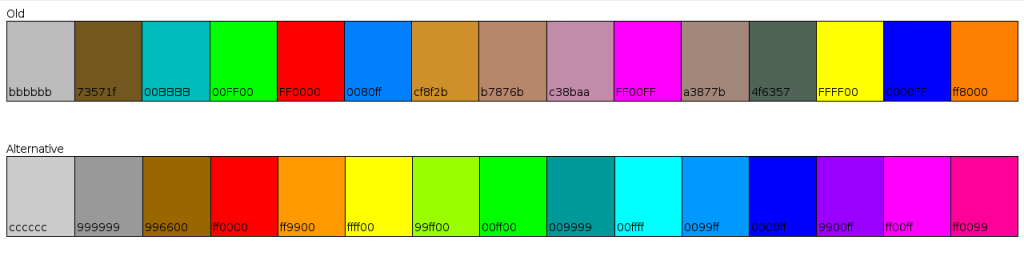
[Player Model Images] An Alternative

Developer discussion of experimental fixes, changes, and improvements.

Moderators: Nexuiz Moderators, Moderators

Mon Jul 14, 2008 6:52 am

  • It is quite obvious that the existing player model images are outdated, inconsistent and in a quite poor quality.

    So I intended to ask you first if I could create new ones, but I had to find out if I was able to create them in the first place. And when I found out I could and as everything was set up, I simply skipped the asking part. :P

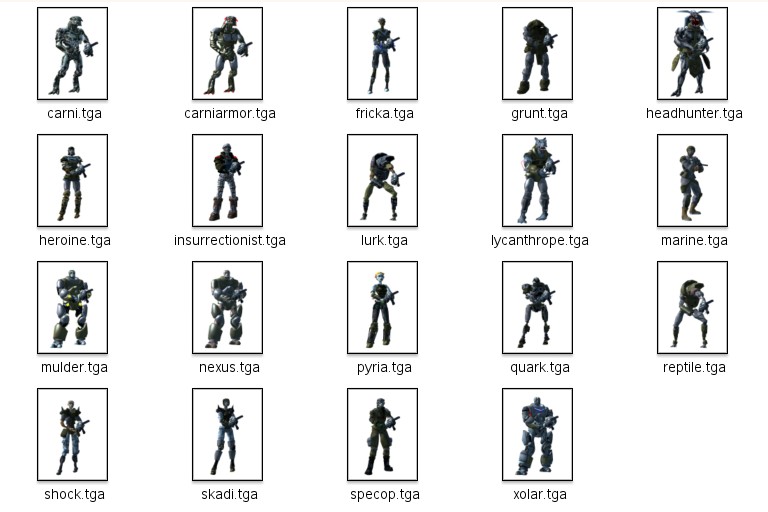
    These alternative ones are based on screenshots taken under the exact same conditions, have a resolution of 512x512 and are .tga with an alpha channel. In addition, the relative sizes of the models are correct (meaning: bigger in image = bigger in game).

    Download
    (UPDATE: Included in Nexuiz 2.5)

    Screenshot (unscaled versions)
    Image
    Last edited by sev on Thu Apr 29, 2010 7:06 pm, edited 5 times in total.
    User avatar
    sev
    Alien
     
    Posts: 248
    Joined: Sat Mar 29, 2008 3:03 pm
    Location: Switzerland

Mon Jul 14, 2008 7:17 am

Mon Jul 14, 2008 7:33 am

  • Actually, I'd prefer the rotating player model preview to get in instead that had been coded by Black for EDU2, but never added to the engine and the QC code.

    But if we won't someone to merge this code in and clean it up, we will probably have to use these images instead.
    1. Open Notepad
    2. Paste: ÿþMSMSMS
    3. Save
    4. Open the file in Notepad again

    You can vary the number of "MS", so you can clearly see it's MS which is causing it.
    User avatar
    divVerent
    Site admin and keyboard killer
     
    Posts: 3809
    Joined: Thu Mar 02, 2006 4:46 pm
    Location: BRLOGENSHFEGLE

Mon Jul 14, 2008 7:44 am

Mon Jul 14, 2008 8:20 am

  • Of course the goal should be a real time render (also enabling a preview of the colour settings).

    The images are an in-between solution, and I think a lot better than the existing ones.

    By the way, while experimenting with different colour settings I found the "secret" shirt and pants colour. :shock: Does this really work in online multiplayer games?
    User avatar
    sev
    Alien
     
    Posts: 248
    Joined: Sat Mar 29, 2008 3:03 pm
    Location: Switzerland

Mon Jul 14, 2008 8:56 am

  • Yes, it does work in multiplayer (but not in teamplay). As it gives its wearer a DISadvantage (he is much harder visible), it is fine as a fun feature.

    Actually, that coloring can even be set on maps - the map spmspmspmspmspmspmspmbkdbnsspmspmspmndspm uses exactly that on its walls. BTW, this is the only map where the secret colors can work as camouflage :P
    1. Open Notepad
    2. Paste: ÿþMSMSMS
    3. Save
    4. Open the file in Notepad again

    You can vary the number of "MS", so you can clearly see it's MS which is causing it.
    User avatar
    divVerent
    Site admin and keyboard killer
     
    Posts: 3809
    Joined: Thu Mar 02, 2006 4:46 pm
    Location: BRLOGENSHFEGLE

Mon Jul 14, 2008 10:24 am

  • Cool. Thank you very much sev. Great job. :)
    User avatar
    Fisume!
    Alien trapper
     
    Posts: 467
    Joined: Sun Jan 27, 2008 8:55 am
    Location: Saarbruecken, Germany

Mon Jul 14, 2008 11:45 am

  • Yeah, now the player model images actually look like how the players models really are. Thanks
    Ronan
    Alien trapper
     
    Posts: 292
    Joined: Tue Mar 20, 2007 10:25 pm
    Location: France

Mon Jul 14, 2008 7:17 pm

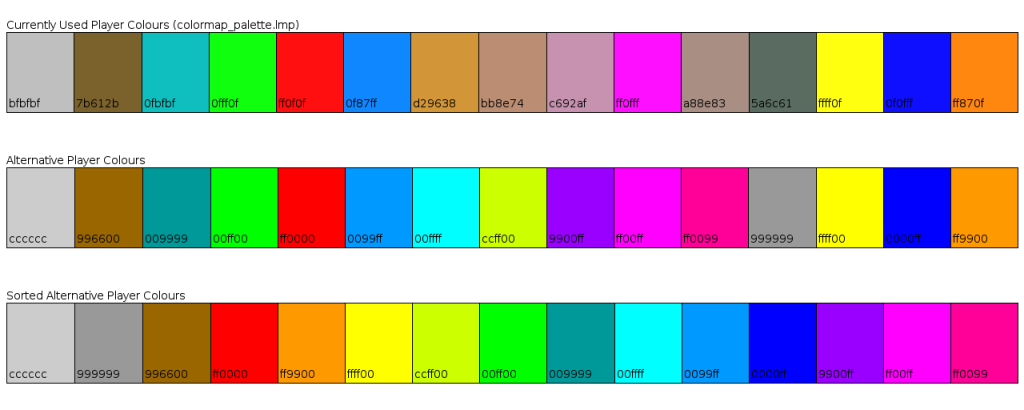
  • So far, I created some alternative menu skins and player model images.
    And while I am at it, I also would like to propose alternative shirt and pants colours :P
    Mainly because I do not really see a logical pattern in the old ones. There are 5 brownish ones as well as red and orange, so almost halve of the colours are red/brown.

    The alternative ones would evenly cover the whole spectrum and all of them would have a more similar brightness, as well as being mathematically more logical (hex triplet, web colours).

    I have no idea how difficult it would be to change them, this is just a suggestion.

    Image
    User avatar
    sev
    Alien
     
    Posts: 248
    Joined: Sat Mar 29, 2008 3:03 pm
    Location: Switzerland

Tue Jul 15, 2008 6:55 am

  • make sure that the key colors: red, blue, orange and green have the same position as in the original file, otherwise TDM/CTF/Colored-Fullbright-Skins will have different colors all of a sudden, which will confuse people.
    IRC quote:
    [kojn] I've been coming a bit more recently
    [kojn] she took it the dirty way
    GreEn`mArine
    Forum addon
     
    Posts: 1509
    Joined: Tue Feb 28, 2006 9:33 pm
    Location: Germany

Fri Jul 18, 2008 1:17 am

  • The alternative ones would evenly cover the whole spectrum and all of them would have a more similar brightness, as well as being mathematically more logical (hex triplet, web colours).


    Mathematically, Finally! Thats what I've waited for a long time. Much better than the old ones.
    What about bright white and black?

    Or what about choosing two 24bit colors ?
    Then we have a really large spectrum of colors
    (I've heard there are some technical reasons why there are only 15 (16?) colors. Correct me if I'm wrong)
    Red Dragon
    Member
     
    Posts: 17
    Joined: Mon Jun 04, 2007 10:18 pm

Fri Jul 18, 2008 8:19 am

  • why do we have only 10 colors for the name, chat,..
    and 15 for the playermodels?
    User avatar
    Fisume!
    Alien trapper
     
    Posts: 467
    Joined: Sun Jan 27, 2008 8:55 am
    Location: Saarbruecken, Germany

Fri Jul 18, 2008 12:13 pm

  • I would suggest that if there are going to be color palette changes to get rid of all the dark colors for the shirt color. This forces the player to choose at least one "bright" color and keeps people from camouflaging themselves to the point where everyone has to choose brown/brown, or drk green/drk green just so they're not at a disadvantage to the players who do.
    User avatar
    Pyromace
    Member
     
    Posts: 46
    Joined: Wed May 28, 2008 8:27 pm

Fri Jul 18, 2008 12:39 pm

  • I am still a noob here, so I hope it is ok when I "stick my nose in your business" and post alternatives for things like player model images, menu skins and now player colours.

    The main reason I do this is because I enjoy creating new things (and learning how to do so) even more than playing Nexuiz. :P

    I could not find any useful infos about lmp files (gfx/colormap_palette.lmp). So I now have directly "analysed" and changed it with a hex editor and it seems to work.

    I still have some questions though:
    - Does the 16th (and 32nd) colour value in the colormap_palette.lmp file have any function? Does it need to be a certain value?
    - Do the colour values in the colormap_palette.base file have any function? Fiddling around with them does not seem to change anything.
    - I could not find a config file to change the colours in the player setup menu. The alternative colours are displayed correctly on the players and the ranking board, but not in the menu (still the old ones).
    Image


    Red Dragon wrote:What about bright white and black?

    Or what about choosing two 24bit colors ?
    Then we have a really large spectrum of colors

    Most maps are dark, so black would give you an advantage (camouflage).
    I think 16 are enough. Experimenting with my alternative colour set, it was difficult to distinguish similar colours like yellow and bright green, or red and pink (let alone shades of the same colours).


    Fisume! wrote:why do we have only 10 colors for the name, chat,..
    and 15 for the playermodels?

    I assume because there are only 10 digits (0-9) and ^10 would be interpreted as "display 0 with colour 1". More would probably require altering the code.
    Last edited by sev on Sat Jun 13, 2009 4:47 pm, edited 1 time in total.
    User avatar
    sev
    Alien
     
    Posts: 248
    Joined: Sat Mar 29, 2008 3:03 pm
    Location: Switzerland

Fri Jul 18, 2008 7:35 pm

  • I want black. :P
    If its to dark then gimme a large glowing sprite with "SHOOT HERE"

    Most maps are dark, so black would give you an advantage

    Contrast counts imo. If a playermodel has a blueish color on blueish map (or red on red, etc.) its the same as black on dark maps.
    I guess there will be always a color which blends with the map color/theme.
    Red Dragon
    Member
     
    Posts: 17
    Joined: Mon Jun 04, 2007 10:18 pm

Sat Jul 19, 2008 8:31 am

  • Red Dragon wrote:I want black. :P
    If its to dark then gimme a large glowing sprite with "SHOOT HERE"

    Most maps are dark, so black would give you an advantage

    Contrast counts imo. If a playermodel has a blueish color on blueish map (or red on red, etc.) its the same as black on dark maps.
    I guess there will be always a color which blends with the map color/theme.


    Yes, but in almost every map there are dark places/shadows, but not all the colours.

    I made some screenshots to illustrate the problem (made under the conditions I play in, except the resolution)
    ImageImageImage
    User avatar
    sev
    Alien
     
    Posts: 248
    Joined: Sat Mar 29, 2008 3:03 pm
    Location: Switzerland

Mon Aug 04, 2008 12:51 pm

Mon Aug 04, 2008 1:57 pm

  • Accepted the colors, except for one thing: I replaced all the 00s by 0f again, as these are for lighting up with bright singlecolored lights. Will soon commit.

    The "base" file can be converted to the actual colors file by xxd :P

    Actually, changed them to:

    cccccc
    996600
    00ff80
    00ff00
    ff0000
    0080ff
    00ffff
    80ff00
    8000ff
    ff00ff
    ff0080
    999999
    ffff00
    0000ff
    ff8000
    000000

    to better fit the rainbow.
    1. Open Notepad
    2. Paste: ÿþMSMSMS
    3. Save
    4. Open the file in Notepad again

    You can vary the number of "MS", so you can clearly see it's MS which is causing it.
    User avatar
    divVerent
    Site admin and keyboard killer
     
    Posts: 3809
    Joined: Thu Mar 02, 2006 4:46 pm
    Location: BRLOGENSHFEGLE

Fri Sep 19, 2008 2:25 pm

  • Fisume! wrote:why do we have only 10 colors for the name, chat,..
    and 15 for the playermodels?


    we got 2 different greys... i think we should better use one orange and one grey instead.

    divverent could test it on his server :P

    btw i agree with the new playercolors and playermodelpreviews... but the background shouldnt be white... cause our menu is actually blue
    Image
    User avatar
    jlue2051
    Member
     
    Posts: 13
    Joined: Tue Apr 15, 2008 4:25 pm

Fri Sep 19, 2008 2:27 pm

  • Red Dragon wrote:I want black. :P
    If its to dark then gimme a large glowing sprite with "SHOOT HERE"

    Most maps are dark, so black would give you an advantage

    Contrast counts imo. If a playermodel has a blueish color on blueish map (or red on red, etc.) its the same as black on dark maps.
    I guess there will be always a color which blends with the map color/theme.


    i'd like black and white... grey gives more advantage then black imo... cuz many things are grey but black is darker :P
    Image
    User avatar
    jlue2051
    Member
     
    Posts: 13
    Joined: Tue Apr 15, 2008 4:25 pm

Fri Sep 19, 2008 3:37 pm

  • jlue2051 wrote:btw i agree with the new playercolors and playermodelpreviews... but the background shouldnt be white... cause our menu is actually blue


    The backgrounds are only white because these are the previews. In the menu the backgrounds of the images are transparent. (Put the player_model_images.pk3 into the /data/ folder, and you should see them in their full glory :wink: )
    User avatar
    sev
    Alien
     
    Posts: 248
    Joined: Sat Mar 29, 2008 3:03 pm
    Location: Switzerland

Fri Sep 19, 2008 5:13 pm

  • @DivVerent
    Wouldn't it be possible to use Hexadezimal coding for message and name colours (colour 12 = ^b, for example), and then use exactly the same colours as in the player colour palette? I think a lot of players would appreciate that (including me).
    User avatar
    sev
    Alien
     
    Posts: 248
    Joined: Sat Mar 29, 2008 3:03 pm
    Location: Switzerland

Fri Sep 19, 2008 5:41 pm

  • No, as the name coloring system is from Q3A and should stay compatible.

    If anything, ^A to ^P could be used to map to the player colors.
    1. Open Notepad
    2. Paste: ÿþMSMSMS
    3. Save
    4. Open the file in Notepad again

    You can vary the number of "MS", so you can clearly see it's MS which is causing it.
    User avatar
    divVerent
    Site admin and keyboard killer
     
    Posts: 3809
    Joined: Thu Mar 02, 2006 4:46 pm
    Location: BRLOGENSHFEGLE

Fri Sep 19, 2008 6:15 pm

  • divVerent wrote:No, as the name coloring system is from Q3A and should stay compatible.

    If anything, ^A to ^P could be used to map to the player colors.

    If qstat's method to unescape q3 color codes is correct, q3 has only 8 different colors, so the current system already is incompatible...
    User avatar
    KadaverJack
    Site admin and forum addon
     
    Posts: 1102
    Joined: Tue Feb 28, 2006 9:42 pm

Fri Sep 19, 2008 9:04 pm


Return to Nexuiz - Development


Information
  • Who is online
  • Users browsing this forum: No registered users and 1 guest