The Style Of Nexuiz (Updates you want)
Moderators: Nexuiz Moderators, Moderators
67 posts
• Page 2 of 3 • 1, 2, 3
-
d00d! those blur screens look pretty kick ass! I can imagine seeing something on the same level as the first one while tromping around at like 60MPH and something like the second one when you boost yourself at like 120MPH.-

Lee_Stricklin - Alien trapper
- Posts: 404
- Joined: Sat Jun 21, 2008 8:42 pm
- Location: Midwest
-
-
Samual wrote:Never mind, I got the glsl thing to work.... What you left out is that we have to use r_glsl_postprocess_uservec1 for setting the individual options.. Now, I use "1 1 0 0" and I think it makes a pretty decent depth of field - I like it.
I do have one question though, what are the other arguments? (Arg 3 and Arg 4?).. What do they do, I mean.
I'm really sorry for the wrong cvar, I posted that late yesterday right before going to sleep. I don't know the meaning of the other parameters, but probably they are not used, you should check how the effect is done in Darkplaces. But also you probably don't want to touch that unless you want to modify the blur effect.
For more info about the glsl language see this.-

mand1nga - Alien trapper
- Posts: 321
- Joined: Mon May 12, 2008 12:19 am
-
-
I've understood the right command to use, it's- Code: Select all
cl_cmd blurtest x y z
r_glsl_postprocess 1
r_glsl_postprocess_uservec1 "3 5 0 0" // 1st arg: radius, 2nd: power
The comment here isn't correct, since those values are the result of some operations on x y z, being y and z the real radius and power.
Anyway, for some reasons, after I've played with those cvars as Mand1nga suggested, the blur effect was working, now that I've found the right command, it does NOTHING!!! WTH! It should change r_glsl_postprocess and r_glsl_postprocess_uservec1, but they stay 0. I've tried many values... I dont get it...-

terencehill - Alien
- Posts: 176
- Joined: Thu Jul 10, 2008 10:33 pm
- Location: Italy
-
Lee_Stricklin wrote:d00d! those blur screens look pretty kick ass! I can imagine seeing something on the same level as the first one while tromping around at like 60MPH and something like the second one when you boost yourself at like 120MPH.
I don't like this blur effect, the effect that rly kicks ass is the MOTION blur. It blurs only the part of the screen moving, the faster the movement, the stronger the effect. An example is the wonderful video Octobre by Pavlvs (it's applied by a video editor, not by the game, obviously).-
terencehill - Alien
- Posts: 176
- Joined: Thu Jul 10, 2008 10:33 pm
- Location: Italy
-
-
terencehill wrote:Lee_Stricklin wrote:d00d! those blur screens look pretty kick ass! I can imagine seeing something on the same level as the first one while tromping around at like 60MPH and something like the second one when you boost yourself at like 120MPH.
I don't like this blur effect, the effect that rly kicks ass is the MOTION blur. It blurs only the part of the screen moving, the faster the movement, the stronger the effect. An example is the wonderful video Octobre by Pavlvs (it's applied by a video editor, not by the game, obviously).
I feel the same way. Love the video. But I do like the depth of field blur too. Where objects further away are blurred compared to closer objects.... I accomplish this with:- Code: Select all
r_glsl_postprocess_uservec1 "1 1 0 0"
I think it looks nice, what's your opinion on it?-

Samual - Keyboard killer
- Posts: 508
- Joined: Mon May 25, 2009 7:22 pm
- Location: Pittsburgh, PA
-
r_glsl_postprocess 1
r_glsl_postprocess_uservec1 "3 5 0 0" // 1st arg: radius, 2nd: power
The comment here isn't correct, since those values are the result of some operations on x y z, being y and z the real radius and power.
No, I'am right, as the time parameter works only with the blurtest command and handled from qc.Samual wrote:I feel the same way. Love the video. But I do like the depth of field blur too. Where objects further away are blurred compared to closer objects.... I accomplish this with:- Code: Select all
r_glsl_postprocess_uservec1 "1 1 0 0"
I think it looks nice, what's your opinion on it?
I guess it is too light, maybe the radius can be increased according to the damage received-
mand1nga - Alien trapper
- Posts: 321
- Joined: Mon May 12, 2008 12:19 am
-
mand1nga wrote:r_glsl_postprocess 1
r_glsl_postprocess_uservec1 "3 5 0 0" // 1st arg: radius, 2nd: power
The comment here isn't correct, since those values are the result of some operations on x y z, being y and z the real radius and power.
No, I'am right, as the time parameter works only with the blurtest command and handled from qc.
If u r right then, in main.qc code these variable names aren't correct:- Code: Select all
if(cmd == "blurtest") {
      blurtest_time0 = time;
      blurtest_time1 = time + stof(argv(1)); // argv(1) is x
      blurtest_radius = stof(argv(2)); // argv(2) is y
      blurtest_power = stof(argv(3)); // argv(3) is z
   }
r_glsl_postprocess_uservec1 is generated using those variables in the file view.qc:- Code: Select all
   if(time > blurtest_time0 && time < blurtest_time1)
   {
      float r, t;

      t = (time - blurtest_time0) / (blurtest_time1 - blurtest_time0);
      r = t * blurtest_radius;
      f = 1 / pow(t, blurtest_power) - 1;

      cvar_set("r_glsl_postprocess", "1");
      cvar_set("r_glsl_postprocess_uservec1", strcat(ftos(r), " ", ftos(f), " 0 0"));
   }
   else
   {
      cvar_set("r_glsl_postprocess", "0");
      cvar_set("r_glsl_postprocess_uservec1", "0 0 0 0");
   }
Anyway It seems to me that there is something wrong with the time (or is it an intended behaviour?), that could be the reason why the command cl_cmd blurtest doesn't work and set always r_glsl_postprocess and r_glsl_postprocess_uservec1 to 0.-
terencehill - Alien
- Posts: 176
- Joined: Thu Jul 10, 2008 10:33 pm
- Location: Italy
-
Alright well I did something wrong here, I wrote a small AccumBuffer and something just isn't working. Halp!!!!!
- Code: Select all
extern cvar_t r_motionblur;
extern cvar_t r_frametime

void DrawAccumBlur (void)
{
   static int blurstate = 0;
   float accblur;
   static float damagetime = -1.0f;
   if (!r_motionblur.value) return;
   if (cl.stats[STAT_HEALTH] <= 0)
   {
      accblur = 0.75f;
   }
   else if (cl.cshifts[CSHIFT_DAMAGE].percent)
   {
      accblur = 0.75f;
      damagetime = 0.5f;
   }
   else if (damagetime >= 0.0f)
   {
      damagetime -= r_frametime;
      accblur = 0.75f;
   }
   else if (cl.cshifts[CSHIFT_CONTENTS].percent)
   {
      accblur = 0.666f;
   }
   else accblur = -1.0f;

   if (accblur <= 0.0f)
   {
      blurstate = 0;
      return;
   }

   if (!blurstate)
   {
      glAccum (GL_LOAD, 1.0f);
   }
   else
   {
      glAccum (GL_MULT, accblur);
      glAccum (GL_ACCUM, 1.0f - accblur);
      glAccum (GL_RETURN, 1.0f);
   }

   blurstate = 1;
}
And don't forget to add to the render- Code: Select all
DrawAccumBlur ();
But something still doesn't work. If someone is able to get this to work, please tell me how. (And make a video?)-
Samual - Keyboard killer
- Posts: 508
- Joined: Mon May 25, 2009 7:22 pm
- Location: Pittsburgh, PA
-
About the server rating thing: Let's not do this. It will only cause the already popular servers to become more and more popular leaving many other (new) servers empty. Not to mention that a system for this would generally be quite easy to abuse in many different ways. Sorting servers by means of the bookmarks, ping and empty/full switches is more than enough. Only thing I'd personally like is to have bookmarked servers always shown (full/empty don't affect them).
About the authentication thing: there is a long thread that has been moved to the trash for offtopic nonsense. Despite this setback there is a lot of good (implementation) discussion. Doing this the right way will be fairly heavy job, but I'd be happy to talk about the concepts of how this should work.Before posting a reply, please read about the bikeshed-

merlijn - Advanced member
- Posts: 84
- Joined: Tue Oct 21, 2008 10:18 am
-
-
merlijn wrote:About the server rating thing: Let's not do this. It will only cause the already popular servers to become more and more popular leaving many other (new) servers empty. Not to mention that a system for this would generally be quite easy to abuse in many different ways. Sorting servers by means of the bookmarks, ping and empty/full switches is more than enough. Only thing I'd personally like is to have bookmarked servers always shown (full/empty don't affect them).
About the authentication thing: there is a long thread that has been moved to the trash for offtopic nonsense. Despite this setback there is a lot of good (implementation) discussion. Doing this the right way will be fairly heavy job, but I'd be happy to talk about the concepts of how this should work.
At the very least we need to improve the filters. More options, etc. And the authentication would probably only be possible by divs help, and we all know he isn't going to do it.. So I doubt that will actually happen (Though I would like it).-
Samual - Keyboard killer
- Posts: 508
- Joined: Mon May 25, 2009 7:22 pm
- Location: Pittsburgh, PA
-
-
Bump ^_^-
Samual - Keyboard killer
- Posts: 508
- Joined: Mon May 25, 2009 7:22 pm
- Location: Pittsburgh, PA
-
-
Samual wrote:Alright well I did something wrong here, I wrote a small AccumBuffer and something just isn't working. Halp!!!!!
What are you trying to do?
Why don't you use the existing blur effect from client qc?-
mand1nga - Alien trapper
- Posts: 321
- Joined: Mon May 12, 2008 12:19 am
-
-
mand1nga wrote:Samual wrote:Alright well I did something wrong here, I wrote a small AccumBuffer and something just isn't working. Halp!!!!!
What are you trying to do?
Why don't you use the existing blur effect from client qc?
That isn't motion blur. It's just a static blur.-
Samual - Keyboard killer
- Posts: 508
- Joined: Mon May 25, 2009 7:22 pm
- Location: Pittsburgh, PA
-
-
Isn't motion blur used on 24FPS movies to make fast action look more smooth?
How much gpu/cpu does it use... my intel card could use some of that smoothing (and probably can't do it )
)- tundramagi
- Forum addon
- Posts: 974
- Joined: Sun Jan 04, 2009 4:53 pm
-
tundramagi wrote:Isn't motion blur used on 24FPS movies to make fast action look more smooth?
How much gpu/cpu does it use... my intel card could use some of that smoothing (and probably can't do it)
Well it would only make it slower for you, sorry. But good news everyone.. I GOT IT TO WORK!!!!!!!!!!!!!!!!!!!!!!!!!!!!!!!!!!!!!! (I KNOW RIGHT?!)
Only supported platform currently is Windows (And this won't change unless I get a lot of help), and compiling this little fucker is a bitch.... Literally, it's almost impossible without hours of troubleshooting. So until I become a better coder, it's not viable.
As for performance, I noticed a 17% drop in framerate (From 170), so it was very usable to me. Blur amounts can't be adjusted quite yet, i'm sure in a release i'll implement settings for it.-
Samual - Keyboard killer
- Posts: 508
- Joined: Mon May 25, 2009 7:22 pm
- Location: Pittsburgh, PA
-
-
Samual wrote:tundramagi wrote:Isn't motion blur used on 24FPS movies to make fast action look more smooth?
How much gpu/cpu does it use... my intel card could use some of that smoothing (and probably can't do it)
Well it would only make it slower for you, sorry. But good news everyone.. I GOT IT TO WORK!!!!!!!!!!!!!!!!!!!!!!!!!!!!!!!!!!!!!! (I KNOW RIGHT?!)
Only supported platform currently is Windows (And this won't change unless I get a lot of help), and compiling this little fucker is a bitch.... Literally, it's almost impossible without hours of troubleshooting. So until I become a better coder, it's not viable.
As for performance, I noticed a 17% drop in framerate (From 170), so it was very usable to me. Blur amounts can't be adjusted quite yet, i'm sure in a release i'll implement settings for it.
Good job, Can you post some screenshots?
If it's window's only it might not get in. Linux is the main dev platform and crossplatform support is always aimed at from what I've seen. Why is it win only? Isn't OpenGL cross platform? You should beable to get it to work on both with OpenGL.- tundramagi
- Forum addon
- Posts: 974
- Joined: Sun Jan 04, 2009 4:53 pm
-
Good job, Can you post some screenshots?
If it's window's only it might not get in. Linux is the main dev platform and crossplatform support is always aimed at from what I've seen. Why is it win only? Isn't OpenGL cross platform? You should beable to get it to work on both with OpenGL.
It's Windows only because I don't know how to add the GL attributes on Linux or OS X. I'm consulting this with div0 and some other people right now. The code which is not dependent on OS is here:
- Code: Select all
=========== Main Code, gl_rmain.c ============
Need this to compile: #include <gl\gl.h>

Code:

extern cvar_t r_motionblur;

void DrawAccumBlur (void)
{
   static int blurstate = 0;
   float accblur;
   static float damagetime = -1.0f;

   if (!r_motionblur.value) return;

   // evaluate blur conditions
   if (cl.stats[STAT_HEALTH] <= 0)
   {
      // being dead always overrides everything else
      accblur = 0.75f;
   }
   else if (cl.cshifts[CSHIFT_DAMAGE].percent)
   {
      // initial damage blur
      accblur = 0.75f;
      damagetime = 0.5f;
   }
   else if (cl.cshifts[CSHIFT_CONTENTS].percent)
   {
      // blur less if underwater
      accblur = 0.666f;
   }
   else accblur = -1.0f;

   if (accblur <= 0.0f)
   {
      // reinit if we're not blurring so that the contents of the
      // accumulation buffer are valid for the frame
      blurstate = 0;
      return;
   }
   if (!blurstate)
   {
      // load the scene into the accumulation buffer
      qglAccum (GL_LOAD, 1.0f);
   }
   else
   {
      qglAccum (GL_MULT, accblur); // scale contents of accumulation buffer
      qglAccum (GL_ACCUM, 1.0f - accblur); // add screen contents
      qglAccum (GL_RETURN, 1.0f); // read result back
   }

   blurstate = 1;
}

=========== Variable setup, gl_rmain.c ============

At the top: cvar_t r_motionblur = {CVAR_SAVE, "r_motionblur", "0", "motion blur testing"};

Respectively with others: Cvar_RegisterVariable(&r_motionblur);

=========== Declaration stuff, glquake.h ============

Under GL_ARB_multitexture: extern void (GLAPIENTRY *qglAccum)(GLenum op, GLfloat value);

=========== Declaration stuff, vid_shared.c ===========

Under GL_ARB_multitexture: void (GLAPIENTRY *qglAccum)(GLenum op, GLfloat value);

In opengl110funcs array: {"glAccum", (void **) &qglAccum},
-
Samual - Keyboard killer
- Posts: 508
- Joined: Mon May 25, 2009 7:22 pm
- Location: Pittsburgh, PA
-
This is awsome. I can't wait to try it on the nvidia box .
.
I'll use slomo + motion blur to get a real movie effect.- tundramagi
- Forum addon
- Posts: 974
- Joined: Sun Jan 04, 2009 4:53 pm
-
tundramagi wrote:This is awsome. I can't wait to try it on the nvidia box.
I'll use slomo + motion blur to get a real movie effect.
I still need moar help! SDL doesn't work so far, and now the WGL version doesn't work. Don't know what I broke, but it's broken. Meh. I need to work on declaring the GL attributes for each OS.
So I will need testers for OS X and Linux when the time comes.-
Samual - Keyboard killer
- Posts: 508
- Joined: Mon May 25, 2009 7:22 pm
- Location: Pittsburgh, PA
-
-
Good news: We're redesigning the method to a texture blur like with bloom... This method will work on all platforms, and should be pretty light on resources.. I'll post a patch when complete.-
Samual - Keyboard killer
- Posts: 508
- Joined: Mon May 25, 2009 7:22 pm
- Location: Pittsburgh, PA
-
Mon Jun 01, 2009 8:05 pm
-
yeah samual since i voted last i do support most of your ideas.
motion blur is a very good one!
keep up the good work!-

fabz0r - Advanced member
- Posts: 66
- Joined: Fri Aug 15, 2008 1:03 am
- Location: Australia
-
-
Awesome! BTW for HUD, check my recent project out:
http://pics.nexuizninjaz.com/viewer.php ... ww5s3t.jpg
http://pics.nexuizninjaz.com/viewer.php ... dpjswi.jpg
http://pics.nexuizninjaz.com/viewer.php ... 2g2pg0.jpg
http://dev.alientrap.org/issues/show/274-

FruitieX - Keyboard killer
- Posts: 588
- Joined: Mon Nov 13, 2006 4:47 pm
- Location: Finland
-
-
FruitieX wrote:Awesome! BTW for HUD, check my recent project out:
http://pics.nexuizninjaz.com/viewer.php ... ww5s3t.jpg
http://pics.nexuizninjaz.com/viewer.php ... dpjswi.jpg
http://pics.nexuizninjaz.com/viewer.php ... 2g2pg0.jpg
http://dev.alientrap.org/issues/show/274
Cool, but add a little more texture into there that matches the themes? I do like that though, fits.-
Samual - Keyboard killer
- Posts: 508
- Joined: Mon May 25, 2009 7:22 pm
- Location: Pittsburgh, PA
-
-
Samual wrote:FruitieX wrote:Awesome! BTW for HUD, check my recent project out:
http://pics.nexuizninjaz.com/viewer.php ... ww5s3t.jpg
http://pics.nexuizninjaz.com/viewer.php ... dpjswi.jpg
http://pics.nexuizninjaz.com/viewer.php ... 2g2pg0.jpg
http://dev.alientrap.org/issues/show/274
Cool, but add a little more texture into there that matches the themes? I do like that though, fits.
Maybe there should be support for per-menu-theme-HUD-skins
Well it's a matter of modifying two files anyway (HUD background + timer background)-
FruitieX - Keyboard killer
- Posts: 588
- Joined: Mon Nov 13, 2006 4:47 pm
- Location: Finland
-
-
As an update, we're still stuck on motion blur.. Currently having some major artifact problems.
Here is the .diff: http://emptyset.endoftheinternet.org/~rpolzer/nexuiz/motionblur-noaccum.diff
Unfortunately this patch breaks bloom and HDR while enabled.. (They don't work while r_motionblur has a value)
The artifacting can be seen here:
On the plus side, this approach is using texture blurring.. Which is used by bloom in the game.. If we use the same buffer as bloom, the performance decrease while having it enabled is much less. (Theoretically) This method is also supported in OpenGL 3.0, and on Mac OS X, unlike the accumulation buffer.
This works on all OSs (Windows, Linux, OSX), on both SDL and WGL/GLX.-
Samual - Keyboard killer
- Posts: 508
- Joined: Mon May 25, 2009 7:22 pm
- Location: Pittsburgh, PA
-
-
Weird, I don't get these artifacts with motion blur and HDR enabled. Seems to work fine (on Linux)-
FruitieX - Keyboard killer
- Posts: 588
- Joined: Mon Nov 13, 2006 4:47 pm
- Location: Finland
-
-
FruitieX wrote:Weird, I don't get these artifacts with motion blur and HDR enabled. Seems to work fine (on Linux)
Oh really? That's great man, screenshots? I don't get it. I'll have to try it on a Linux distro later.
--- Make sure you have vsync on.. That's where the problem might occur-
Samual - Keyboard killer
- Posts: 508
- Joined: Mon May 25, 2009 7:22 pm
- Location: Pittsburgh, PA
-
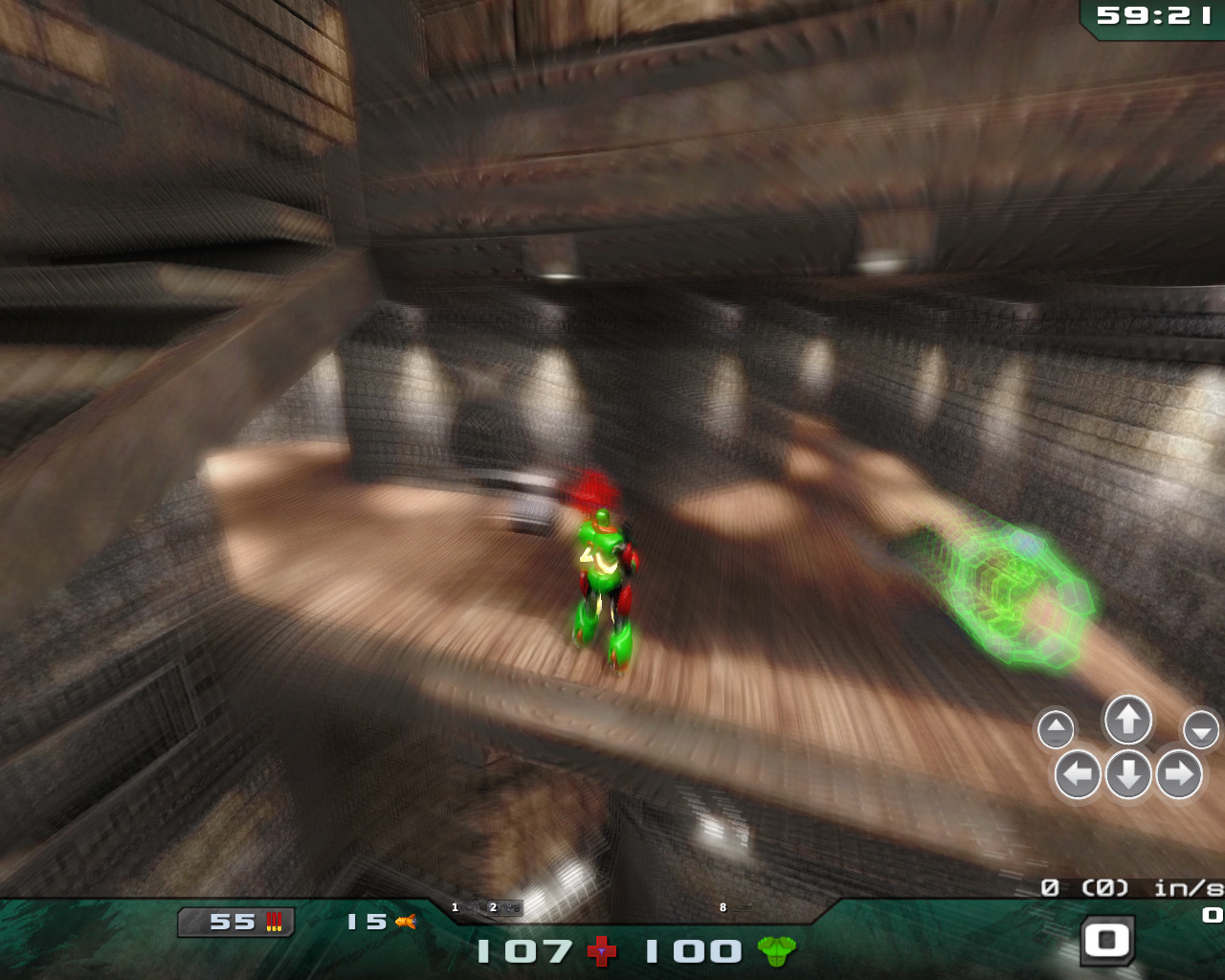


-
~~~~~~~~~~~~~~~~~~~~~~~~~~~~~~~~~~~~~~~~
ALMOST DONE - Next post will describe what needs done.
~~~~~~~~~~~~~~~~~~~~~~~~~~~~~~~~~~~~~~~~-
Samual - Keyboard killer
- Posts: 508
- Joined: Mon May 25, 2009 7:22 pm
- Location: Pittsburgh, PA
-
-
Now, the only thing left is adding mouse motion support for adjusting the velocity.... This is the last update that will be needed, and then the motion blur / damage blur will be complete. I'm going to submit it to dev.alientrap.org soon.-
Samual - Keyboard killer
- Posts: 508
- Joined: Mon May 25, 2009 7:22 pm
- Location: Pittsburgh, PA
-
67 posts
• Page 2 of 3 • 1, 2, 3
Return to Nexuiz - Development
Information
-
- Who is online
- Users browsing this forum: No registered users and 1 guest