You read correctly. I've created some mapping video tutorials and uploaded them on:
Link to training videos (veoh, user): http://www.veoh.com/users/RandomPolygons
Link to training videos (veoh, nexuiz channel): http://www.veoh.com/channels/NexuizLevelDesign
NOTE: This channel thing might work unpredictable and some videos might not show up or play, use the first link to be sure to see them all.
Link to DivX streaming site: http://beta.vreel.net (Just search for: nexuiz level design)
Link to training videos (planetnexuiz, raw): http://ai.planetnexuiz.de/TrainingVideo ... velDesign/
The reason is that youtube has a limit to max 10 minutes and that's just a limitation that won't work for me. Veoh doesn't have any limits, not size of the file nor length of the video.
However, for some reason they got discolored on veoh but nothing that will affect the actual material discussed there.
There's also sometimes some ads before the videos start but that's a small prize to pay for unlimited size and length IMO.
So anyway, for people who want to learn how to make maps for Nexuiz I suggest you watch these. Also I'm gonna make more of these as soon as I've found a good way to actually encode them (which I think I've done).
There's only a matter of time before more are going to show up. The link to veoh and the tutorials are shown above. I will also upload the raw material on planetnexuiz.de if you with to see with true 100% quality. They aren't insanely big so if you like it that way, go ahead. Also, I've made them .RAR, however if you think I should use .ZIP instead please do tell me. The reason right now why I'm using .RAR is that it compresses the videos better.
Enjoy and happy mapping.
Nexuiz Level Design training videos.
Moderators: Nexuiz Moderators, Moderators
26 posts
• Page 1 of 1
Wed Jun 25, 2008 9:29 pm
-
Last edited by ai on Tue Mar 31, 2009 1:56 pm, edited 9 times in total.Grand HOWTO: http://forums.alientrap.local/viewtopic.php?t=4435
My Portfolio: www.kurotorobert.com
My 3D Blog: http://kuroto3d.blogspot.com/
___________
Oh mai-

ai - Forum addon
- Posts: 2131
- Joined: Sun Mar 05, 2006 3:54 pm
- Location: Behind you
-
-
Excellent, excellent videos. You provide a very non-threatening environment and provide information for users of all levels .
.
I hope to see more advanced videos in the future.
kudos to you.
P.S. A tip about the dragging the menu to allow you to flip / rotate axis easily. There are buttons on your toolbar for that. I like them better because the dragged out menu steals focus.-

[-z-] - Site Admin and Nexuiz Ninja
- Posts: 1794
- Joined: Mon Nov 13, 2006 12:20 am
- Location: Florida
-
-
[-z-] wrote:P.S. A tip about the dragging the menu to allow you to flip / rotate axis easily. There are buttons on your toolbar for that. I like them better because the dragged out menu steals focus.
What do you mean? Don't quite understand what you're trying to say :p Icons on my toolbar for flipping my menu?Grand HOWTO: http://forums.alientrap.local/viewtopic.php?t=4435
My Portfolio: www.kurotorobert.com
My 3D Blog: http://kuroto3d.blogspot.com/
___________
Oh mai-
ai - Forum addon
- Posts: 2131
- Joined: Sun Mar 05, 2006 3:54 pm
- Location: Behind you
-
-
Good job! Thought that still conviences me that I sohuld never use radiant 1.5

Anyway, a tip: to unselcet everything, hit your ESC key. That'll unselect everything. Also, hitting A will toggle between select all. I toggles Invert selection.
Keep'em coming, so I might be able to understand 1.5 Oh, and facedragging failed again "One should strive to achieve; not sit in bitter regret."
WE ARE NEXUIZ.

-

C.Brutail - Laidback mapper
- Posts: 2357
- Joined: Tue Feb 28, 2006 7:26 pm
- Location: Ironforge
-
-
ai wrote:What do you mean? Don't quite understand what you're trying to say :p Icons on my toolbar for flipping my menu?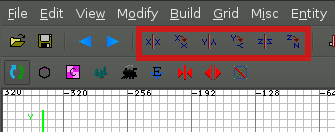
The selected buttons do what the menu you dragged out does. The benefit to using the toolbar, is they don't steal focus. That is to say, if you have a brush selected and you click one of the buttons to flip or rotate it... you can hold alt+arrow and move the brush. With the menu dragged out, you cannot.-
[-z-] - Site Admin and Nexuiz Ninja
- Posts: 1794
- Joined: Mon Nov 13, 2006 12:20 am
- Location: Florida
-
-
Well, I already know that those buttons rotate or flip brushes, in fact I brought them up in another video I just recorded (which will be available soon). But what 'menu' are you talking about? The thing in my mind is the 'File, Edit, Help' thingie at the top.Grand HOWTO: http://forums.alientrap.local/viewtopic.php?t=4435
My Portfolio: www.kurotorobert.com
My 3D Blog: http://kuroto3d.blogspot.com/
___________
Oh mai-
ai - Forum addon
- Posts: 2131
- Joined: Sun Mar 05, 2006 3:54 pm
- Location: Behind you
-
-
A new video is available (Advanced object manipulation) and I've also created a channel for these particular videos. This link brings you directly to those videos: http://www.veoh.com/channels/NexuizLevelDesignGrand HOWTO: http://forums.alientrap.local/viewtopic.php?t=4435
My Portfolio: www.kurotorobert.com
My 3D Blog: http://kuroto3d.blogspot.com/
___________
Oh mai-
ai - Forum addon
- Posts: 2131
- Joined: Sun Mar 05, 2006 3:54 pm
- Location: Behind you
-
-
-

morfar - Site Admin
- Posts: 938
- Joined: Tue Feb 28, 2006 6:08 pm
- Location: The Island
-
-
in one video . you were showing us how to makes shapes using a number to specify the number of sides. for those who like shortcut keys you can press ctrl plus a number starting at 3
ctrl+#? :
3 = triangle
4 = square
5 = penatagon
6 thru 9 just keeps adding sides
so if i wanted an octagon shape i would draw a brush then press ( ctrl+8 )
and presto , i have an octagon . 3 thru 9 are the only shortcuts i know of for quick shapes . maybe this will be added to someones bag of tricks . hope it helpsMaster ? Do you call me Grasshopper because I am cunning and stealthy?
NO ! Because you are Ugree , Rike insect !-

Grasshopper - Alien
- Posts: 228
- Joined: Sat Feb 02, 2008 9:44 am
- Location: Dead Guy In Nexuiz
-
-
A new video: Texturing, is available as raw on the planetnexuiz link, and in a few minutes also on veoh (uploading right now).Grand HOWTO: http://forums.alientrap.local/viewtopic.php?t=4435
My Portfolio: www.kurotorobert.com
My 3D Blog: http://kuroto3d.blogspot.com/
___________
Oh mai-
ai - Forum addon
- Posts: 2131
- Joined: Sun Mar 05, 2006 3:54 pm
- Location: Behind you
-
-
I'm uploading all the videos on http://beta.vreel.net/
It's the new stage6 for those who don't know. They use divx encoding so I don't now how well this would work on Linux, but anything to help out. They have great quality. I'm adding the link to my first post.Grand HOWTO: http://forums.alientrap.local/viewtopic.php?t=4435
My Portfolio: www.kurotorobert.com
My 3D Blog: http://kuroto3d.blogspot.com/
___________
Oh mai-
ai - Forum addon
- Posts: 2131
- Joined: Sun Mar 05, 2006 3:54 pm
- Location: Behind you
-
-
Great job on the videos!
I think they're really good.
I just watched the texturing tutorial and it's very good that you've mentioned caulk. I for myself always start roughing out the layout and having everything caulk from the beginning, because always moving or hiding brushes to select an unseen face to texture it with caulk is very painful.
....and face-selecting using ctrl+shift+click was so much better in 1.4bleach->aneurysm->straledm5->dieselpower->space-fun->o-fun->runningman->runningman1on1->aggressor(conversion)->soylent->bloodprison->bluesky->ruiner->reslimed->strength-

Strahlemann - Keyboard killer
- Posts: 676
- Joined: Wed Mar 01, 2006 12:11 am
- Location: Ulm/Germany
-
-
ai wrote:I'm uploading all the videos on http://beta.vreel.net/
It's the new stage6 for those who don't know. They use divx encoding so I don't now how well this would work on Linux, but anything to help out. They have great quality. I'm adding the link to my first post.
Nice find there. I had no problems watching this on linux.
As far as I can tell excellent job on the tutorials too *thumbs up*"It's a long story kid. You don't wanna hear it. I don't wanna tell it."-

dIM - Alien
- Posts: 160
- Joined: Wed Mar 01, 2006 4:10 am
- Location: DD ger
-
-
great tutorial ai.
compliment
-

BARTUC - Advanced member
- Posts: 65
- Joined: Fri Jun 27, 2008 7:16 pm
- Location: near the nex
-
-
Hmm, I noticed now when I watched one of the videos that the sound is of sync in the videos on vreel (the DivX streaming site). That's not too good. I also think the further you get into the movie the more of sync it gets. At least that's the case for me. Hopefully it's just me that's affected.Grand HOWTO: http://forums.alientrap.local/viewtopic.php?t=4435
My Portfolio: www.kurotorobert.com
My 3D Blog: http://kuroto3d.blogspot.com/
___________
Oh mai-
ai - Forum addon
- Posts: 2131
- Joined: Sun Mar 05, 2006 3:54 pm
- Location: Behind you
-
-
I've made and uploaded two more videos, part 05 just how to set up GTKRadiant with the new Nexuiz entities.def and the fixed models for radiant (given to me by morfar). Then a part 06 where spawnpoints, items and weapons are brought up.
I'm currently uploading them on vreel but they are both up on veoh and the planetnexuiz link. Also, I've replaced the old bigger raw files with encoded versions. The quality isn't that bad as you still can see the text of the menus and the size is a lot smaller, so made sense.
Also, another request, could anyone sticky this thread so it won't get lost in the packs of other threads for new people to find it easier. Thanks.Grand HOWTO: http://forums.alientrap.local/viewtopic.php?t=4435
My Portfolio: www.kurotorobert.com
My 3D Blog: http://kuroto3d.blogspot.com/
___________
Oh mai-
ai - Forum addon
- Posts: 2131
- Joined: Sun Mar 05, 2006 3:54 pm
- Location: Behind you
-
-
excellent work . keep em comming .Master ? Do you call me Grasshopper because I am cunning and stealthy?
NO ! Because you are Ugree , Rike insect !-
Grasshopper - Alien
- Posts: 228
- Joined: Sat Feb 02, 2008 9:44 am
- Location: Dead Guy In Nexuiz
-
Sat Jul 05, 2008 11:05 am
-
Hi there fellows.
Just notifying that I have started a "special" episode/part thingie. In these special parts I bring up tips and tricks that I might have forgotten to say in other videos or responses from the community and etc. I've created the first one and uploaded it. On the planetnexuiz.de link I created a new folder called "Specials" where they are located if you want to download them. More videos will hopefully be available later today.
I want to create those in the evening when I can close my windows and not die from the heat the weather is creating. There's lots of cars running by and if I don't close the window the mic will actually pick them up.Grand HOWTO: http://forums.alientrap.local/viewtopic.php?t=4435
My Portfolio: www.kurotorobert.com
My 3D Blog: http://kuroto3d.blogspot.com/
___________
Oh mai-
ai - Forum addon
- Posts: 2131
- Joined: Sun Mar 05, 2006 3:54 pm
- Location: Behind you
-
-
I took myself the time to work through the first few of your tutorials, and, believe it or not, I managed to make a map for Nexuiz! Isn't that awesome? Well ok it is only a kind of hollow box with another kind of box in it but it is fully textured and I get awesome framerates
No seriously, I got the idea of how this works. I would never ever had the nerve to dig myself through this by try & error or with some manual. Thanks a lot for this great tutorial, ai. Now I will be sacrificing a significant amount of my spare time to make a map for Nexuiz (Notice that the term "significant" is relative as it relates to my amount of spare time which is almost negligible atm). Maybe I will be posting it somewhen in March (2014, that is).
Thanks a lot, ai!<Community>: Why was the name "Nexuiz" licensed to IllFonic in a way that allows IllFonic to use the name without any suffix or subtitle for a commercial console game?
<Lee Vermeulen>:
<Community>: http://www.xonotic.org-

halogene - Alien trapper
- Posts: 465
- Joined: Fri Jun 20, 2008 8:31 am
- Location: http://www.xonotic.org
-
-
izua wrote:gah! veoh ceased services to my country.
You can still download them. But I will look into getting them up on another streaming site.Grand HOWTO: http://forums.alientrap.local/viewtopic.php?t=4435
My Portfolio: www.kurotorobert.com
My 3D Blog: http://kuroto3d.blogspot.com/
___________
Oh mai-
ai - Forum addon
- Posts: 2131
- Joined: Sun Mar 05, 2006 3:54 pm
- Location: Behind you
-
-
Can people access vidoes on this streaming site?: http://www.dailymotion.com
Or are some countries blocked there as well?
If not, this site actually looks promising for future uploads.Grand HOWTO: http://forums.alientrap.local/viewtopic.php?t=4435
My Portfolio: www.kurotorobert.com
My 3D Blog: http://kuroto3d.blogspot.com/
___________
Oh mai-
ai - Forum addon
- Posts: 2131
- Joined: Sun Mar 05, 2006 3:54 pm
- Location: Behind you
-
-
ai wrote:Can people access vidoes on this streaming site?: http://www.dailymotion.com
Or are some countries blocked there as well?
If not, this site actually looks promising for future uploads.
yes dm is fine... sorry but veoh is crap.
http://en.wikipedia.org/wiki/Veoh#Avail ... _the_world- timotity
- Member
- Posts: 24
- Joined: Mon Mar 23, 2009 2:18 am
-
great tuts. helped find the error in my map.+The Dude+
[-Project 2501-]- Mizu Kitsune
- Alien trapper
- Posts: 362
- Joined: Sat Apr 11, 2009 7:51 pm
- Location: Maridia
Thu Jan 07, 2010 7:51 am
-
- akemidragon
- Newbie
- Posts: 1
- Joined: Thu Jan 07, 2010 7:48 am
26 posts
• Page 1 of 1
Information
-
- Who is online
- Users browsing this forum: No registered users and 1 guest