I've run into an odd snag in Radiant. I have several hexagonal brushes fitted together, and everything looks hunky-dory in Radiant. When I build and test it in Nexuiz, there are random faces on some of them that aren't textured. They can be shot and stood on, but the texture isn't shown. Some of them aren't even a full face missing, just a piece of it.
I checked for overlaid clones and found none. Changing textures has no effect on the missing textures. The only stipulation I found (don't ask, I was trying random stuff) is that if you change the bottom faces from caulk or rock texture to nodraw, then the missing textures are fixed (the bottom faces aren't drawn, as is expected) and the brushes are no longer solid (which makes them useless for what I'm doing).
Any ideas for the odd behavior?
P.S. Here's my .map: http://rapidshare.com/files/135711838/b ... d.map.html
Texture Holes?
Moderators: Nexuiz Moderators, Moderators
9 posts
• Page 1 of 1
Fri Aug 08, 2008 3:21 am
-
I put together some screenshots just because:
Caulk brushes (textures missing):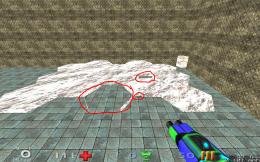
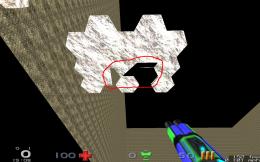
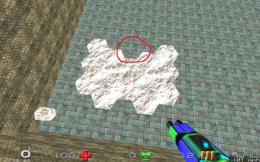
Caulk brushes with nodraw bottom faces (textures correct):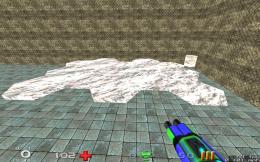
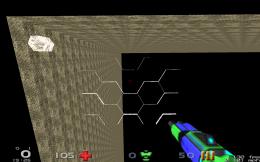
^- The bottom faces are missing, as expected because of the nodraw texture
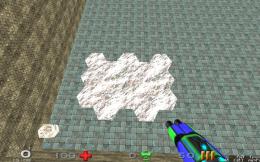
-

Kryten - Member
- Posts: 12
- Joined: Thu Jul 31, 2008 11:50 pm
-


-
I see. I've had a similar problem to this before. Put in a single light, and do a full compile and see if it resolves it. Shouldnt take long if there isnt much to it.
When I was making Eye of the Duck one of the walls went missing, I decided to continue building the map despite this and when I started putting lights in it mysteriously resolved.Possibly not the worst mapper in the world.
A blog of random pish:
http://xeno.planetnexuiz.com/blog/?author=5-

Sepelio - Forum addon
- Posts: 1101
- Joined: Tue Jun 27, 2006 7:57 pm
- Location: Scotland
-
-
Hm, I just tried your suggestion, and unfortunately it didn't fix it. Thanks for the advice though!
On the one hand I want to get more work done on it, but on the other I don't want to build on it and end up not being able to resolve the issue / have to go back and tediously fix it.
Edit: Also, I just noticed that my ceiling shows up as solid black instead of its correct texture. I'm not sure how long it's been like that, the room has a high ceiling so I haven't noticed it much. The issues could be related...-
Kryten - Member
- Posts: 12
- Joined: Thu Jul 31, 2008 11:50 pm
-
-
I downloaded you map and compiled it, it works fine here
are you sure you ran a full compile?
 HOF:
HOF:
<Diablo> the nex is a "game modification"
<Diablo> quake1 never had a weapon like that.
<Vordreller> there was no need for anything over 4GB untill Vista came along
<Samua>]Idea: Fix it?
<Samua>Lies, that only applies to other people.-

tZork - tZite Admin
- Posts: 1337
- Joined: Tue Feb 28, 2006 6:16 pm
- Location: Halfway to somwhere else
-

-
Strange.
I downloaded the version from my link up top, added a single puny light for effect, and ran the "BSP -meta -vis -light -deluxe -fast -filter -super 2 -bounce 8" build option. (I know nothing about most of these options, it was just the longest and had (final) at the front)
It didn't fix:
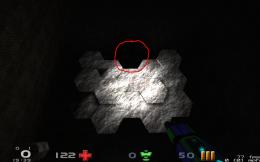
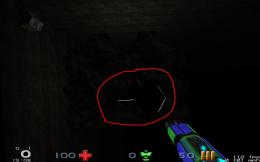
Crappy contrast, I know, but it gets the point across. I'm using 1.5.0...I don't think my attempts at compiling ZeroRadiant ever touched any of my 1.5 packaged files...
Maybe my PC just hates me
Addendum: Thanks for trying though, every piece of info / attempt helps.-
Kryten - Member
- Posts: 12
- Joined: Thu Jul 31, 2008 11:50 pm
-


-
try this: select everything (esc, then i) copy it (ctl+c) delete it, then paste (ctl+v)
that can ger trid of bad brushes sometimes.HOF:
<Diablo> the nex is a "game modification"
<Diablo> quake1 never had a weapon like that.
<Vordreller> there was no need for anything over 4GB untill Vista came along
<Samua>]Idea: Fix it?
<Samua>Lies, that only applies to other people.-
tZork - tZite Admin
- Posts: 1337
- Joined: Tue Feb 28, 2006 6:16 pm
- Location: Halfway to somwhere else
-
-
Or maybe you could try bobtools->brush cleanup.
Very odd problem really.
Could you tell us what OS do you use, version of Radiant and the version of q3map2?"One should strive to achieve; not sit in bitter regret."
WE ARE NEXUIZ.

-

C.Brutail - Laidback mapper
- Posts: 2357
- Joined: Tue Feb 28, 2006 7:26 pm
- Location: Ironforge
-
-
Copy/pasting didn't work, and brushcleanup returned "0 invalid/duplicate planes removed", so here's my info:
Ubuntu 8.04 Hardy Heron (up to date)
- Code: Select all
Q3Map         - v1.0r (c) 1999 Id Software Inc.
Q3Map (ydnar) - v2.5.17
GtkRadiant    - v1.5.0 May 12 2008 02:23:37
I think I may purge my gtkradiant, delete all the source stuff of it I have floating around, and install again from scratch. When I get a chance, that is.
And yes, this error is very odd. It might be a video driver bug of some sort? *shrugs*
Hm...can someone post their compiled working version of my .map? I can load it and see if it works on mine to help figure out where the problem lies.-
Kryten - Member
- Posts: 12
- Joined: Thu Jul 31, 2008 11:50 pm
9 posts
• Page 1 of 1
Information
-
- Who is online
- Users browsing this forum: No registered users and 1 guest