I was told (while playing) that .asa models can be made in GTKRadiant, and that they were better than using meshes and so on. But I can't find any documentation on how to do this. Googling for "gtkradiant .asa" does not provide anything helpful (esp since "Asa" is not only a first name but also an acronym).
Anybody have a link to share?
.asa models?
Moderators: Nexuiz Moderators, Moderators
10 posts
• Page 1 of 1
Fri Aug 22, 2008 1:51 pm
-
2 GHz Mac Pro
Mac OS X 10.6.2
nvidia GeForce 8800 GT- Clueless Newbie
- Keyboard killer
- Posts: 518
- Joined: Wed Jan 03, 2007 1:01 pm
-
- Code: Select all
http://www.modwiki.net/wiki/ASE_(file_format)
.ASE is the the 3ds ascii model format for static meshes. It can be imported into GTKRadiant using misc_model. In certain occasions, it can be more appropriate than using brushes, and can help add eye candy.
-

torus - Forum addon
- Posts: 1341
- Joined: Sun Dec 24, 2006 6:59 am
- Location: USA
-
Didn't you recieve my PM? I just saw that it is in my outbox, but not in the sentbox, how did that happen? Anyway here is it:
Hi there
We talked about .ase models earlier (I play as 1024), and here is the link:
http://en.wikibooks.org/wiki/Q3Map2
Look for the "Creating an .ase model out of brushwork" section.
I learned how to create and use ase models when torus told me about them, in the Treasure Island Beta 3 thread, and I got to love them. I am currently working on my next map, and almost everything that is visible to the player will be made of ase models .
.
Some of my experiences:
- Use -game quake3
- With the -subdivisions key you have to experiment, 4-8 for small stuff works good, for bigger things (big rocks) I use up to 256.
- Texturing of brushes gets messed up, but works fine on patches.
- I need to put in at least one structural brush, otherwise I get an error and it does not compile it.
- To import them, right click > misc > misc_model
- To make them solid, you need to manually create the spawnflags key (select model, n, Key: "spawnflags" Value: "2" for auto-clipping, "4" to make bump and norm maps of the textures used on the models work, "6" for both).
And a screenshot (the model is about 2048x1536, on the left are the original patches, right is the ase, I used -subdivisions 64)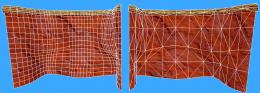
So long
sevLast edited by sev on Fri Aug 22, 2008 3:40 pm, edited 1 time in total.-

sev - Alien
- Posts: 248
- Joined: Sat Mar 29, 2008 3:03 pm
- Location: Switzerland
-

-
sev wrote:. I am currently working on my next map, and almost everything that is visible to the player will be made of ase models.
Ah, a man after my own heart
-
torus - Forum addon
- Posts: 1341
- Joined: Sun Dec 24, 2006 6:59 am
- Location: USA
-
-
sev wrote:Didn't you recieve my PM?
Yes, I did. Unfortunately, I forgot about the whole PM thing. I rarely check my PMs. Found a minor backlog there. Sorry to everybody for the late replies. B/We talked about .ase models earlier (I play as 1024), and here is the link:
http://en.wikibooks.org/wiki/Q3Map2
Look for the "Creating an .ase model out of brushwork" section.
I learned how to create and use ase models when torus told me about them, in the Treasure Island Beta 3 thread, and I got to love them. I am currently working on my next map, and almost everything that is visible to the player will be made of ase models.
Some of my experiences:
- Use -game quake3
- With the -subdivisions key you have to experiment, 4-8 for small stuff works good, for bigger things (big rocks) I use up to 256.
- Texturing of brushes gets messed up, but works fine on patches.
- I need to put in at least one structural brush, otherwise I get an error and it does not compile it.
- To import them, right click > misc > misc_model
- To make them solid, you need to manually create the spawnflags key (select model, n, Key: "spawnflags" Value: "2" for auto-clipping, "4" to make bump and norm maps of the textures used on the models work, "6" for both).
And a screenshot (the model is about 2048x1536, on the left are the original patches, right is the ase, I used -subdivisions 64)
So long
sev
Thanks for the tip. As I wrote in my reply (by PM); I will try this with the next level I make.2 GHz Mac Pro
Mac OS X 10.6.2
nvidia GeForce 8800 GT- Clueless Newbie
- Keyboard killer
- Posts: 518
- Joined: Wed Jan 03, 2007 1:01 pm
-
if my copy of gtkradiant wasn't borked i'd be making maps from ase files too.
getting ase files from blender (or whatever) to gtkradiant is only half the story, you can do it the other way too. compile your brush-based map to a bsp, decompile it to an ase with q3map2 and you can then import it into blender to use as a guide for making your new models. it's possible to have blender made models fit seemlessly with your original brushwork, which is a nice trick.- zuriastrad
- Alien
- Posts: 169
- Joined: Thu May 15, 2008 4:13 am
-
sev wrote:Some of my experiences:
- Use -game quake3
- With the -subdivisions key you have to experiment, 4-8 for small stuff works good, for bigger things (big rocks) I use up to 256.
- Texturing of brushes gets messed up, but works fine on patches.
- I need to put in at least one structural brush, otherwise I get an error and it does not compile it.
- To import them, right click > misc > misc_model
- To make them solid, you need to manually create the spawnflags key (select model, n, Key: "spawnflags" Value: "2" for auto-clipping, "4" to make bump and norm maps of the textures used on the models work, "6" for both).
I've made a few .asa models now, but Radiant can't import them. If I try importing the .asa as a prefab, I get this:
---
Importing map from /Volumes/Radiant/Quake3/baseq3/maps/-test-BuildFolder/maps/blocks.ase
WARNING: no module found for map interface type 'ase'
---
If I try importing them as a model, I get this:
---
vfsExtractRelativePath: /Volumes/Radiant/Quake3/baseq3/maps/-test-BuildFolder/maps/blocks.ase
cleaned path: /volumes/radiant/quake3/baseq3/maps/-test-buildfolder/maps/blocks.ase
Matching against /users/clund/.q3a/baseq3
Matching against /users/clund/games/quake3/baseq3
vfsExtractRelativePath: failed
trying with a short version
vfsExtractRelativePath: /Volumes/Radiant/Quake3/baseq3/maps/-test-BuildFolder/maps/blocks.ase
cleaned path: /volumes/radiant/quake3/baseq3/maps/-test-buildfolder/maps/blocks.ase
Matching against /users/clund/.q3a/baseq3
Matching against /users/clund/games/quake3/baseq3
vfsExtractRelativePath: failed
WARNING: could not extract the relative path, using full path instead
---
Looks to me as if Radiant is stumbling over the paths here. Where are the .asas and .map files supposed to be stored, relative to each other?2 GHz Mac Pro
Mac OS X 10.6.2
nvidia GeForce 8800 GT- Clueless Newbie
- Keyboard killer
- Posts: 518
- Joined: Wed Jan 03, 2007 1:01 pm
-
Clueless Newbie wrote:Looks to me as if Radiant is stumbling over the paths here. Where are the .asas and .map files supposed to be stored, relative to each other?
It's .ase
I'm not sure what the problem is there. The standard folder config is the following (on Linux that is, as far as I know):
/path to Nexuiz/data/ (the folder where the big data*.pk3 is) and then in this folder (data):
/maps/ (thats where the map and bsp files are)
/models/YourProject/ (the location of the ase models)
Is there no model at all, or at least a small box with "no shader found"? If the box is there, open the entity window (select model, n) and check if the path is correct (should look like "models/YourProject/YourModel.ase", without C:/ or /home/user/). Press enter after you changed it.
Maybe you want to download my map Treasuer Island v1r1 (complete), put it into the data folder, extract the .map file into the /maps/ folder and open it with Radiant. If you can see the rocks, your system would seem to work correctly.-
sev - Alien
- Posts: 248
- Joined: Sat Mar 29, 2008 3:03 pm
- Location: Switzerland
-
-
sev wrote:Clueless Newbie wrote:Looks to me as if Radiant is stumbling over the paths here. Where are the .asas and .map files supposed to be stored, relative to each other?
It's .ase
Uh, ok. Maybe you want to download my map Treasuer Island v1r1 (complete), put it into the data folder, extract the .map file into the /maps/ folder and open it with Radiant. If you can see the rocks, your system would seem to work correctly.
K. Done. Using that as reference below:I'm not sure what the problem is there. The standard folder config is the following (on Linux that is, as far as I know):
/path to Nexuiz/data/ (the folder where the big data*.pk3 is) and then in this folder (data):
/maps/ (thats where the map and bsp files are)
/models/YourProject/ (the location of the ase models)
Is there no model at all, or at least a small box with "no shader found"?
I get small boxes but no visible models. The box can't be selected like normal entities. Instead, i have to use "select inside". Pain.If the box is there, open the entity window (select model, n) and check if the path is correct (should look like "models/YourProject/YourModel.ase", without C:/ or /home/user/). Press enter after you changed it.
The path to one of the .ases in your map is: models/treasureisland/tirock_platform2.ase
Correct yes?2 GHz Mac Pro
Mac OS X 10.6.2
nvidia GeForce 8800 GT- Clueless Newbie
- Keyboard killer
- Posts: 518
- Joined: Wed Jan 03, 2007 1:01 pm
-
Clueless Newbie wrote:The path to one of the .ases in your map is: models/treasureisland/tirock_platform2.ase
Correct yes?
That's correct.
If the textures (the Trease Island ones) are displayed correctly in the map (in Radiant), but the models are not, then I can't think of anything else to help you, sorry.
Mainly because I don't really now how the programs work in detail.
But maybe someone more experienced can...
I hope you get it to work, because you can do some wicked stuff with it.-
sev - Alien
- Posts: 248
- Joined: Sat Mar 29, 2008 3:03 pm
- Location: Switzerland
-
10 posts
• Page 1 of 1
Information
-
- Who is online
- Users browsing this forum: No registered users and 1 guest