I got the nexuiz:// protocol working in Firefox and Opera

Post anything to do with editing Nexuiz here. Whether its problems you've had, questions, or if you just want to show off your work.

Moderators: Nexuiz Moderators, Moderators


  • Apologies for the hap-hazard way this thread might be thrown together at this point, I started with the firefox method, found the gnome method which was easier, then got it working in opera.

    WTF is this? >> Video of it in action 5mb

    Provoked by a "conversation" on IRC, I set out to give implementing the nexuiz:// a shot. There are a few layers where this could be handled. The two most viable options were in the Window Manager (GNOME in my case) or the browser (Firefox in my case). Below are the two methods I've successfully implemented, though each has it's downfalls. All methods need the following bash script:

    Code: Select all
    #!/bin/bash
    /home/tyler/Games/Nexuiz/nexuiz-linux-x86_64-glx -basedir /home/tyler/Games/Nexuiz +connect $(echo $@ | awk -F "//" '{ print $2 }')

    Path to my bin, -basedir (necessary) and +connect $ip_address, where $ip_address is a little awk statement I used to split off the front of the URL. $@ is all input passed and in my case, nexuiz://dojo.nexuizninjaz.com, that would be the entire passed value. Running it through the awk expression drops the "nexuiz://" bit.

    So now I have a script that executes nexuiz with the proper base directory and connect to an ip / name server.

    Save in in ~/Games/Nexuiz as "nexuiz_url.sh" or something and chmod +x it. (I saved mine in ~/nn_dev/nexuiz)


    EASIEST - GNOME level:

    Update for GNOME users, this was is actually easier... but unfortunately the bash script is still needed because Nexuiz doesn't accept "nexuiz://" in the +connect syntax. Otherwise, the bash script could be dropped. Anyway, this is done with 3 simple commands that add it to a GNOME like "registry"

    Code: Select all
    gconftool-2 --set --type=string /desktop/gnome/url-handlers/nexuiz/command '/home/tyler/nn_dev/nexuiz/nexuiz_url.sh %s'
    gconftool-2 --set --type=bool /desktop/gnome/url-handlers/nexuiz/enabled true
    gconftool-2 --set --type=bool /desktop/gnome/url-handlers/nexuiz/need-terminal false


    Obviously replace the path in /home/tyler/... with your information.


    This does not work in Opera by default, you have to configure it similar to the firefox way below without as much trouble, edit your advanced preferences and link to the Nexuiz script.
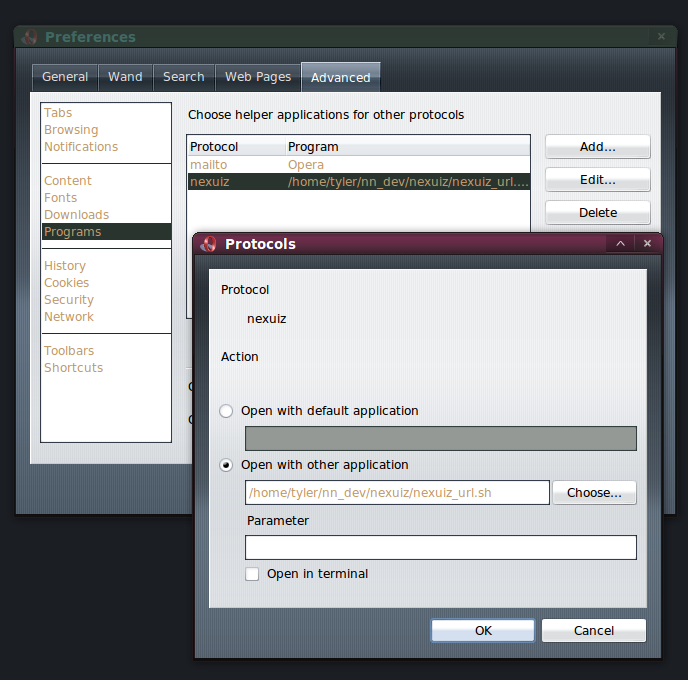
    Image


    MORE COMPLICATED - Firefox level (currently linux only but can be made to work with windows):

    This method is not recommended, I keep this information as a story to share with you my trials and errors.

    This firefox way is more round about... it's by no means a distributable solution and currently only for Linux users (though a batch script can be written to do the same thing) but I thought I'd share my work with everyone.

    Following some advice I found on about how firefox handles URLs, I navigated to my about:config and added a new string "network.protocol-handler.app.nexuiz" with a path the Nexuiz with -basedir and +connect but soon realized that you cannot enter parameters here. So instead, I linked it to a bash script. "/home/tyler/nn_dev/nexuiz/nexuiz_url.sh" (the one seen above)

    Image

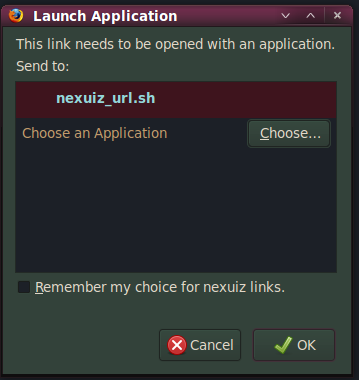
    I click my test case and get the following dialog for running my script. I click it and nothing happens...
    Image

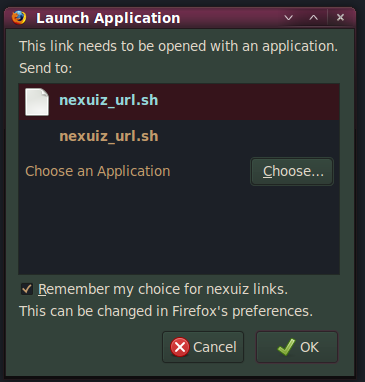
    I click choose and navigate to the file and run it this way, SUCCESS!
    Image


    Turns out the reason is because it gets added to ~/.mozilla/firefox/<profile>/mimeTypes.rdf

    Code: Select all
    tyler@quadjutsu:~/.mozilla/firefox/b1ta3p8a.default$ grep "nexuiz_url.sh" *
    mimeTypes.rdf:                   NC:prettyName="nexuiz_url.sh"
    mimeTypes.rdf:                   NC:path="/home/tyler/nn_dev/nexuiz/nexuiz_url.sh" />
    mimeTypes.rdf:    <NC:possibleApplication RDF:resource="urn:handler:local:/home/tyler/nn_dev/nexuiz/nexuiz_url.sh"/>
    mimeTypes.rdf:  <RDF:Description RDF:about="urn:handler:local:/home/tyler/nn_dev/nexuiz/nexuiz_url.sh"
    mimeTypes.rdf:                   NC:prettyName="nexuiz_url.sh"
    mimeTypes.rdf:                   NC:path="/home/tyler/nn_dev/nexuiz/nexuiz_url.sh" />
    prefs.js:user_pref("network.protocol-handler.app.nexuiz", "/home/tyler/nn_dev/nexuiz/nexuiz_url.sh");


    So namely for this reason, that causes a round about install, this solution isn't ready for the mainstream. Of course other operating systems and browsers need to be supported as well but hey, this is a start.
    Last edited by [-z-] on Thu May 28, 2009 1:44 am, edited 10 times in total.
    User avatar
    [-z-]
    Site Admin and Nexuiz Ninja
     
    Posts: 1794
    Joined: Mon Nov 13, 2006 12:20 am
    Location: Florida

Wed May 27, 2009 10:49 pm

  • Interesting. Well, I know in Windows you can use the registry to create application links like this.. So i'll look into that. However, I think it might be better to create a plugin for Firefox at the current moment. Considering Firefox is crossplatform, widely used, and easy to program for.
    User avatar
    Samual
    Keyboard killer
     
    Posts: 508
    Joined: Mon May 25, 2009 7:22 pm
    Location: Pittsburgh, PA

Wed May 27, 2009 10:53 pm

  • Samual wrote:However, I think it might be better to create a plugin for Firefox at the current moment. Considering Firefox is crossplatform, widely used, and easy to program for.


    Except for the fact that it uses an external bash script. We'd need to create a batch file and distribute both with Nexuiz for the plugin to be even close to a viable solution.
    User avatar
    [-z-]
    Site Admin and Nexuiz Ninja
     
    Posts: 1794
    Joined: Mon Nov 13, 2006 12:20 am
    Location: Florida

Wed May 27, 2009 11:05 pm

  • [-z-] wrote:
    Samual wrote:However, I think it might be better to create a plugin for Firefox at the current moment. Considering Firefox is crossplatform, widely used, and easy to program for.


    Except for the fact that it uses an external bash script. We'd need to create a batch file and distribute both with Nexuiz for the plugin to be even close to a viable solution.


    Well there was talk about making a Nexuiz-For-Windows Installer. I don't know if that idea is abandoned, but maybe we could offer the plugin while installing Nexuiz? (All the install would be is some registry changes, install folder, and a few shortcuts.. I would want it though.)

    Especially the ability to uninstall Nexuiz from add/remove.. that would be cool.

    Anyway, the same could be done with a .deb file. Besides, if someone puts up a nexuiz:// link, they could offer the plugin by saying "If this link does not work for you, please go to xyz to get the required plugin."

    It's not the best solution.... Well.. actually it is. At least for Linux.. As I said earlier, Windows has the ability to launch programs from links in any browser as long as it's in the registry... It's a standard feature that has been in Windows since Windows 98, I believe.
    User avatar
    Samual
    Keyboard killer
     
    Posts: 508
    Joined: Mon May 25, 2009 7:22 pm
    Location: Pittsburgh, PA

Thu May 28, 2009 10:02 am

  • [-z-] wrote:
    Samual wrote:However, I think it might be better to create a plugin for Firefox at the current moment. Considering Firefox is crossplatform, widely used, and easy to program for.


    Except for the fact that it uses an external bash script. We'd need to create a batch file and distribute both with Nexuiz for the plugin to be even close to a viable solution.


    An extension would not need the bash script. Extensions are flexible enough for this, I believe :p
    Meh.
    User avatar
    Mr. Bougo
    Keyboard killer
     
    Posts: 760
    Joined: Mon Sep 10, 2007 3:29 pm

Thu May 28, 2009 10:31 am

  • oooh _nice_ going there z! :D
    yes, firefox plugins can launch external applications, for example: https://addons.mozilla.org/sv-SE/firefox/addon/9078

    now all we need is a small cute nexuiz icon sitting in the bottom corner that grabs serverlist from the master server and when you click on yaddayadda server nexuiz launches and voilà instant fraging. :3
    [Want to develop? Look HERE]. Image Image Gif sauce.
    paperclips
    Alien trapper
     
    Posts: 346
    Joined: Mon Jan 12, 2009 10:27 am
    Location: internets

Thu May 28, 2009 2:30 pm

  • Looking at this...

    I'll make a batch file to create the registry entries later. (It will have to be run from the nexuiz folder, else there is no way to detect/input the folder.)
    User avatar
    Samual
    Keyboard killer
     
    Posts: 508
    Joined: Mon May 25, 2009 7:22 pm
    Location: Pittsburgh, PA

Thu May 28, 2009 4:27 pm

  • div suggested you use vbs or js as it's less limited than batch.
    User avatar
    [-z-]
    Site Admin and Nexuiz Ninja
     
    Posts: 1794
    Joined: Mon Nov 13, 2006 12:20 am
    Location: Florida

Fri May 29, 2009 2:48 pm

  • killquick of the AU servers has been working on an installer and promoting the use of nexuiz://

    I've added nexuiz:// as links to servers.nn too but don't provide an installer yet.

    A GUI will be available soon I hear.
    User avatar
    [-z-]
    Site Admin and Nexuiz Ninja
     
    Posts: 1794
    Joined: Mon Nov 13, 2006 12:20 am
    Location: Florida

Sat May 30, 2009 9:04 am

  • you could replace the username with $USER
    ....
    [Image
    Image
    User avatar
    Gego
    Alien
     
    Posts: 159
    Joined: Wed Mar 01, 2006 4:39 pm

Sat May 30, 2009 2:53 pm

  • Gego wrote:you could replace the username with $USER
    ....


    or /home/tyler/ with $HOME but that doesn't help us know where Nexuiz is on their harddrive.
    User avatar
    [-z-]
    Site Admin and Nexuiz Ninja
     
    Posts: 1794
    Joined: Mon Nov 13, 2006 12:20 am
    Location: Florida

Fri Jun 05, 2009 11:36 am

  • On another note, i'm working on using NSIS to create a Nexuiz installer for Windows... I want to make it as specialized as possible, meant to improve the usage of Nexuiz. As for now, it works and applies the nexuiz:// protocol in the Windows registry. Unfortunately it's a large file, so I will not upload it anywhere until I'm 100% certain it works perfectly (And is not in need of any more updates).
    User avatar
    Samual
    Keyboard killer
     
    Posts: 508
    Joined: Mon May 25, 2009 7:22 pm
    Location: Pittsburgh, PA

Fri Jun 05, 2009 1:09 pm

  • That will never get accepted as official version, as you wouldn't be able to install it on Linux any more and we want to only provide ONE huge download.

    However, can you perhaps make a NSIS online installer that pulls the nexuiz zip file from sourceforge and installs that (together with additional programs, like the URL handler)?
    Last edited by divVerent on Fri Jun 05, 2009 1:27 pm, edited 1 time in total.
    1. Open Notepad
    2. Paste: ÿþMSMSMS
    3. Save
    4. Open the file in Notepad again

    You can vary the number of "MS", so you can clearly see it's MS which is causing it.
    User avatar
    divVerent
    Site admin and keyboard killer
     
    Posts: 3809
    Joined: Thu Mar 02, 2006 4:46 pm
    Location: BRLOGENSHFEGLE

Fri Jun 05, 2009 1:16 pm

  • LOL, imagine this:

    We make a global website:
    +One button to install Nexuiz
    +A frame, where you can chat ppl on #nexuiz @ irc.quakenet.org
    +Another tab/frame, where you can browse servers, list the players there, and nexuiz:// joins them
    +tools tab (config file generator)
    +link to forum

    Hmm... this fairly reminds me....

    Quake LIVE! :D
    "One should strive to achieve; not sit in bitter regret."
    WE ARE NEXUIZ.
    Image
    Image
    User avatar
    C.Brutail
    Laidback mapper
     
    Posts: 2357
    Joined: Tue Feb 28, 2006 7:26 pm
    Location: Ironforge

Fri Jun 05, 2009 1:40 pm

Fri Jun 05, 2009 9:12 pm

  • C.Brutail wrote:LOL, imagine this:

    We make a global website:
    +One button to install Nexuiz
    +A frame, where you can chat ppl on #nexuiz @ irc.quakenet.org
    +Another tab/frame, where you can browse servers, list the players there, and nexuiz:// joins them
    +tools tab (config file generator)
    +link to forum

    Hmm... this fairly reminds me....

    Quake LIVE! :D


    YES, DO WANT
    User avatar
    Psychcf
    Forum addon
     
    Posts: 1554
    Joined: Sun Dec 03, 2006 11:38 pm
    Location: NY, USA

Sat Sep 26, 2009 6:08 pm

  • Neat tool - I'd highly suggest some input scripts to be able to configure the protocol standards across several different games, since anything id-based will follow the +connect procedure. The deathmask server page would be an ideal place to use this, and I think we could streamline a lot of promotion this way.
    ==Tastyspleen.tv== All of Quake, All the Time
    Jehar
    Newbie
     
    Posts: 1
    Joined: Sat Sep 26, 2009 6:06 pm


Return to Nexuiz - Editing


Information
  • Who is online
  • Users browsing this forum: No registered users and 1 guest