toneddu2000 Sir, yes sir!
Yes, you are absolutely right! It need more details. It would be nice if you participate with some models. I know you are very busy so if it is more convenient for you to just submit some sketches with what you ment: In this case I can model all that by myself.
And by the way, even now map FPS isn't very high, especially when trees are on the screen. And I afraid that when we implement more detailes it might become unplayable. I did all models with as small faces count as I could. May be I was wrong and modern video cards can easily handle big triangles count well.
FPS is low when shaders with alpha transparency are in the screen. I used to display tree leaves and branches.
Blender to MAP exporter
Moderators: Nexuiz Moderators, Moderators
-
Don't use the force, Luke! Try to think!-

z80 - Advanced member
- Posts: 92
- Joined: Sun Jul 26, 2009 7:35 pm
- Location: Russia
-
Sun Dec 20, 2009 8:08 pm
-
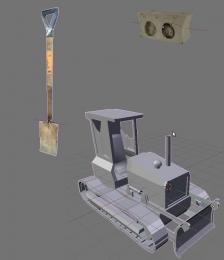
Ok, sorry z80 for this long silence, but I was very busy in the last week. So, for now I finished a shovel and a cement block. It remains some old tyres and, of course the excavator. According to what you said, about low fps, I think the problem is darkplaces engine. as AFAIK , dp has a limit of tris per view so, if a scene has concentrated areas of high poly object, the engine could slow fps a bit. I don't if this is correct (devs know that problem much better ), but if I were you I'd use no-leafy trees (I should have modeled something in my computer, I'll check for it!). Anyway, this is my first pic, excavator, of course, is unfinished!!
 my site: www.antoniolatronico.it
-

toneddu2000 - Alien trapper
- Posts: 251
- Joined: Mon Mar 09, 2009 7:56 pm
- Location: Italy
-

Mon Dec 21, 2009 6:17 pm
-
toneddu2000 Your models look very nice, but a little hint: tractor bucket (it's front blade or how it is in English...) should be at least the same width as distance between caterpillars + 2 * caterpillar width And it's cabin seat looks too big compared with other parts. It seems it's driver is 5 meters tall... Please, don't pay much attention on this, it's only my opinion, but I'm not a designer
We may make a branch with the map and try your models to find out how it would look like with them.
As for trees without leaves It seems to me not so good. First, because it would not be possible to hide behind them and Nex weapon would be a "victory gun" without any opportunities. Who takes it first wins the game And second, I'd like to keep design as close to original place as possible for map to be recognizable by people as some really existing place.
Anyway, I'm not completely against the design suggested by you. Let's experiment and compare results.Don't use the force, Luke! Try to think!-
z80 - Advanced member
- Posts: 92
- Joined: Sun Jul 26, 2009 7:35 pm
- Location: Russia
-
Tue Dec 22, 2009 12:30 pm
-
z80 wrote:toneddu2000 Your models look very nice, but a little hint: tractor bucket (it's front blade or how it is in English...) should be at least the same width as distance between caterpillars + 2 * caterpillar width And it's cabin seat looks too big compared with other parts. It seems it's driver is 5 meters tall... Please, don't pay much attention on this, it's only my opinion, but I'm not a designer
Ok thanks, I'll try today to make some changes!z80 wrote:We may make a branch with the map and try your models to find out how it would look like with them.
Well I'm still learning with Rapid SVN and, for now it produced to me only a headache !! z80 wrote:As for trees without leaves It seems to me not so good. First, because it would not be possible to hide behind them and Nex weapon would be a "victory gun" without any opportunities. Who takes it first wins the game
In case of a big no leafy trees People could hide behind them! But, if you prefer leafy ones, is not a problem!
z80 wrote:And second, I'd like to keep design as close to original place as possible for map to be recognizable by people as some really existing place.
Understood. You're right.
z80 wrote:Anyway, I'm not completely against the design suggested by you. Let's experiment and compare results.
ok! Let's see what we can do!
PS: I'd like to talk to you in these Xmas days, by skype or similar, if you have time, about the possibility of create an high poly terrain with mega-texture in Blendermy site: www.antoniolatronico.it-
toneddu2000 - Alien trapper
- Posts: 251
- Joined: Mon Mar 09, 2009 7:56 pm
- Location: Italy
-
Wed Dec 23, 2009 8:41 am
-
toneddu2000 Well, cie.pk3 includes blend file so you can modify it and watch how it looks. It isn't absolutly necessary to use SVN.I'd like to talk to you in these Xmas days, by skype or similar, if you have time, about the possibility of create an high poly terrain with mega-texture in Blender
O'Key, great!. Let's talk about that on Christmas. But in my opinion bi space partitioning tree doesn't suit very well for terrain. But I believe it's possible to use low poly brushes set for terrain collisions and several misc_models with high poly design for it's visual representation. I did the same in cie.bsp for visualization of rusty steel construction elements. I made misc_models for visualization and low poly brushes for collisions with common/weapclip shader.Don't use the force, Luke! Try to think!-
z80 - Advanced member
- Posts: 92
- Joined: Sun Jul 26, 2009 7:35 pm
- Location: Russia
-
Mon Feb 01, 2010 10:03 pm
-
Haven't heard anything new going on here... How is it going z80? What's new with the script? Any attempts of porting it to Blender 2.5 ?- motorsep
- Member
- Posts: 33
- Joined: Wed Jul 12, 2006 4:10 pm
- Location: San Antonio, TX
Sat Feb 13, 2010 8:17 pm
-
motorsep As for me, I'm quite satisfied with the 0.21 version of the exporter. I can model entire map in Blender incuding brushes, misc models with automatic placing, scaling and orienting, any items or weapons. It doesn't include complete list of entities NetRadiant has yet... but for me personally it's enough to do anything I can imagine. (May be my imagination is so limited )
I didn't work on porting it to Blender 2.5 because I suppose it is on very early stage of development (it was alpha when I checked it last time) and scripting interface may change.
What else may one desire for making realistic maps? If one has any suggestions I'll be happy to satisfy them.Don't use the force, Luke! Try to think!-
z80 - Advanced member
- Posts: 92
- Joined: Sun Jul 26, 2009 7:35 pm
- Location: Russia
-
Thu Feb 25, 2010 4:56 pm
-
I have some trouble with the alignment of the texture when I export to map…
Is there something wrong with my setup?
blender 2.49b – exporter v0.21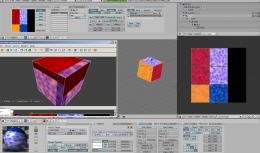
Anyway, thanks a lot for the exporter!- sputnik
- Member
- Posts: 10
- Joined: Thu Feb 11, 2010 11:50 pm

Thu Feb 25, 2010 6:55 pm
-
sputnik: Well, sometimes textures alignment doesn't work well. It may be caused by the following.
In Blender texture transformation includes all types of deformations (e.i. position, scale, rotation and shift) and described by matrix. But as far as in NetRadiant texture has only position, scale and rotation transformation parts, arbitrary Blender texture transformation can't be moved to NetRadiant. If it contains even very little shift transformation part result might become slightly unexpectable And that is often the case.
Anyway, sometimes situation may be fixed with UV-s slightly moved or scaled, just a bit.Don't use the force, Luke! Try to think!-
z80 - Advanced member
- Posts: 92
- Joined: Sun Jul 26, 2009 7:35 pm
- Location: Russia
-
Fri Feb 26, 2010 5:47 pm
-
Thanks for the quick response!
I just tried a few things out but, as you said, it seems to be relatively tricky to get the textures on the right position However, apart from that it works very well!
- sputnik
- Member
- Posts: 10
- Joined: Thu Feb 11, 2010 11:50 pm
Sat Feb 27, 2010 9:13 am
-
sputnik: You may use misc_model-s and surround them with player_clip textured brushes. I did that in my test map. Anyway it's too hard to make something looking nice of only brushes. IMHO, it's better to make nice looking high polygon elements as misc_models and make them rigid by surrounding with bounding brushes.Don't use the force, Luke! Try to think!-
z80 - Advanced member
- Posts: 92
- Joined: Sun Jul 26, 2009 7:35 pm
- Location: Russia
-
Sat Feb 27, 2010 6:18 pm
-
I wanted to bake a high poly version of the map onto simple brushes in order to reduce the complexity of the geometry and the time spent in netradiant.
But isn't there a way to get the right values for netradiant with the UV coordinates of a vertex?- sputnik
- Member
- Posts: 10
- Joined: Thu Feb 11, 2010 11:50 pm
Wed Mar 03, 2010 5:43 am
-
sputnik: I'm working on it. But I need any fresh idea. If one has any, please, share it!Don't use the force, Luke! Try to think!-
z80 - Advanced member
- Posts: 92
- Joined: Sun Jul 26, 2009 7:35 pm
- Location: Russia
-
Sun Mar 07, 2010 11:38 pm
-
Even in netradiant itself it's very hard to fit textures correctly. However, I hope it's another approach:- Code: Select all
#!BPY

"""
Name: 'z'
Blender: 244
Group: 'Export'
Tooltip: '-'
"""
import Blender
import bpy
import math

print
print "---------------------"
print
print

sce = bpy.data.scenes.active
ob = sce.objects.active
mesh = ob.getData(mesh=1)


matrix = ob.matrixWorld
faces = mesh.faces
netscale = 64
obloc = ob.getLocation()
obx = obloc[0]
oby = obloc[1]
obz = obloc[2]

for face in faces:
   nor2 = face.no*matrix
   x = nor2.x-obx
   y = nor2.y-oby
   z = nor2.z-obz
   azi  = math.degrees(math.atan2(y,x))
   inc = math.degrees(math.acos(z/math.sqrt(x**2+y**2+z**2)))
   print "face:", face.index,inc,azi,
   if inc < 45:
      ## top projection
      print "top"
      print "----------"
   elif inc > 135:
      ## bottom projection
      print "bottom"
      print "----------"
   elif azi >= -45 and  azi <= 45:
      ## front projection
      print "front"
      v1m = face.v[0].co*matrix
      v2m = face.v[1].co*matrix
      v1x = v1m.y*netscale
      v1y = v1m.z*netscale
      v2x = v2m.y*netscale
      v2y = v2m.z*netscale
      imgSx = face.image.size[0]
      imgSy = face.image.size[1]
      v1u = face.uv[0][0]*imgSx
      v1v = face.uv[0][1]*imgSy
      v2u = face.uv[1][0]*imgSx
      v2v = face.uv[1][1]*imgSy

      rota1  = math.atan2(v2y-v1y,v2x-v1x)
      rota2  = math.atan2(v2v-v1v,v2u-v1u)
      rota = math.degrees(rota1-rota2)

      scar1 = abs(math.cos(math.atan2(z,x)))
      scar2 = abs(math.cos(math.atan2(y,x)))

      sca2cos = abs(math.cos(math.radians(rota)))

      rsquax = sca2cos*scar2+math.sqrt(1-sca2cos**2)*scar1
      rsquay = sca2cos*scar1+math.sqrt(1-sca2cos**2)*scar2
      dAB = math.sqrt((v2x-v1x)**2+(v2y-v1y)**2)
      duvAB = math.sqrt((rsquax*(v2u-v1u))**2+(rsquay*(v2v-v1v))**2)
      sca = dAB/duvAB

      scax = sca*rsquax
      scay = sca*rsquay

      ccos = math.cos(math.radians(-rota))
      csin = math.sin(math.radians(-rota))
      v1x2 = (ccos*v1x)-(csin*v1y)
      v1y2 = (csin*v1x)+(ccos*v1y)

      xpos = v1u-(v1x2/scax)
      ypos = -v1v+(v1y2/scay)
      print
      print "h pos:", xpos
      print "v pos:", ypos
      print "h stretch:", scax
      print "v stretch:", scay
      print "rota:", rota
      print "----------"


   elif (azi > -135 and azi < -45):
      ## left projection
      print "left"
      print "----------"
   elif azi >= 135 or azi <= -135:
      ## back projection
      print "back"
      print "----------"
   else:
      ## right projection
      print "right"
      print "----------"
It seems to work with some restrictions:
Rotation only around one axis and no distortion of the UVface, except the scale.
edit codeLast edited by sputnik on Mon Mar 08, 2010 12:55 pm, edited 1 time in total.- sputnik
- Member
- Posts: 10
- Joined: Thu Feb 11, 2010 11:50 pm
Mon Mar 08, 2010 3:00 am
-
z80: What I'd like to know is how to create a set of entities specific to a game (Quake, DP mod, Steel Storm, etc.) ?
Also is there a way you can make parallelepipeds to be exported as one brush and not set of 8 brushes? Thanks.- motorsep
- Member
- Posts: 33
- Joined: Wed Jul 12, 2006 4:10 pm
- Location: San Antonio, TX
Tue Mar 09, 2010 11:14 am
-
sputnik: Great! I'll investigate that. Could you tell something about the code, what's general idea?
motorsep: Parallelepipeds, cubes, cylynders spheres etc. (i ment any convex mesh) are exported as is without subdividing into individual faces. It is exported using individual faces only if one has pressed "surface mesh" from exporter menu on it.
Actually there are three ways to export mesh: 1) if it's convex it by default exported as is; 2) if it isn't conves exporter tries to subdivide it into convex parts (for simple shapes it works, for comples such as wall with windows it doesn't always work); 3) if mesh is quite complex and is not convex ( 1-st method doesn't match and 2-d fails) it can be exported as a set of individual faces.
As concerns entities specific to a game and the game is not Nexuiz then currently there is only one way: lurk the code Sorry for that.Don't use the force, Luke! Try to think!
-
z80 - Advanced member
- Posts: 92
- Joined: Sun Jul 26, 2009 7:35 pm
- Location: Russia
-
Tue Mar 09, 2010 4:40 pm
-
thanks z80!
For some reason I have been having troubles with script exporting all meshes as if they had "surface" flag applied to them. I guess I am doing something wrong.
As far as digging the code, where exactly in the code and how do I add another set of entities?- motorsep
- Member
- Posts: 33
- Joined: Wed Jul 12, 2006 4:10 pm
- Location: San Antonio, TX
Tue Mar 09, 2010 8:36 pm
-
The idea was to use the spherical coordinates of the surface normal in order to define from which side netradian projects the texture and how the texture should be stretched to fit with an inclination. The rest is calculated with the 2d and UV coordinates of the face. I'm not a coder, so I think that the quality leaves a lot to be desired- sputnik
- Member
- Posts: 10
- Joined: Thu Feb 11, 2010 11:50 pm
Wed Mar 10, 2010 8:50 am
-
motorsep: If you submit your Blender file I may try to take a look at it and may be suggest something. Entities parsing is done in file
"exporter/bpymodules/nex_nexify.py" lines 281 - 300.
Each entity or set of looking almost alike entities are described in files
"exporter/bpymodules/nex_info_all.py",
"exporter/bpymodules/nex_misc_model.py",
"exporter/bpymodules/nex_item_all.py".
If you'd like to participate, please, let me know. I may give you write access to a repository with the exporter code. It would be very nice if you improve it...
sputnik: Well, very nice approach! Thanks for the explanation! I'm not sure I've understood everything, I need experiment with it and take a look at results to understand itDon't use the force, Luke! Try to think!-
z80 - Advanced member
- Posts: 92
- Joined: Sun Jul 26, 2009 7:35 pm
- Location: Russia
-
Thu Mar 11, 2010 1:42 am
-
z80: My coding abilities slightly over copy and paste technique The only way I can help is by making entity set for Quake 3 and Quake.
- motorsep
- Member
- Posts: 33
- Joined: Wed Jul 12, 2006 4:10 pm
- Location: San Antonio, TX
Sat Mar 27, 2010 10:37 am
-
Hey z80, how it all going in the exporting business? I've been looking at some google earth models and trying out your exporter with this.
Keep up the good work
Also if you put your latest version into your first post in this thread.... it would be a lot easier to find!
...
Tonedu: it's occurs to me that this building site map you are making could really benefit from a whole load lot of lighting.fishsticks-

Rad Ished - Keyboard killer
- Posts: 609
- Joined: Wed Jun 27, 2007 8:00 am
- Location: Not the Netherlands
-
Sat Mar 27, 2010 9:31 pm
-
z80: I was exporting a mesh to a brush set. I got following error: http://www.pasteall.org/11987
Why do I get the error?
Thanks.- motorsep
- Member
- Posts: 33
- Joined: Wed Jul 12, 2006 4:10 pm
- Location: San Antonio, TX
Mon Mar 29, 2010 3:42 pm
-
motorsep: Well, ... it happened one mesh or a part of a mesh when subdriving contain no faces. If you supply me with that mesh it might be possible to tell you more exactly. And in the case of bug fix it. Please don't keep it secret, please, share that mesh
Rad Ished It goes not so well as I expected when was designing it. One of all reasons is because the exporter is not so user friendly. At least at this moment. I've composed a map "cie_v1" as a tutorial "how to" for the exporter. My aim was to make it looking as real as I can containing complex geometry. Because I don't like the most part of Nexuiz "squared" maps. They are perfect from performance point of view, but look quite unnatural.
Very good idea, thanks! I'll put the latest version to the first post!Don't use the force, Luke! Try to think!-
z80 - Advanced member
- Posts: 92
- Joined: Sun Jul 26, 2009 7:35 pm
- Location: Russia
-
Mon Mar 29, 2010 4:14 pm
-
Hey z80, I've been mucking about with this model that i got from google earth.
http://www25.zippyshare.com/v/91214707/file.html
This is the .blend, now I am having trouble exporting it. I guess it's because the model is made of meshes that are only flat surfaces and have no volume, anyway, i keep getting errors.
It's a building by Henry Lloyd Wright.
Also, can i recommend you re-post this topic in the Xonotic forum, as this forum is getting very very quiet these days...........
http://forums.xonotic.org/fishsticks-
Rad Ished - Keyboard killer
- Posts: 609
- Joined: Wed Jun 27, 2007 8:00 am
- Location: Not the Netherlands
-
Tue Mar 30, 2010 2:23 am
-
z80: The issue was resolved by deleting all the meshes from the scene, except the one needed to be exported as brushes (and it was moved to Layer 1 before exporting). I think exporter needs a button or a check box "only selected". Also I might have had that mesh in the layer different from layer 1.- motorsep
- Member
- Posts: 33
- Joined: Wed Jul 12, 2006 4:10 pm
- Location: San Antonio, TX
Tue Mar 30, 2010 8:37 am
-
Rad Ished: I'm sorry, but a file seems to be empty. A least my Blender shows no meshes inside. Strange...
Oh wow, I've missed a lot New project Xonotic. But What should I do? Should I just post a link to the exporter and to example map?
motorsep Actually it's strange because example map "cie_v1" consisnts of several layers and is exported without any troubles. And that's correct that exporter processes all objects but not only selected. It doesn't process mesh only if it has "ignore" game property set to "true".
I'll try to take into account "only selected" button. But now it might be possible to mark all unnecessary objects with "ignore" property to get the same effect.Don't use the force, Luke! Try to think!-
z80 - Advanced member
- Posts: 92
- Joined: Sun Jul 26, 2009 7:35 pm
- Location: Russia
-
Tue Mar 30, 2010 1:32 pm
-
z80, its there but there is more than one scene, go to the scene menu and choose sketchup model, or somesuch.fishsticks-
Rad Ished - Keyboard killer
- Posts: 609
- Joined: Wed Jun 27, 2007 8:00 am
- Location: Not the Netherlands
-
Mon Apr 05, 2010 9:09 am
-
Rad Ished A problem has appeared to be slightly more complex then I expected I'm working on it. When it's ready I tell about results.Don't use the force, Luke! Try to think!-
z80 - Advanced member
- Posts: 92
- Joined: Sun Jul 26, 2009 7:35 pm
- Location: Russia
-
Fri Apr 09, 2010 4:16 am
-
hi z80,
http://www.flickr.com/photos/48777284@N02/4504645330/
I created terrain, exported it as .map file. Turned out that all texture faces were messed up. Is there a way to keep textures at least aligned ? Otherwise there is no way to re-texture such terrain in NetRadiant- motorsep
- Member
- Posts: 33
- Joined: Wed Jul 12, 2006 4:10 pm
- Location: San Antonio, TX
Mon Apr 19, 2010 9:47 am
-
soooo... I've got my ideas for a map sorted out and thought about starting with blender to do the vertex work. Is the zipped exporter script in your first post the most recent one? I tried to follow its instructions but unfortunately couldn't get it to work ("python script error: check console").
What I did was the following:
Download the zip file
extract it to the ./blender/scripts folder (all three subfolders and the txt files)
update menus in blender script window
select export->Nexuiz (.map)
I am using Ubuntu Studio 9.10, blender 2.49a
If I am missing something obvious, hit me on the head. Thx.
Oh and this exporter really is a very cool idea. Thx for that!<Community>: Why was the name "Nexuiz" licensed to IllFonic in a way that allows IllFonic to use the name without any suffix or subtitle for a commercial console game?
<Lee Vermeulen>:
<Community>: http://www.xonotic.org-

halogene - Alien trapper
- Posts: 465
- Joined: Fri Jun 20, 2008 8:31 am
- Location: http://www.xonotic.org
-
Information
-
- Who is online
- Users browsing this forum: No registered users and 1 guest