Actually I haven't ever worked with Mac. No, copying and pasting it right in blender text editor would not work. As far as it consists of one script and two modules.
I have an idea: you may try to launch file search and look for "export_map.py" or "3ds_export.py". These are standard Blender export scripts Blender is equipt with. My exporter files should be copied to the same folder.
Blender to MAP exporter
Moderators: Nexuiz Moderators, Moderators
-
Don't use the force, Luke! Try to think!-

z80 - Advanced member
- Posts: 92
- Joined: Sun Jul 26, 2009 7:35 pm
- Location: Russia
-
-
my computer can't find anything called that, so it must be hidden in another file.
I am using blender 2.49 if it helpsWhy has a developer ever needed any reason other than "it looks bloody awesome?"
-Archon-

Yoda almighty - Alien
- Posts: 151
- Joined: Thu Aug 20, 2009 2:19 am
- Location: somewhere in the void
-
-
You can try to locate this folder right in Blender package for you computer and then find it in filesystem. For example in Linux *.DEB files are just archives. One can locate where need folder is and then find it where it is in filesystem. The same with win32 *.zip Blender archive, it's even easier with win32 because all Blender files are in one folder. I believe the same should be on Mac... Don't use the force, Luke! Try to think!
-
z80 - Advanced member
- Posts: 92
- Joined: Sun Jul 26, 2009 7:35 pm
- Location: Russia
-
-
z80 wrote:toneddu2000 What kind of error does it return? Would you be so kind to submit the text of these errors? It would be easier for me to fix those bugs.
The error is the same I posted above; But, I repeat, errors desappear when I change .blend file.
So, It's not so annoying!Thanks z80 for theese clarifications, I'll try to complete a map to insert it in the tutorial!
for Yoda almighty: I think you have to use the "go to" button in Finder and go to ../
your blender directory/.blender/scripts because .blender directory is hiddenmy site: www.antoniolatronico.it-

toneddu2000 - Alien trapper
- Posts: 251
- Joined: Mon Mar 09, 2009 7:56 pm
- Location: Italy
-
-
Version 0.10: http://www.box.net/shared/eir6e82pop
- I've made a button for texture override to avoid manual properties editing.
- Remade sectioning algorithm in integers.
- Made a few little bug fixes.
Anyone, please, test it!Don't use the force, Luke! Try to think!-
z80 - Advanced member
- Posts: 92
- Joined: Sun Jul 26, 2009 7:35 pm
- Location: Russia
-
-
Will do!
Nice work qnd thqnks; hqhqhqqqqq in on frecnh keyboard q qnd a qre swqpped qnd everything elese too
If i rememeber correctly blender on mac stores stuff in .blender you have to show hidden files to see it tho.
I look forward to plqying with this thing when i get bqck home z80.
How does the .map exporter export surfaces ? as a model?
Or did you use a different method to get that bean shaped shell that i sent you into the map that you showed, good work getting it to compile btw.
I'll check back when i've tortured some more polys.fishsticks-

Rad Ished - Keyboard killer
- Posts: 609
- Joined: Wed Jun 27, 2007 8:00 am
- Location: Not the Netherlands
-
-
Rad Ished Exporter checks if mesh is forced to be exported as a surface (by pressing an appropriate button) or if it isn't closed (something like cube with one or several faces absent). If it is so, mesh is splitted into individual triangles. Each triangle is extruded on height supplied (it is prism after it) and exported.
If mesh isn't a surface mesh (not forced and has all his faces) it is sectioned into convex parts. Each part is exported after that.
Lights and NURBS are exported almost "as is". NURBS resolution is fit to odd one from 3 ro 31. And light addinional properties are taken from Blender LOGIC section if any (they appear after "PREPARE" press).
Concerning your shell like cave. I've exported it as a surface mesh, e.i. extruded all faces outwards and got approximatelly 53000 brushes scene Don't use the force, Luke! Try to think!
-
z80 - Advanced member
- Posts: 92
- Joined: Sun Jul 26, 2009 7:35 pm
- Location: Russia
-
-
Version 0.11 http://www.box.net/shared/6aro6lf84e
- Some bug fixes.
- Unnecessary sectioning planes removing added.Don't use the force, Luke! Try to think!-
z80 - Advanced member
- Posts: 92
- Joined: Sun Jul 26, 2009 7:35 pm
- Location: Russia
-
-
Hi, I have been following this thread for a couple of weeks as I have been trying to export from Blender on linux, but every version gives some error or other.
This is the latest one:-
File "/home/organic/install/linux2/.blender/scripts/bpymodules/btreemesh.py", line 282, in splitIntoConvex
submeshes = self.splitIntoIsolated()
File "/home/organic/install/linux2/.blender/scripts/bpymodules/btreemesh.py", line 333, in splitIntoIsolated
mesh[ 'facesUv' ].append( facesUv.pop() )
IndexError: pop from empty list-

organic - Newbie
- Posts: 6
- Joined: Wed May 06, 2009 12:58 am
-
-
organic Thank you for the information! Could you please submit Blender file you got an error with? Or explain what kind of object/objects you've tried to export?
Unfortunately, every exporter version by now has a lot of bugs. Anyway, it's on very early stage of development. And I need as many suggestions and information on problems met as possible.Don't use the force, Luke! Try to think!-
z80 - Advanced member
- Posts: 92
- Joined: Sun Jul 26, 2009 7:35 pm
- Location: Russia
-
-
Yes I understand it is still early to be claiming 100% success, but if I could get this exported I would be very pleased as the only other option at the moment is to remodel the whole thing in Radiant, which would be a bit of a nuisance for me.
Anyway it looks like this, they are all simple shapes:-
I have been using the Lightmap UV pack unwrap option, though I got the same error after deleting all(as far as I could tell) the UV layers.-
organic - Newbie
- Posts: 6
- Joined: Wed May 06, 2009 12:58 am
-
-
organic Currently there are problems if model includes faces of zero area. Exporter in such case can't recalculate UV to shift-scale-angle.
As for exactly this model. Well ..... if each step isn't a saparate mesh it's very complex model. It's because the exporter is to section your model into convex parts before exporting brushes to NetRadiant. And I suppose there would be thousands of them in this case. Anyway, I believe, it succeed if you apply treat selected as surf when export to your model before exporting.
I'm going to submit ver 0.12 of the exporter today, it definitely works there. (In version 0.11 also but GUI buttons in 0.11 version don't work properly )Don't use the force, Luke! Try to think!
-
z80 - Advanced member
- Posts: 92
- Joined: Sun Jul 26, 2009 7:35 pm
- Location: Russia
-
-
Version 0.12 http://www.box.net/shared/ioocar3f5q
- GUI interface bug fixes.
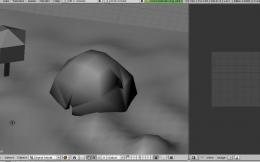
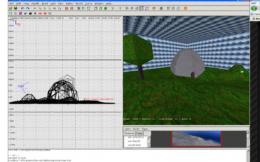
- From experimenting I've found out it sections correct concave mesh without holes.
Example how it works:
 Don't use the force, Luke! Try to think!
-
z80 - Advanced member
- Posts: 92
- Joined: Sun Jul 26, 2009 7:35 pm
- Location: Russia
-


-
I just started learning blender not long ago so maybe its my fault but the exporting isnt working too well, it misses quite lot of faces after the export. Also on Win 7 i need admin privileges to run blender to be able to change the export path. I guess its the same in vista.-

FraNcoTirAdoR - Alien trapper
- Posts: 288
- Joined: Tue Mar 04, 2008 10:25 am
- Location: near the nex
-
-
--FraNcoTirAdoR-- Yes, you are right! It's impossible to export abitrary meshes set to good enough brushes set, if I've understood you note correctly.
Unfortunatelly, I can't tell anything about working with Blender in Vista or in Windows 7, I even haven't ever seen Vista and Windows 7...Don't use the force, Luke! Try to think!-
z80 - Advanced member
- Posts: 92
- Joined: Sun Jul 26, 2009 7:35 pm
- Location: Russia
-
-
I'm back to the float division error
File "/home/organic/install/linux2/.blender/scripts/bpymodules/btreemesh.py", line 955, in writeSurf
nx, ny, nz = nx * self.nexify.g_scale / nSz, ny * self.nexify.g_scale / nSz, nz * self.nexify.g_scale / nSz
ZeroDivisionError: float division
No worries though......
EDIT - I can successfully export a single set of steps, but I get errors trying to open or import it in Radiant:-
-
organic - Newbie
- Posts: 6
- Joined: Wed May 06, 2009 12:58 am
-
-
organic First of all, thank you for testing the exporter! I really need such work being done.
Well, I haven't seen the .blend file, but such error might appear if mesh contains zero area faces. If you've got an error when export there is no use trying to open it in NetRadiant. MAP file would be unfinished. I suppose that is the root of opening error.
Anyway, I'll add zero area test into export procedure in the 0.13-th version. After that it should be exported without errors. At least I hope so.Don't use the force, Luke! Try to think!-
z80 - Advanced member
- Posts: 92
- Joined: Sun Jul 26, 2009 7:35 pm
- Location: Russia
-
-
z80 wrote:organic If you've got an error when export there is no use trying to open it in NetRadiant. MAP file would be unfinished. I suppose that is the root of opening error.
It exported without error, I tried it with just one of the stairs objects.
What is a zero area face, and how would I have made one?-
organic - Newbie
- Posts: 6
- Joined: Wed May 06, 2009 12:58 am
-
-
organic Zero area face is a face with zero area It's easy to make oneif all three vertices lie on one line.Don't use the force, Luke! Try to think!-
z80 - Advanced member
- Posts: 92
- Joined: Sun Jul 26, 2009 7:35 pm
- Location: Russia
-
-
Version 0.13 of the exporter: http://www.box.net/shared/21mh8p6i5r.
- It now skips zero area faces (if there are some).Don't use the force, Luke! Try to think!-
z80 - Advanced member
- Posts: 92
- Joined: Sun Jul 26, 2009 7:35 pm
- Location: Russia
-
-
Alas, same problems for me.
Either this:-
'IndexError: pop from empty list'
..or this:-
' File "/home/organic/install/linux2/.blender/scripts/bpymodules/btreemesh.py", line 979, in writeSurf
x, y, ang, w, h = self.transformUv( face, faceUv )
File "/home/organic/install/linux2/.blender/scripts/bpymodules/btreemesh.py", line 554, in transformUv
angle = math.acos( a10x / lenX ) * 57.295779513082320876798154814105
ZeroDivisionError: float division'-
organic - Newbie
- Posts: 6
- Joined: Wed May 06, 2009 12:58 am
-
-
organic Did you try "remove duplicates" in Blender with some nonzero distance, for example 0.1?
Also it would be very nice if you submit the blend file for me to solve your problem. Because I can imagine a lot of cases when such situation may exist. And it's really hard to guess one right case among several probable.Don't use the force, Luke! Try to think!-
z80 - Advanced member
- Posts: 92
- Joined: Sun Jul 26, 2009 7:35 pm
- Location: Russia
-
-
thanks z80 for this new release!Everything works flawless!! Only Nurbs surfaces don't seem to do their work! Textures don't appear, even with f4 propetry string or f5 material. And (worse) their geometry appear weird after exporting. If you pay attention to this image
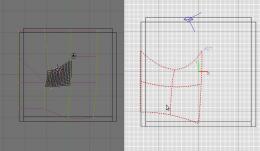
you can observe what I mean: original blender nurbs surface has its shape, but after exporting in radiant it lost its original shape and it seems (but I'm not sure) that the shape follows blender modifying cage ( you can see the cage in left picture).
If I create a simple nurbs surface and leave it unmodified, it appear weird after exporting too.
It seems that bends on one edge, instead I left it well-proportioned in all its edges!
Well, I don't use nurbs, but I've wanted to let you know!!my site: www.antoniolatronico.it-
toneddu2000 - Alien trapper
- Posts: 251
- Joined: Mon Mar 09, 2009 7:56 pm
- Location: Italy
-

-
Dear toneddu2000, thank you for the information. Great work! Concerning NURBS surface geometry, one should press "Endpoint U" and "V" in edit mode. After that it coinsides with NetRadiant representation. Also it fits better if order along U and V decreased to 2. And one should make NURMS resolution odd, because NetRadiant understands only odd resolution. And Exporter first limits it if it is even to odd by subtracting one.
Today I'm going to submin 0.14 version. I'll check material problems you told me and try to fix it in 0.15 version.
By the way did you try assigning texture/shader with exporter appropriate button? I thought it worked. This button is right to label "Overwrite texture" with "over" text on it.Don't use the force, Luke! Try to think!-
z80 - Advanced member
- Posts: 92
- Joined: Sun Jul 26, 2009 7:35 pm
- Location: Russia
-
-
Hio, well I've abusing your exporter with very large and complicated meshes again.
So anyway SOME success.
I exporter the mesh, blender spent mebbe 15 seconds thinking really hard and output a 4.8mb .map file.
This .map when opened in netradiant shows precisely .... nothing!
hrm hrm
pm'ed you the files.
Thank you for your continued effort in thisfishsticks-
Rad Ished - Keyboard killer
- Posts: 609
- Joined: Wed Jun 27, 2007 8:00 am
- Location: Not the Netherlands
-
-
thx for your quick reply z80!So, I've used over button and now radiant doesn't show anymore nurbs with caulk textures but now nurbs is only grey, it's not textured!
Then, for geometry, with endpoint U and V pressed, it fit better (not equal to blender, better) in space but it tranforms completely its shape(it appears always bent on its edge). I tried also with order U and V to 2 and resolution U and V to 2 or 1 but nothing!my site: www.antoniolatronico.it-
toneddu2000 - Alien trapper
- Posts: 251
- Joined: Mon Mar 09, 2009 7:56 pm
- Location: Italy
-
-
Version 0.14: http://www.box.net/shared/89f67o3598
toneddu2000 I'll watch what's going on with NURBS and try to fix it. Thank you for the information!
Rad Ished Thank you! I've received your blend file. I'll try to understand what goes wrong and fix it. What version did you use for exporting scene?Don't use the force, Luke! Try to think!-
z80 - Advanced member
- Posts: 92
- Joined: Sun Jul 26, 2009 7:35 pm
- Location: Russia
-
-
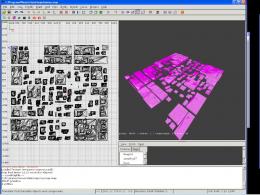
Rad Ished I've succeded importing city. Just played a bit with sizes avoiding any face to have zero area Also mesh by default had very-very-very big UV coordinates. So big that my NetRadiant (win32) didn't want to import such numbers
I've taken into account this bug. I'll fix it in 0.15 version.
 Don't use the force, Luke! Try to think!
-
z80 - Advanced member
- Posts: 92
- Joined: Sun Jul 26, 2009 7:35 pm
- Location: Russia
-

-
Outstanding!
Could you pm me the .map ?
Or will it just work now?
Damn it's windy here, awesome sunset tho.fishsticks-
Rad Ished - Keyboard killer
- Posts: 609
- Joined: Wed Jun 27, 2007 8:00 am
- Location: Not the Netherlands
-
-
Rad Ished I've sent you a private message with the result. Pleasant hearing that you enjoy windy sunsets, be well and have a nice day!Don't use the force, Luke! Try to think!-
z80 - Advanced member
- Posts: 92
- Joined: Sun Jul 26, 2009 7:35 pm
- Location: Russia
-
Information
-
- Who is online
- Users browsing this forum: No registered users and 1 guest