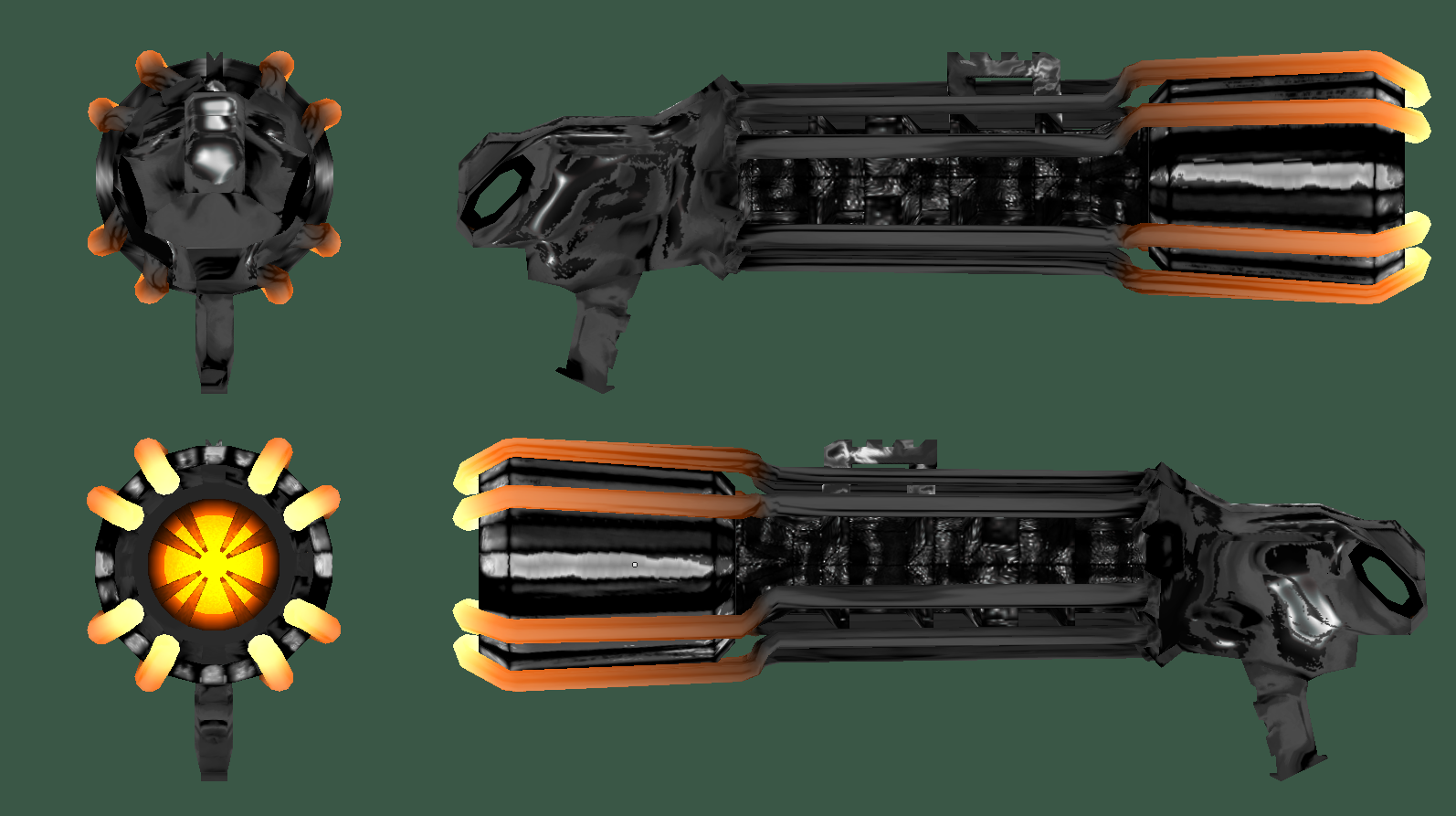
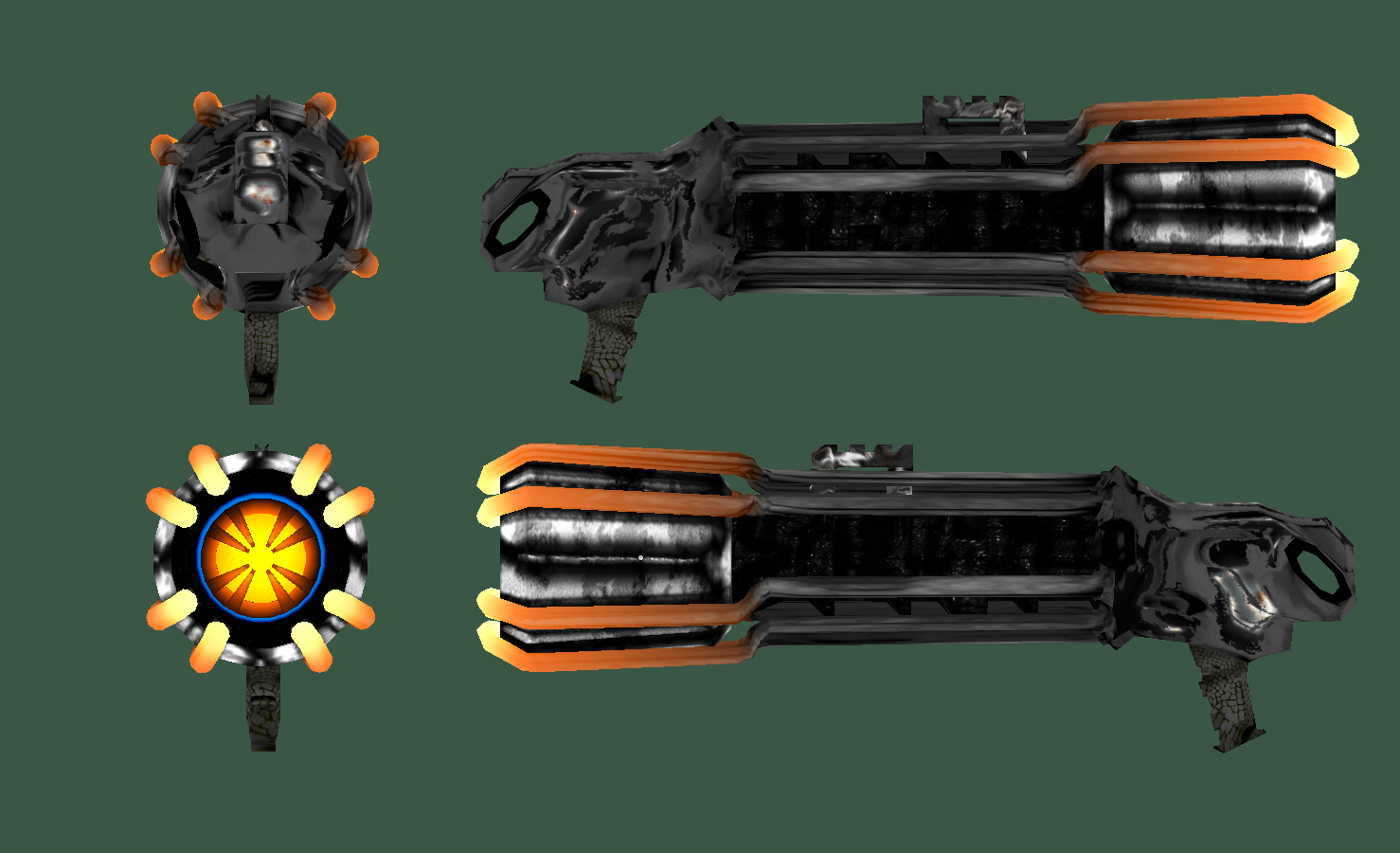
Flameball model

Post anything to do with editing Nexuiz here. Whether its problems you've had, questions, or if you just want to show off your work.

Moderators: Nexuiz Moderators, Moderators

Tue Sep 15, 2009 9:24 am

  • I made this mesh to go with the flameball launcher that i know divverent has been coding, I got inspired by the huge glowing spheres to make something with a really wide muzzle.
    I am quite happy with the mesh so far, but maybe it has too many polys... 3738 faces in blender :o, i guess thats a yes.
    Image
    Goshdurnit, shouldna left it out in the rain i guess... xD
    The interesting thing is that it could have been a lot less if i had not made it one continuous mesh, however the consensus with people in the know is that this is the way to go.
    Despite.. haha.. none of the models in nexuiz being made this way.. correct me if im wrong but i could not load all of them into blender.
    ...
    Here is the .blend along with the pshop file that is very bloated and containing a lot of redundant textures, and also the most recent test texture pictured above:
    http://www29.zippyshare.com/v/18617544/file.html
    ...
    Please feel free to do whatever you want with it.
    Leave that hamster alone.. you know who you are.
    ...
    To do: separate out glow and pants and make normals and bumps.
    fishsticks
    User avatar
    Rad Ished
    Keyboard killer
     
    Posts: 609
    Joined: Wed Jun 27, 2007 8:00 am
    Location: Not the Netherlands

Tue Sep 15, 2009 10:07 am

  • Rad Ished wrote:but maybe it has too many polys... 3738 faces in blender :o, i guess thats a yes.

    That's a hell yes. Don't try to go over 2000 tris. Some models I think have more than 2000 tris but still, if you can keep it below that's awesome. I think 1000 is a bit too low as much details and stuff will be hindered, and certain ideas won't go at all as it would look too polygonal.

    Rad Ished wrote:The interesting thing is that it could have been a lot less if i had not made it one continuous mesh, however the consensus with people in the know is that this is the way to go.

    Who said that? If someone said that then that person clearly isn't familiarized with game models. Use just as many separate objects as you want, it doesn't matter if it's one continuous mesh or composed of several pieces. In fact, several pieces would even be better as you can control how much polygons is on that particular object, rather than being constrained to a fixed amount.
    User avatar
    ai
    Forum addon
     
    Posts: 2131
    Joined: Sun Mar 05, 2006 3:54 pm
    Location: Behind you

Tue Sep 15, 2009 1:40 pm

  • The more I look at this model the more I like it. I think this has really evolved beautifully. Nice work, Rad!
    <Community>: Why was the name "Nexuiz" licensed to IllFonic in a way that allows IllFonic to use the name without any suffix or subtitle for a commercial console game?
    <Lee Vermeulen>:
    <Community>: http://www.xonotic.org
    User avatar
    halogene
    Alien trapper
     
    Posts: 465
    Joined: Fri Jun 20, 2008 8:31 am
    Location: http://www.xonotic.org

Tue Sep 15, 2009 1:51 pm

  • I'd like to see it ingame too.

    Can you export it as md3 with the trigger at the origin, and save it over the existing model as v_fireball.md3?
    1. Open Notepad
    2. Paste: ÿþMSMSMS
    3. Save
    4. Open the file in Notepad again

    You can vary the number of "MS", so you can clearly see it's MS which is causing it.
    User avatar
    divVerent
    Site admin and keyboard killer
     
    Posts: 3809
    Joined: Thu Mar 02, 2006 4:46 pm
    Location: BRLOGENSHFEGLE

Tue Sep 15, 2009 2:22 pm

  • i love it :D
    German Nexuiz Clan:
    Image
    User avatar
    Sven
    Alien trapper
     
    Posts: 315
    Joined: Sun Jun 01, 2008 8:38 am
    Location: Berlin; Germany

Tue Sep 15, 2009 3:07 pm

  • ai wrote:Who said that?


    No one expects the Spanish Inquisition!

    But looking at the mesh, I don't think I was understood exactly, I probably wasn't clear enough.

    The large parts of the mesh should be made into one initially, as was done with the intersection of the radiator(?) cylinder middle section and the big nozzle at the front, this is good imo. And most of the intersections look like they came naturally through extrusions, which saves polys.

    The fuel injectors can be separate to start with though since the parts where they attach only cover a small surface.

    It seems like there are too many cylinders in the front though, in the mouth of the gun, which are fairly high poly to start with.

    Finally, the model doesn't need to be one solid mesh when you are done, I find that when you separate any edges that are about a 90 degree angle, the shading artifacts, that normal mapping can't fix, disappear.


    But all that technical stuff out of the way now, it is indeed a beautiful and fitting model.
    Flying Steel
    Keyboard killer
     
    Posts: 623
    Joined: Fri May 08, 2009 9:13 pm

Tue Sep 15, 2009 3:18 pm

  • I haven't taken a look at the model in Blender, but just to put it out there. There really are no rules as how to build a model, as long as it looks good and fulfills its purpose, along with not having tremendously more poly's than necessary.
    Whether an object is extruded (continuous) or not all depends on the model, the look and what one is trying to convey.
    One guideline for game models though, make use of every vertex and every face on the model. Don't make more than what is needed. This guideline can actually be applied to all models, not just game models. If you can do without an extra face or two without losing (too) much, or any detail then go for it.

    Note, I'm not saying how to build this specific model, I'm just saying what one should keep in mind when building them.
    User avatar
    ai
    Forum addon
     
    Posts: 2131
    Joined: Sun Mar 05, 2006 3:54 pm
    Location: Behind you

Tue Sep 15, 2009 3:31 pm

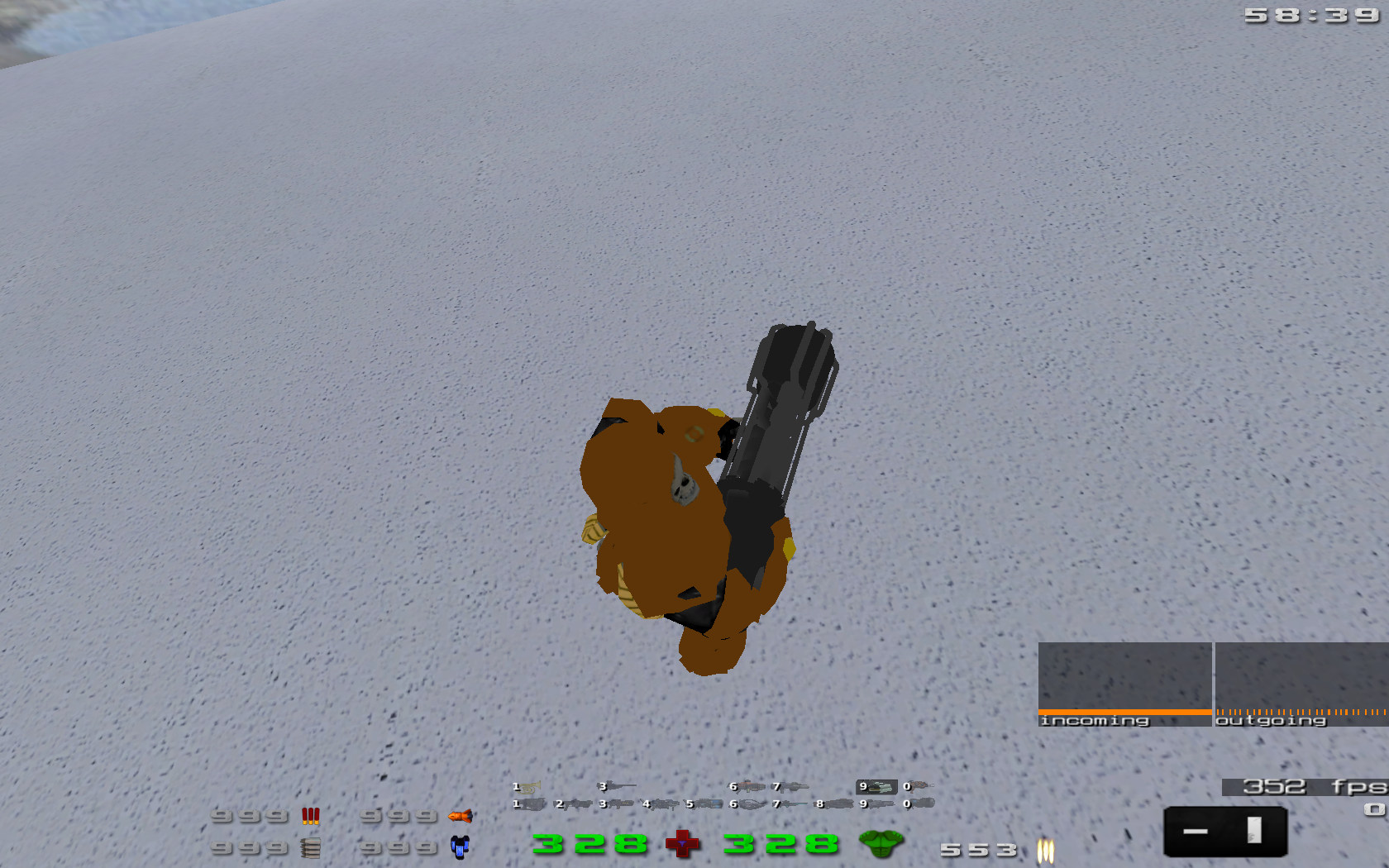
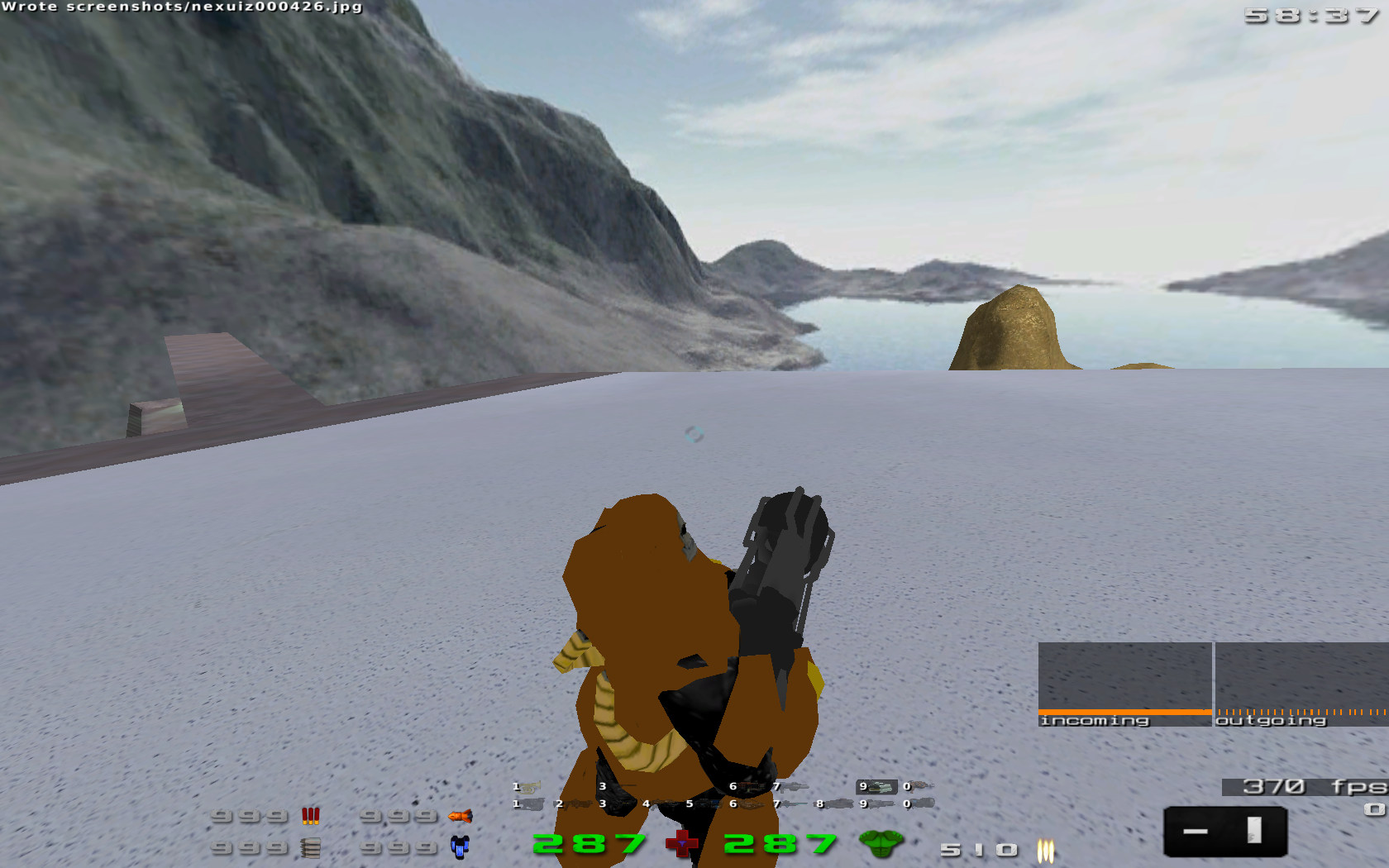
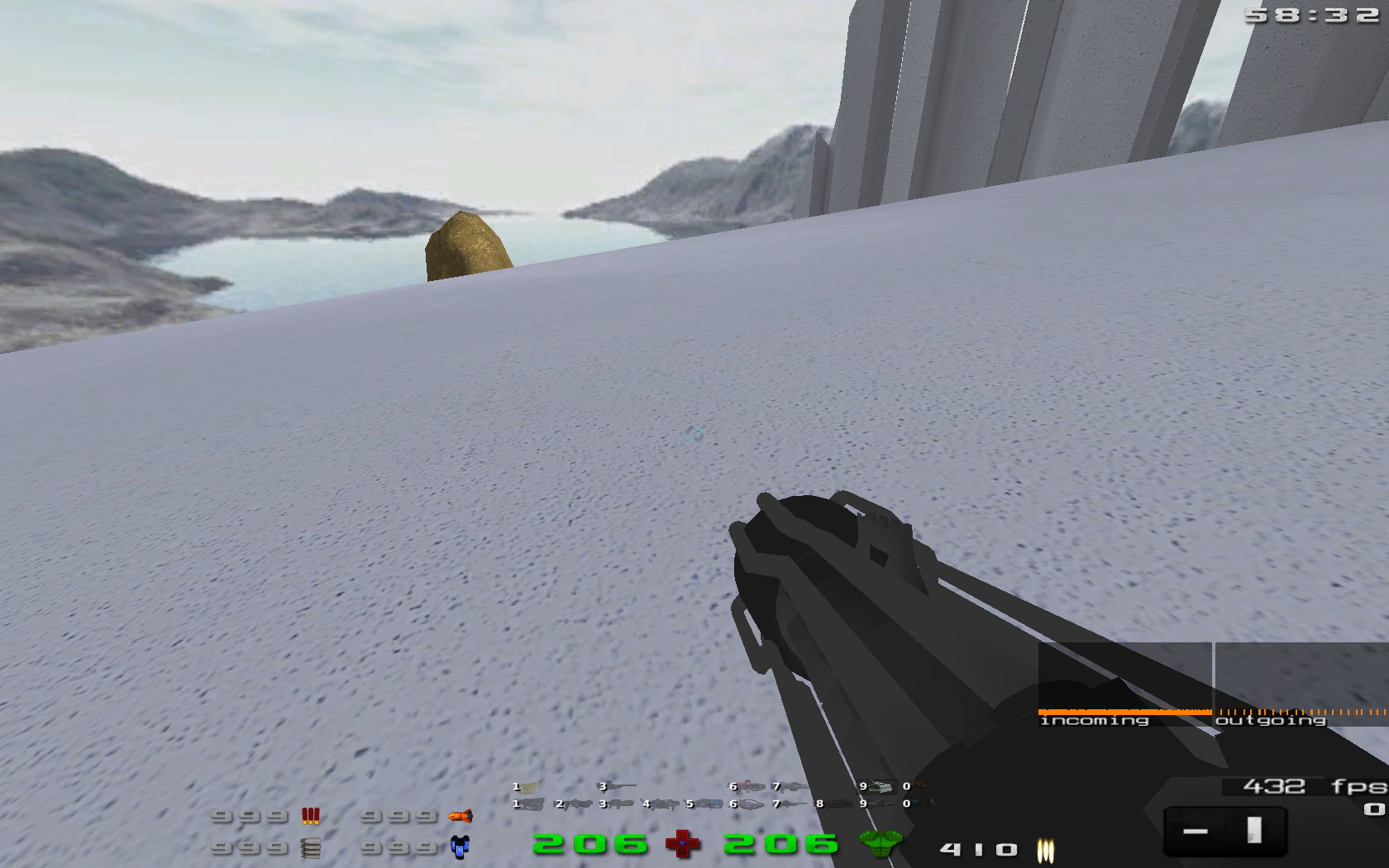
  • ok i got some ingame pics , but can't get the texture in there yet:
    Image
    Image
    Image
    fishsticks
    User avatar
    Rad Ished
    Keyboard killer
     
    Posts: 609
    Joined: Wed Jun 27, 2007 8:00 am
    Location: Not the Netherlands

Tue Sep 15, 2009 3:53 pm

  • ai wrote:I haven't taken a look at the model in Blender, but just to put it out there. There really are no rules as how to build a model, as long as it looks good and fulfills its purpose, along with not having tremendously more poly's than necessary.


    I would just add that in addition to having fewer polys being a good thing in and of itself, it is better to not have too many large surfaces covering other surfaces, pointing in the same direction so that backface culling doesn't get rid of them. That's what I was trying to get across.

    Radished wrote:ok i got some ingame pics , but can't get the texture in there yet:


    That isn't your in game texture settings that's causing that? The character model there looks almost untextured for some reason. It seems like only the parts of him that are not team colored are rendering with texture detail?
    Flying Steel
    Keyboard killer
     
    Posts: 623
    Joined: Fri May 08, 2009 9:13 pm

Tue Sep 15, 2009 4:32 pm

  • Well backface culling, or 'normals' as it is also called, need to point in the same direction, outward. If it points inward the faces could be invisible. However, depending on the format it might not be a problem and also if it is a problem it could potentially be fixed with a shader, adding a line that would allow to see the model no matter of the normals.
    However, normally they are pointing outward so no matter if faces are overlapping or not it wouldn't be a problem. One can also delete the faces that are not visible or hidden within the model.

    @Rad Ished:
    I would think you need to place the texture in the same folder as the model. But depending on your settings in the .md3 it might be a different place. I for one put my textures in /textures/SomeFolder/MaybeEvenAnotherFolder...WhoKNows

    If you have a hex editor you could edit the .md3, or if you created this one based on .smd model then converted to .md3. Then you could specify the location of the texture in that .smd file (or see current, and current is the same folder as the .md3).
    User avatar
    ai
    Forum addon
     
    Posts: 2131
    Joined: Sun Mar 05, 2006 3:54 pm
    Location: Behind you

Tue Sep 15, 2009 5:16 pm

  • ai wrote:Well backface culling, or 'normals' as it is also called, need to point in the same direction, outward. If it points inward the faces could be invisible.


    Right, so your system doesn't have to draw those. It only draws the faces that are facing the camera, so you don't want to have so many of these that it has to draw twice as much area as the model takes up on your screen, because it has so many hidden surfaces that are just going to waste anyway.

    One can also delete the faces that are not visible or hidden within the model.


    Right, unless parts of that face are in plain sight. Then to get rid of the hidden surface area you have to add more geometry than just the one face.
    Flying Steel
    Keyboard killer
     
    Posts: 623
    Joined: Fri May 08, 2009 9:13 pm

Tue Sep 15, 2009 8:49 pm

  • AAAAaaaaaahhh, no you see the reason that all the colours are flat in the screens is because i took them in a map that only has a quick light phase oooooops. As to why i can't get the texture there, hmm dunno. I have trouble with this sort of thing. :roll:
    fishsticks
    User avatar
    Rad Ished
    Keyboard killer
     
    Posts: 609
    Joined: Wed Jun 27, 2007 8:00 am
    Location: Not the Netherlands

Wed Sep 16, 2009 5:42 am

  • I can help you with that. All I need is the texture and the PK3.

    This model BTW wakes memories, when viewing it ingame. It reminds of the Nexuiz 1.5 rocket launcher... :P

    The character model BTW looks that way because it's nexus with skin 6 (fbskin). This is absolutely correct :P
    1. Open Notepad
    2. Paste: ÿþMSMSMS
    3. Save
    4. Open the file in Notepad again

    You can vary the number of "MS", so you can clearly see it's MS which is causing it.
    User avatar
    divVerent
    Site admin and keyboard killer
     
    Posts: 3809
    Joined: Thu Mar 02, 2006 4:46 pm
    Location: BRLOGENSHFEGLE

Wed Sep 16, 2009 6:48 am

Wed Sep 16, 2009 10:33 pm

  • Ok, after a lot of playing and a 23 layer photoshop file im there with the texture, NO MORE PLAYING
    Ok now some of you are going to tell me that snakeskin grips are way last year, and that may be true but im done with this here texture so you will have to deal with being a little bit unfashionable.
    Image
    Div, i have not removed any polys yet, and i guess that doing so will wreck the uv mapping and thus render my texture obselete. hMMMmmmmmm.
    well, ill get to that later. I'll post this texture and the md3 tomorrow.....
    ...
    .....and thank you very much to all you chaps what said you liked it :D
    fishsticks
    User avatar
    Rad Ished
    Keyboard killer
     
    Posts: 609
    Joined: Wed Jun 27, 2007 8:00 am
    Location: Not the Netherlands

Wed Sep 16, 2009 10:52 pm

  • First off, depending on how you delete details the UVs might not change much, if at all (as long as you stay away from the edges). It's fully possible to remove detail without wrecking anything.

    However, what's with the chrome like texture? I'm not even sure what I'm looking at. It's very hard (based on those screens) to make out anything besides plain chrome. It doesn't have much details at all just a jumbo mess in my eyes, especially the back of it.
    And looking straight from the back of the model I can't see any contour or lines at all.
    User avatar
    ai
    Forum addon
     
    Posts: 2131
    Joined: Sun Mar 05, 2006 3:54 pm
    Location: Behind you

Wed Sep 16, 2009 10:55 pm

  • /me chromes ai
    fishsticks
    User avatar
    Rad Ished
    Keyboard killer
     
    Posts: 609
    Joined: Wed Jun 27, 2007 8:00 am
    Location: Not the Netherlands

Thu Sep 17, 2009 12:47 am

  • heres a tip about reducing poly count. for the cylinders, try using a cylinder with less vertices around the circumference. i know in blender, you can change that. default is 32, but 6 looks almost the same once you are done texturing.

    just a thought ;)
    Why has a developer ever needed any reason other than "it looks bloody awesome?"

    -Archon
    User avatar
    Yoda almighty
    Alien
     
    Posts: 151
    Joined: Thu Aug 20, 2009 2:19 am
    Location: somewhere in the void

Thu Sep 17, 2009 1:04 am

  • Yoda almighty wrote:heres a tip about reducing poly count. for the cylinders, try using a cylinder with less vertices around the circumference. i know in blender, you can change that. default is 32, but 6 looks almost the same once you are done texturing.


    6 is actually kind of obvious unless the cylinder is very thin. For this situation with such a wide barrel, I don't think it would be wise to use anything less than 16 for the outside.

    But any additional optimization on this model should go towards lower LoDs, because detail wise this model is already in a good place, methinks.
    Flying Steel
    Keyboard killer
     
    Posts: 623
    Joined: Fri May 08, 2009 9:13 pm

Thu Sep 17, 2009 7:41 am

  • I don't know what ai is referring to with "chrome", but I like this model very much, especially the front part of it. These glowing pipes just rock! Also the front cylinder is really nice textured.

    If anything, I could, if I must, agree that the back could be improved (where you hold/trigger the thing). From the texturing I find it a bit hard to tell if it was supposed to be shiny and got worn or if it was supposed to be the other way round (got shiny by too many fatty hands holding it... ugh). Maybe in the back in some corners there could be some rust-like corrosion? Or maybe it would be more obvious what the texture is trying to tell there if the wear and tear would be applied to edges mostly? Or is it already that way and it is only hard to tell from the view angle of the screenshots? Dunno.

    But heck, I like this model the way it is already. Good work, rad. *thumbs up*

    On a side note: would it be possible to make it part of the weapon's animation that the pipes get glowing white when it shoots? Especially when it shoots the fireball? I don't know, since this would not affect the geometry of the model but the textures or gamma values or something. Just a thought.
    <Community>: Why was the name "Nexuiz" licensed to IllFonic in a way that allows IllFonic to use the name without any suffix or subtitle for a commercial console game?
    <Lee Vermeulen>:
    <Community>: http://www.xonotic.org
    User avatar
    halogene
    Alien trapper
     
    Posts: 465
    Joined: Fri Jun 20, 2008 8:31 am
    Location: http://www.xonotic.org

Thu Sep 17, 2009 9:09 am

  • Great work, Rad! :D

    Try making all details out of textures instead of the model. Scrap anything that you won't be seeing often, like, anything that's only visible from the bottom. (You're not gonna be standing under the gun all day.... Will you?)
    4m [PB] (amoebios)

    This is Your world.
    The mysterious Mr. 4m
    Forum addon
     
    Posts: 1402
    Joined: Wed Mar 01, 2006 6:03 pm
    Location: germany

Thu Sep 17, 2009 9:41 am

  • excellent work there! :D
    I for one really enjoy the snakeskin, that came out so sweet man!
    [Want to develop? Look HERE]. Image Image Gif sauce.
    paperclips
    Alien trapper
     
    Posts: 346
    Joined: Mon Jan 12, 2009 10:27 am
    Location: internets

Thu Sep 17, 2009 10:40 am

  • I used the poly reducer script, it works perfectly, UV data intact. The model looks pretty much the same and is now just over 2000 polys.
    ...
    I did try the decimate modfier but it scrapped all the uv data. Also the poly reducer script created a hole which i could not seem to repair without making white patches on the model where the texture was not mapped.
    So then I made the area in question a vertex group and used the poly reducer script option to not reduce that area so much. I very rarely have this kind of positive result with Blender problems, im stoked. :o
    ...
    Im just working on the pants shirt and glow textures now. Anybody know what the difference between pants and shirt is in this context?... i assume they are just the areas coloured with either red or blue depending on which team you are on, but why two of them?
    ...
    I admit that the rear of the weapon is suffering from 'no clear concept' syndrome, but such is life.
    xD
    fishsticks
    User avatar
    Rad Ished
    Keyboard killer
     
    Posts: 609
    Joined: Wed Jun 27, 2007 8:00 am
    Location: Not the Netherlands

Thu Sep 17, 2009 11:11 am

  • Rad Ished wrote:Im just working on the pants shirt and glow textures now. Anybody know what the difference between pants and shirt is in this context?... i assume they are just the areas coloured with either red or blue depending on which team you are on, but why two of them?


    This is because you can use 2 colours for the player model, and those 2 colours are also used on the weapons "shirt" and "pants". This is how the RL looks with "color 3 4":
    Image
    User avatar
    sev
    Alien
     
    Posts: 248
    Joined: Sat Mar 29, 2008 3:03 pm
    Location: Switzerland

Thu Sep 17, 2009 12:41 pm

  • ah, oops of course .. it was on the tip of my brain
    fishsticks
    User avatar
    Rad Ished
    Keyboard killer
     
    Posts: 609
    Joined: Wed Jun 27, 2007 8:00 am
    Location: Not the Netherlands

Thu Sep 17, 2009 4:31 pm

  • sev, is that your screenshot? In case that is, you're playing with the same colors as me :D
    "One should strive to achieve; not sit in bitter regret."
    WE ARE NEXUIZ.
    Image
    Image
    User avatar
    C.Brutail
    Laidback mapper
     
    Posts: 2357
    Joined: Tue Feb 28, 2006 7:26 pm
    Location: Ironforge

Thu Sep 17, 2009 4:58 pm

  • C.Brutail wrote:sev, is that your screenshot? In case that is, you're playing with the same colors as me :D

    Sorry, I just chose those colours because of the contrast, and I didn't use red-blue to avoid misunderstandings about team colours :P
    (I only play with one colour at a time, which I alternate)
    User avatar
    sev
    Alien
     
    Posts: 248
    Joined: Sat Mar 29, 2008 3:03 pm
    Location: Switzerland

Fri Sep 18, 2009 10:04 am


Return to Nexuiz - Editing


Information
  • Who is online
  • Users browsing this forum: No registered users and 1 guest