[MenuSkin][Beta] Wicked3 Beta 4 (Blue,Green,Yellow)

Post anything to do with editing Nexuiz here. Whether its problems you've had, questions, or if you just want to show off your work.

Moderators: Nexuiz Moderators, Moderators


  • EDIT: Get the latest version here: http://forums.xonotic.org/showthread.php?tid=260

    Beta 4

    Added the green and yellow versions.
    The highlight colour of wicked3 blue is now darker and its hue is closer to blue.

    ImageImageImage


    Beta 3

    Yay, I found some useful info in the menu source code.

    Revised background frame (stays centered behind the windows now). Converted the background image to jpg.
    I'm not sure if I can keep the "framing" of the 2 bottom windows. If there's any overlap in the main view (of the windows and frame), a screenshot would be helpful.

    I experimented with the server list colours, but it's just not working. If you know a system with 3 colours (good, ok, bad ping), + colour for bookmarked servers, + alpha values for full and empty servers (and ones with very bad ping), that is not confusing AND that fits the theme, I'll happily use it.

    Image


    Beta 2

    I decreased the size of the (background) frame and made some minor colour adjustments.
    I'm now interested in screenshots with ratio 16:9 of the main menu (with the 3 windows in the centre).
    (If I force it manually, it just gets streched, not correctly scaled)

    Image


    Beta 1
    Ready for testing, I'm open for comments and suggestions.
    I'm also interested in screenshots with width >= 1600 (I can't set it higher than my native screen res).

    I'll make several colour versions once the graphics are tested (blue, green, red, yellow, magenta), as well as a default candidate (if the blue one is too blue).

    There are some issues with the version number (ugly scaling), I'll work on that.

    Image
    Last edited by sev on Thu Apr 29, 2010 6:39 pm, edited 13 times in total.
    User avatar
    sev
    Alien
     
    Posts: 248
    Joined: Sat Mar 29, 2008 3:03 pm
    Location: Switzerland


  • Very nice work!

    Maybe just two little things that could be improved:
    The green color of the server list doesn't fit very well with the rest. Maybe orange instead of green?
    And I think that the background color of a selected row is a little too light at moment.

    Image
    sputnik
    Member
     
    Posts: 10
    Joined: Thu Feb 11, 2010 11:50 pm


  • Looking great, the one thing I don't really like is the sliderbutton, it could be more shiny like the rest of the menu.

    Anyway, here's some screenshots at 1920x1200:

    Image
    Image
    Image
    Image
    Before posting a reply, please read about the bikeshed
    User avatar
    merlijn
    Advanced member
     
    Posts: 84
    Joined: Tue Oct 21, 2008 10:18 am


  • I'm waiting for the green one :)
    "One should strive to achieve; not sit in bitter regret."
    WE ARE NEXUIZ.
    Image
    Image
    User avatar
    C.Brutail
    Laidback mapper
     
    Posts: 2357
    Joined: Tue Feb 28, 2006 7:26 pm
    Location: Ironforge


  • same here :P

    The blue one looks very cool though. GJ
    IRC quote:
    [kojn] I've been coming a bit more recently
    [kojn] she took it the dirty way
    GreEn`mArine
    Forum addon
     
    Posts: 1509
    Joined: Tue Feb 28, 2006 9:33 pm
    Location: Germany


  • Screenshots I have are from Beta 2 ----

    Anyway I have a few problems with this at the moment:

    Image
    The Credits and Quit buttons are out of place, future Nexuiz menus will use 5:4 aspect ratio on the menu no matter what the vid_con* values are to remain compatible with multiple monitor setups and etc. (We chose 5:4 because it fits with almost everything possible.) The problem here is that using a single image at the bottom which is increased in size just doesn't work with different monitor sizes as the background part of the menu doesn't care for the 5:4 ratio (Or any other ratio changes for that matter) -- I suggest taking a different idea for the background image of the theme or finding some way to solve this problem. Note: You should avoid doing this method for the top too, as again I mentioned multiple monitor usage would be interrupted by this.

    Image
    As mentioned before, perhaps you could make the colors a little more blue-based with text in the serverlist?

    ImageImage
    Take a look at the backgrounds here and compare that with another theme, the background of the singleplayer matches the maplist in other themes --- Perhaps check for other background color controls like this (Example: Serverlist or listbox global background color control) in the config. I don't have time to look at the config itself right now, sorry, else I would point out what needs changed.

    Image
    This just looks silly (We could probably extend the button size for this theme if we make it default, but i'm not sure if they would then be too big for the name of the model.)

    Image
    And this needs to be red.

    Note: My font is not default for a later release, it's the xscale2 font which isn't GPL. I just use it because I think it looks better.
    Do it yourself, or stop complaining.
    (Developer Tracker) | (Nexuiz Roadmap)
    User avatar
    Samual
    Keyboard killer
     
    Posts: 508
    Joined: Mon May 25, 2009 7:22 pm
    Location: Pittsburgh, PA


  • Thanks so far for the feedback. :mrgreen:

    The Credits and Quit buttons are out of place, future Nexuiz menus will use 5:4 aspect ratio on the menu no matter what the vid_con* values are to remain compatible with multiple monitor setups and etc. (We chose 5:4 because it fits with almost everything possible.) The problem here is that using a single image at the bottom which is increased in size just doesn't work with different monitor sizes as the background part of the menu doesn't care for the 5:4 ratio (Or any other ratio changes for that matter) -- I suggest taking a different idea for the background image of the theme or finding some way to solve this problem. Note: You should avoid doing this method for the top too, as again I mentioned multiple monitor usage would be interrupted by this.


    EDIT: I read through the code and found a useful (yet seemingly undocumented) aligning method. Problem hopefully solved.

    As mentioned before, perhaps you could make the colors a little more blue-based with text in the serverlist?

    The reason why I kept these colours is their well known meaning. green = good ping, yellow = ok ping, red = bad ping. Apart from blueplastic, all skins use this colour coding, I think with good reason:
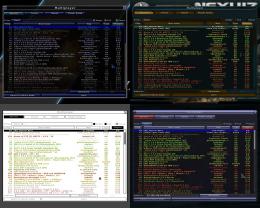
    Image

    Take a look at the backgrounds here and compare that with another theme, the background of the singleplayer matches the maplist in other themes --- Perhaps check for other background color controls like this (Example: Serverlist or listbox global background color control) in the config. I don't have time to look at the config itself right now, sorry, else I would point out what needs changed.

    Hmm... One important thing with the map selector is that the maps (unlike the other list items) can have different statuses: activated or deactivated.
    To make it look like the other skins, I have to brighten the background to make the black list-item background stand out. It then looks like this:
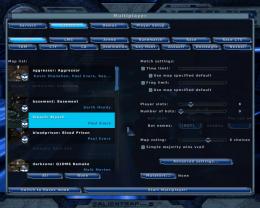
    Image

    I don't mind doing it this way (unless the background needs to be brighter, then it looks washed out), though beta2 has better contrast.

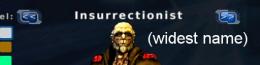
    This just looks silly (We could probably extend the button size for this theme if we make it default, but i'm not sure if they would then be too big for the name of the model.)

    This problem occurs because these 2 buttons override the 1:2:1 ratio of the buttons.
    I can't do anything about this apart from making the "unscalable" parts at either side narrower, affecting ALL other buttons.

    They simply should be extended, it shouldn't cause problems with the names.
    Image

    And this needs to be red.

    Done.


    In return, I would have some suggestions for the menu:

    The gametype buttons (multiplayer > create) should be reverted from bigbuttons to buttons, sice they are now the same size as the normal buttons.

    I also suggest a different approach to missing image files. Instead of the checkered texture, it would be useful if an alternative image is used instead:
    missing _f, _c --> use _n (only within the same activation status, i.e. c0 = n0, c1 = n1)
    missing _d --> use _n with alpha 0.5
    missing background_ingame_l* --> use background_l*
    This would get rid of a lot of redundant data, while not removing any features or breaking compatibility of existing skins.
    (In a test with wicked3, with the top half of the bg frame for ingame, this results in 30% fewer files (73 to 51) and 20% lower archive size)
    User avatar
    sev
    Alien
     
    Posts: 248
    Joined: Sat Mar 29, 2008 3:03 pm
    Location: Switzerland


  • This looks good but the list selection color does not match the design. The hue is off. Correct this and you'll have a solid menu skin.
    User avatar
    [-z-]
    Site Admin and Nexuiz Ninja
     
    Posts: 1794
    Joined: Mon Nov 13, 2006 12:20 am
    Location: Florida


  • [-z-] wrote:This looks good but the list selection color does not match the design. The hue is off. Correct this and you'll have a solid menu skin.

    If you mean the same colour I mean, then it's an optical illusion, since the highlight colour is the same everywhere (00bfef).
    Image

    Would this be better?
    Image
    User avatar
    sev
    Alien
     
    Posts: 248
    Joined: Sat Mar 29, 2008 3:03 pm
    Location: Switzerland


  • I'm trying to say I think it's too bright and in your face, perhaps try muting the color a bit:

    Image

    Quickly GIMPed but I think maybe the background color could be even darker than that to make the white text pop more.

    Also, I noticed the Nexuiz text isn't very defined. Perhaps emboss or bevel it and mabe grunge it up to give it some character.
    User avatar
    [-z-]
    Site Admin and Nexuiz Ninja
     
    Posts: 1794
    Joined: Mon Nov 13, 2006 12:20 am
    Location: Florida


  • better but I think the hue should be closer to the dark blue in the menu, not the cyan.
    User avatar
    [-z-]
    Site Admin and Nexuiz Ninja
     
    Posts: 1794
    Joined: Mon Nov 13, 2006 12:20 am
    Location: Florida


  • Well, that's part of the concept. Every colour version has a base colour (e.g. blue) and a highlight colour (e.g. cyan).
    That way there's more contrast and more character :wink:.
    User avatar
    sev
    Alien
     
    Posts: 248
    Joined: Sat Mar 29, 2008 3:03 pm
    Location: Switzerland


  • sev wrote:That way there's more contrast and more character :wink:.


    More contrast and character would use a complimentary color ;)

    I think your choice of color for this selection does more harm than good in the overall design. I really think you did a great job with the rest of the design, the buttons and scrollbars especially...

    The blue in the bottom of this screenshot is a lot easier on the eyes (the author text would probably need to be updated)
    http://pics.nexuizninjaz.com/viewer.php ... e5gl1l.jpg

    The Nexuiz text looks better but still lacks depth, the version number should probably be darker or more prominent.
    User avatar
    [-z-]
    Site Admin and Nexuiz Ninja
     
    Posts: 1794
    Joined: Mon Nov 13, 2006 12:20 am
    Location: Florida


  • tbh i prefer the over-bright blue version, even if it may hurt a bit on tired eyes, its got more character. numbing it down to a murky blue sorta looses that sting.
    HOF:
    <Diablo> the nex is a "game modification"
    <Diablo> quake1 never had a weapon like that.
    <Vordreller> there was no need for anything over 4GB untill Vista came along
    <Samua>]Idea: Fix it? :D
    <Samua>Lies, that only applies to other people.
    User avatar
    tZork
    tZite Admin
     
    Posts: 1337
    Joined: Tue Feb 28, 2006 6:16 pm
    Location: Halfway to somwhere else


  • tZork wrote:tbh i prefer the over-bright blue version, even if it may hurt a bit on tired eyes, its got more character. numbing it down to a murky blue sorta looses that sting.

    +1
    Do it yourself, or stop complaining.
    (Developer Tracker) | (Nexuiz Roadmap)
    User avatar
    Samual
    Keyboard killer
     
    Posts: 508
    Joined: Mon May 25, 2009 7:22 pm
    Location: Pittsburgh, PA


  • sev wrote:You're not going to make it easy then :roll:

    Added beta 4.
    Looks impressive from the screenshots -- *claps*

    I can't try it right now, i'm working on something. However I can't wait to try this later.
    Do it yourself, or stop complaining.
    (Developer Tracker) | (Nexuiz Roadmap)
    User avatar
    Samual
    Keyboard killer
     
    Posts: 508
    Joined: Mon May 25, 2009 7:22 pm
    Location: Pittsburgh, PA


  • I've tried the green version, very nice!
    Though the bars and buttons sometimes won't loose highlight color if I move the mouse away from them, only when another one gets it.
    "One should strive to achieve; not sit in bitter regret."
    WE ARE NEXUIZ.
    Image
    Image
    User avatar
    C.Brutail
    Laidback mapper
     
    Posts: 2357
    Joined: Tue Feb 28, 2006 7:26 pm
    Location: Ironforge


  • Okay, it looks like you fixed the problem with the bars, now they're center which is very good.

    Image

    I noticed one problem though, look at the scroll bar in this picture:

    Image

    Doesn't happen on the other themes, just this one -- missing image.
    Do it yourself, or stop complaining.
    (Developer Tracker) | (Nexuiz Roadmap)
    User avatar
    Samual
    Keyboard killer
     
    Posts: 508
    Joined: Mon May 25, 2009 7:22 pm
    Location: Pittsburgh, PA


  • C.Brutail wrote:Though the bars and buttons sometimes won't loose highlight color if I move the mouse away from them, only when another one gets it.
    With the skin, I can only influence the appearance, not the behaviour.

    Samual wrote:I noticed one problem though, look at the scroll bar in this picture: [...] Doesn't happen on the other themes, just this one -- missing image.
    ...illustrated with a 5760×1200 screenshot :lol: ...
    The missing image could be caused by a corrupted archive, it is included and should be displayed correctly (it does on my system).


    I'm trying to finish this project now, I'll make a red version and one that could be used as default.
    For this I would need to know what default colours you want me to use.
    Personally, I like the blue version and it would fit the futuristic theme quite well.
    The blue version could also be used as base, with a highlight colour:
    Image

    Or do you prefer the -z- style?
    Image (gimped preview)

    I would need to know if (and if yes, with which colours) you (leaders/devs) want to use Wicked3 as default.
    User avatar
    sev
    Alien
     
    Posts: 248
    Joined: Sat Mar 29, 2008 3:03 pm
    Location: Switzerland


  • I like the last one because it's less in your face, it's not quite '-z- style' but I can understand that because it's a quick GIMP mockup as you said.

    I think overall the interface design is good but the color palettes need work. Maybe check out www.coverlovers.com
    User avatar
    [-z-]
    Site Admin and Nexuiz Ninja
     
    Posts: 1794
    Joined: Mon Nov 13, 2006 12:20 am
    Location: Florida


  • Samual wrote:
    Image


    I think this one is the best. Nice color combination and well matched.
    User avatar
    Aleator
    Member
     
    Posts: 46
    Joined: Thu Feb 25, 2010 12:13 pm
    Location: France


Return to Nexuiz - Editing


Information
  • Who is online
  • Users browsing this forum: No registered users and 1 guest