I know everyone plays with gamma of 3, at 800x600, textures lowest quality, fov 150, and absolutely every fps-robbing feature disabled.
Well turn your effects back on, and prepare for your journey to Awesome in the Grand Screenshot Contest.
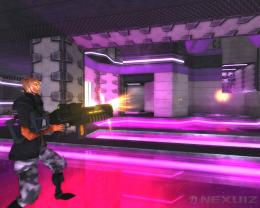
Best screenshot(s) will go on apple.com for the release of 2.4, and other places in need of fresh Nexuization.
There will be two categories for glory:
Third-person - Screenshot without HUD or weapons.
First-person - Screenshot with the HUD & weapons visible.
Contest will be judged by an expert, neutral board of reviewers.
Post your entries in this thread (full-size preferred :) at your earliest convenience, contest ends when 2.4 is released.
Suggestions:
Use standard gamma & fov
Submit as many times as you want.
Turn it up! - ultimate.cfg, AA, AF, HDR
Max out your resolution - For excellent clarity.
You may want to disable the HUD & on-screen text.
Use SVN - improved effects like the new bullet-impacts.
Exaggerated bumpmaps don't look as good as you think they do.
Turn on auto-demo-record, and capture moments of wonder later.
hm, what a lovely cascading pattern this post turned into :)
[Contest] of the Grand Screenshot
Moderators: Nexuiz Moderators, Moderators
66 posts
• Page 1 of 3 • 1, 2, 3
Thu Feb 21, 2008 6:17 am
-
set- Code: Select all
scr_screenshot_jpeg_quality 1 // set the default quality of screenshots to 100
first
To start us off...
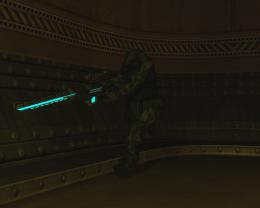
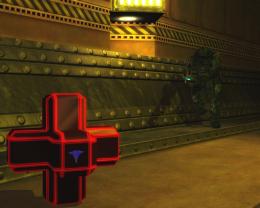
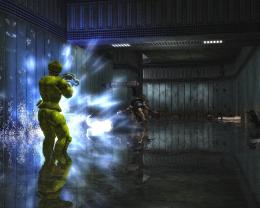 Last edited by [-z-] on Thu Feb 21, 2008 7:04 am, edited 1 time in total.
-

[-z-] - Site Admin and Nexuiz Ninja
- Posts: 1794
- Joined: Mon Nov 13, 2006 12:20 am
- Location: Florida


-
or- Code: Select all
scr_screenshot_jpeg 0
- :)
- Keyboard killer
- Posts: 590
- Joined: Tue Feb 28, 2006 9:09 pm
-


-
Captain Haddock - Forum addon
- Posts: 1000
- Joined: Thu Jun 15, 2006 3:57 pm
-


-

Sorry about the FOV, must it REALLY be default? I mean, that makes no sense for non-1stperson views-

Mr. Bougo - Keyboard killer
- Posts: 760
- Joined: Mon Sep 10, 2007 3:29 pm
-
-
Mr. Bougo wrote:Sorry about the FOV, must it REALLY be default? I mean, that makes no sense for non-1stperson views
Those were all suggestions, have fun with the settings :)- :)
- Keyboard killer
- Posts: 590
- Joined: Tue Feb 28, 2006 9:09 pm
-
[-z-] wrote:- Code: Select all
scr_screenshot_jpeg_quality 1 // set the default quality of screenshots to 100
Please don't. JPEG quality is arbitary and 100 is pointless. Use no higher than 85. If you need it lossless, use another format.
I would suggest, as Dave did to save as Targa, then use the Gimp to save as a JPEG. 85% quality, 'optimise' enabled and 'progressive'.
I would also strongly support Fov of 90 or less. Otherwise things just look wonky.- Ed
- Forum addon
- Posts: 1172
- Joined: Wed Mar 01, 2006 12:32 am
- Location: UK
-
Ed wrote:[-z-] wrote:- Code: Select all
scr_screenshot_jpeg_quality 1 // set the default quality of screenshots to 100
Please don't. JPEG quality is arbitary and 100 is pointless. Use no higher than 85.
Unless you can prove this to me with mathematics, I will disregard this comment as skepticism and continue to take screenshots as 100.-
[-z-] - Site Admin and Nexuiz Ninja
- Posts: 1794
- Joined: Mon Nov 13, 2006 12:20 am
- Location: Florida
-
Bougo, yours is awesome. Is that the hit animation playing? It looks like he's pointing forward to assault
I wish someone would make a graphically improved greatwall though!- Shoe
- Keyboard killer
- Posts: 517
- Joined: Wed Mar 08, 2006 2:18 am
-
Ed wrote:[-z-] wrote:- Code: Select all
scr_screenshot_jpeg_quality 1 // set the default quality of screenshots to 100
Please don't. JPEG quality is arbitary and 100 is pointless. Use no higher than 85. If you need it lossless, use another format.
I would suggest, as Dave did to save as Targa, then use the Gimp to save as a JPEG. 85% quality, 'optimise' enabled and 'progressive'.
I would also strongly support Fov of 90 or less. Otherwise things just look wonky.
In my experience, 92 is the limit of what you need. 90 sometimes still has visible artifacts.
Also, if you have strong red stuff on the screen, turn off chroma subsampling (you can do that in GIMP).1. Open Notepad
2. Paste: ÿþMSMSMS
3. Save
4. Open the file in Notepad again
You can vary the number of "MS", so you can clearly see it's MS which is causing it.-

divVerent - Site admin and keyboard killer
- Posts: 3809
- Joined: Thu Mar 02, 2006 4:46 pm
- Location: BRLOGENSHFEGLE
-
I think FOV of 95 looks the best- you can see the weapon to some degree, but it's not distorted too much.
-

torus - Forum addon
- Posts: 1341
- Joined: Sun Dec 24, 2006 6:59 am
- Location: USA
-
-
[-z-] wrote:Unless you can prove this to me with mathematics, I will disregard this comment as skepticism and continue to take screenshots as 100.
JPEG uses the Discrete Cosine Transform. Let's say you need to define a harsh edge or a large monochromic region in an image. To do so exactly would require an infinite number of cosine functions summed and produce an infinitely large file. Hence you can not make a lossless image by DCT and the 100% quality setting is purely arbitary and varies between different programs. Open a 100% PS JPEG in Gimp and it might come to ~98%.
Doubling the number of cosine functions used does not double quality, you have to use MANY more. Compare files of different quality settings I just snapped my desktop (1280x960) and saved it in different qualities from 100% down to 85% in Gimp:- Code: Select all
-rw-r--r-- 1 ed root 173086 2008-02-21 21:01 85.jpg
-rw-r--r-- 1 ed root 178317 2008-02-21 21:00 86.jpg
-rw-r--r-- 1 ed root 182323 2008-02-21 21:00 87.jpg
-rw-r--r-- 1 ed root 189688 2008-02-21 21:00 88.jpg
-rw-r--r-- 1 ed root 194758 2008-02-21 21:00 89.jpg
-rw-r--r-- 1 ed root 202609 2008-02-21 21:00 90.jpg
-rw-r--r-- 1 ed root 210519 2008-02-21 20:59 91.jpg
-rw-r--r-- 1 ed root 217824 2008-02-21 20:59 92.jpg
-rw-r--r-- 1 ed root 229307 2008-02-21 20:59 93.jpg
-rw-r--r-- 1 ed root 243445 2008-02-21 20:59 94.jpg
-rw-r--r-- 1 ed root 259829 2008-02-21 20:58 95.jpg
-rw-r--r-- 1 ed root 278548 2008-02-21 20:58 96.jpg
-rw-r--r-- 1 ed root 302321 2008-02-21 20:58 97.jpg
-rw-r--r-- 1 ed root 326558 2008-02-21 20:58 98.jpg
-rw-r--r-- 1 ed root 374185 2008-02-21 20:57 99.jpg
-rw-r--r-- 1 ed root 413080 2008-02-21 20:57 100.jpg
There are vast differences in file sizes there and while you could tell the difference between the files using a mathematical comparison, the eye can't do that. You're not asking the user to carry out a spectral analysis, the actual values don't matter It's about removing psychovisual redundancy. The desktop snapshot is a good way to test JPEG quality as it is badly suited to use JPEG on, that is that it has large uniform regions (application windows) and is therefore hard to express via DCT and compression artifacts would be very obvious.
Next, if you really did want a high colour image, use a lossless format. It's unlikely to be smaller than an 85% JPEG as game screenshots rarely have large uniform regions however even in this case, a PNG may well be smaller than a JPEG at '100%'.
Lastly, what makes an image look good? Exact pixel definition does not. What does Anti-aliasing do? It carries out a blurring of edges via a kernel. Via your logic, this would be reducing image quality as it is changing the games graphical output and introducing the kind of soft edges that you might see appearing via DCT. Therefore lowering the JPEG quality can often make an image look better psychovisually. Every implementation of OpenGL is different, if you were to mathematically compare two lossless screenshots of the same scene on an ATi card and an NVIDIA card, they would be different. Does that make on better than the other? No. Different drivers have different kinds of image optimisations, many with options and by your argument, they would all be degrading the image.
To get a good screenshot you must use a software renderer. All others use approximations and are therefore bad quality. I demand that the rules of the competition are changed to outlaw hardware accelerated OpenGL implementations as they are producing screenshots which are wrong. For that matter, the engine itself uses too many approximations. No screenshots can be entered in this competition until a software ray tracing rendering path has been implemented in the Darkplaces engine!
PS: And we must do it all on the same computer with at least 10 repeat measurements taking place. We can not allow miscalculations due to hardware/software issues to interfere with prospective users desire to carry out image analysis on screenshots to prove that the game is 'cool'.- Ed
- Forum addon
- Posts: 1172
- Joined: Wed Mar 01, 2006 12:32 am
- Location: UK
-
Well then, I stand corrected. That is some interesting information I was previously unaware of. I guess I was being a bit nitpicky but I have noticed some artifacts on the 90% quality as div pointed out as a possibility, thus I assumed 100 would be THE ULTIMATE. I guess it's really not ~that~ big of a deal but I mean, if we're trying to promote Nexuiz, we should want it looking as nice as possible.




Here's the watermark I used for those interested. Put it at 15-20% opacity.
-
[-z-] - Site Admin and Nexuiz Ninja
- Posts: 1794
- Joined: Mon Nov 13, 2006 12:20 am
- Location: Florida
-


-
woooow i want this quality ingame!!- [NC]adamas
- Member
- Posts: 37
- Joined: Tue Nov 27, 2007 5:16 pm
-
[NC]adamas wrote:woooow i want this quality ingame!!
those are ingame screenshots of the SVN builds of 2.4
-

Psychcf - Forum addon
- Posts: 1554
- Joined: Sun Dec 03, 2006 11:38 pm
- Location: NY, USA
-


-
damn. i could force higher resolution to compensate for my odd laptop display but "high.cfg" is the best i can do on this hardware anyway.

oh, and here's a visual example of JPG's quality limits:
high-quality JPG 745 KB
max-quality JPG 1,6 MB
full-quality PNG 2,4 MB4m [PB] (amoebios)
This is Your world.- The mysterious Mr. 4m
- Forum addon
- Posts: 1402
- Joined: Wed Mar 01, 2006 6:03 pm
- Location: germany
-
[-z-], do you not find your continued usage of a lossy format, in the wake of an explanation of DCT, and along with your desire to portray Nexuiz at it's graphical peak, ironic?- TVR
- Alien trapper
- Posts: 404
- Joined: Fri Jun 01, 2007 12:56 am


-
Look at those big sad faces.
Is that you machine?
...
Dave is trying to find the soul of Nexuiz.-

Rad Ished - Keyboard killer
- Posts: 609
- Joined: Wed Jun 27, 2007 8:00 am
- Location: Not the Netherlands
-
-
dave. those are amazing. What settings are you using for those? Just ultimate.cfg?
It seems like those shots need 1 or two player models, and possibly some action, like an explosion?- Dokujisan
- Forum addon
- Posts: 1199
- Joined: Sat Oct 07, 2006 4:31 pm
- Location: Louisville, Kentucky
-
Those reflections are looking very nice Dave!- Ed
- Forum addon
- Posts: 1172
- Joined: Wed Mar 01, 2006 12:32 am
- Location: UK
-
[TSA] Psychcf wrote:[NC]adamas wrote:woooow i want this quality ingame!!
those are ingame screenshots of the SVN builds of 2.4
i have SVN an i can play with ultimate settings on most maps... but it looks uglier than that...- [NC]adamas
- Member
- Posts: 37
- Joined: Tue Nov 27, 2007 5:16 pm
-
It should look nice, reflections were set to "insane" and 16x AA and AF were enabled. :)
If you want players/action in the scene, feel free to take such a screenshot :)
Also, if you've got SVN and it still doesn't look as nice, your video card/driver might not support all of the OpenGL extensions necessary to render every one of the effects- :)
- Keyboard killer
- Posts: 590
- Joined: Tue Feb 28, 2006 9:09 pm
-
Dave wrote:Also, if you've got SVN and it still doesn't look as nice, your video card/driver might not support all of the OpenGL extensions necessary to render every one of the effects
that could be the reason... i have a geforce 7950 GX2 and the newest nvidia drivers... does anybody know?
edit: i will take a few screenies...- [NC]adamas
- Member
- Posts: 37
- Joined: Tue Nov 27, 2007 5:16 pm
-
[NC]adamas wrote:that could be the reason... i have a geforce 7950 GX2 and the newest nvidia drivers... does anybody know?
I took mine with a 7900GS...-
[-z-] - Site Admin and Nexuiz Ninja
- Posts: 1794
- Joined: Mon Nov 13, 2006 12:20 am
- Location: Florida
-
-
How exactly does one disable text/HUD?
-

Mute Print - Advanced member
- Posts: 93
- Joined: Thu Dec 27, 2007 10:13 pm
-
-
Mute Print wrote:How exactly does one disable text/HUD?
You can basically follow this guide for video capturing. The freeview alias is the one you want. http://www.nexuizninjaz.com/forum/showthread.php?tid=17- :)
- Keyboard killer
- Posts: 590
- Joined: Tue Feb 28, 2006 9:09 pm
-
Yes, that worked fine, thanks.Dave wrote:Mute Print wrote:How exactly does one disable text/HUD?
You can basically follow this guide for video capturing. The freeview alias is the one you want. http://www.nexuizninjaz.com/forum/showthread.php?tid=17-
Mute Print - Advanced member
- Posts: 93
- Joined: Thu Dec 27, 2007 10:13 pm
-
-
Dave wrote:It should look nice, reflections were set to "insane" and 16x AA and AF were enabled.
If you want players/action in the scene, feel free to take such a screenshot
Also, if you've got SVN and it still doesn't look as nice, your video card/driver might not support all of the OpenGL extensions necessary to render every one of the effects
AA? Where! I want!
My screenie has some serious aliasingShoe wrote:Bougo, yours is awesome. Is that the hit animation playing? It looks like he's pointing forward to assault
I wish someone would make a graphically improved greatwall though!
Yep, hit animation
Big big big big luck though, I was playing through that demo with Bundy, Diomedes, Mirio and Victim (they kindly accepted to help me) and I paused randomly, and I saw that
A few milliseconds later, Bundy's MG starts shooting again and it goes weird.
That's Bundy (foreground) and Diomedes (background) on the sceenie
And too bad about the textures, indeed... We need a hidef texture pack! :p-
Mr. Bougo - Keyboard killer
- Posts: 760
- Joined: Mon Sep 10, 2007 3:29 pm
-
66 posts
• Page 1 of 3 • 1, 2, 3
Information
-
- Who is online
- Users browsing this forum: No registered users and 1 guest