Lighting and shadows problems on Mac

If you've had any problems with Nexuiz, or would like to report bugs, post here.

Moderators: Nexuiz Moderators, Moderators

Sun Apr 23, 2006 11:12 pm

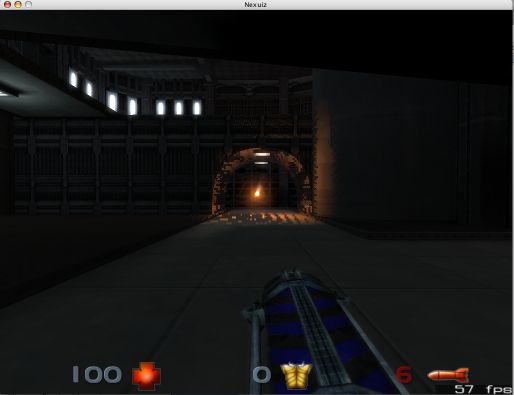
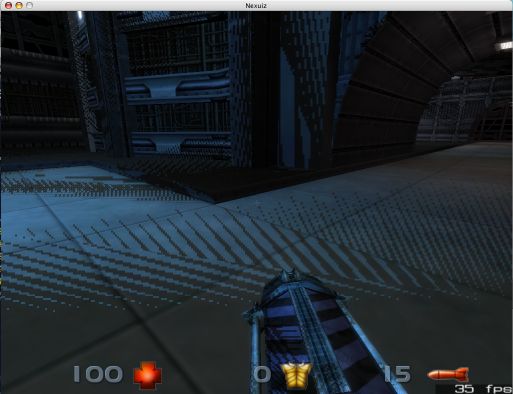
  • I've got some problems with the realtime lighting and shadows settigns. With the realtime world and dynamic lights on, I get all kinds of lines all over the walls. The shadow options don't seem to work at all (I don't see any dynamic shadows). This is on the Mac version, playing on a dual 2.5 G5 with 1.5GB RAM and a Radeon 9800XT running 10.4.6. Any ideas what's going on?
    -Dave
    Image
    Image
    artfoundry
    Newbie
     
    Posts: 4
    Joined: Sun Apr 23, 2006 10:52 pm

Mon Apr 24, 2006 8:05 am

  • i remember i have seen that a few times ago... 16-bits colors instead of 32-bits perhaps ?
    i also cant see any dynamic shadow or light, whatever i do :( but didn't told about the problem before, coz i thought it was me that was buggy :)
    [NSB] ppwer !
    User avatar
    obi_wan
    Alien trapper
     
    Posts: 256
    Joined: Mon Mar 13, 2006 9:24 am
    Location: France

Mon Apr 24, 2006 8:33 am

  • i was wrong :( 16 or 32 bits colors doesn't have any effect... it is bloom that doesn't work with 16-bits colors.
    I have the same problem than you if i activate lights and shadows :(

    Image
    [NSB] ppwer !
    User avatar
    obi_wan
    Alien trapper
     
    Posts: 256
    Joined: Mon Mar 13, 2006 9:24 am
    Location: France


  • artfoundry wrote:I've got some problems with the realtime lighting and shadows settigns. With the realtime world and dynamic lights on, I get all kinds of lines all over the walls. The shadow options don't seem to work at all (I don't see any dynamic shadows). This is on the Mac version, playing on a dual 2.5 G5 with 1.5GB RAM and a Radeon 9800XT running 10.4.6. Any ideas what's going on?
    -Dave


    Try turning on/off r_shadow_glsl and seeing if it behaves better with it off (however it will be slower and lower quality).

    You can also turn off shadows.

    This looks like Apple isn't honoring the strict rules on behavior of the ftransform() vertex shader function, which is guarenteed to produce the same vertex positions no matter what the shader is doing, in this case it is producing different vertex positions in the lighting shader than the shadows.

    This is not good for Apple users, ds01 has been encountering shader compilation bugs as well :(
    LordHavoc
    Site Admin
     
    Posts: 191
    Joined: Wed Mar 29, 2006 7:39 am
    Location: western Oregon, USA


  • LordHavoc wrote:Try turning on/off r_shadow_glsl and seeing if it behaves better with it off (however it will be slower and lower quality).

    You can also turn off shadows.

    This looks like Apple isn't honoring the strict rules on behavior of the ftransform() vertex shader function, which is guarenteed to produce the same vertex positions no matter what the shader is doing, in this case it is producing different vertex positions in the lighting shader than the shadows.

    This is not good for Apple users, ds01 has been encountering shader compilation bugs as well :(


    Not sure what r_shadow_glsl is, but if I turn off the realtime lighting options, this effect goes away.And this effect happens whether or not I have realtime shadows on. Realtime shadows don't seem to work at all.
    artfoundry
    Newbie
     
    Posts: 4
    Joined: Sun Apr 23, 2006 10:52 pm


  • artfoundry wrote:Not sure what r_shadow_glsl is, [...]

    It's an engine option. You can turn it of by switching the "OpenGL 2.0 Shaders" option (in the effects menu) to "off" or manually (open the console (shift+esc) and enter "r_shadow_glsl 0").
    User avatar
    KadaverJack
    Site admin and forum addon
     
    Posts: 1102
    Joined: Tue Feb 28, 2006 9:42 pm


  • artfoundry wrote:I've got some problems with the realtime lighting and shadows settigns ... I get all kinds of lines all over the walls... This is on the Mac version ... Any ideas what's going on?


    Hey. That bug is reproducable with the last stable release 1.5 download, and yeah I've seen it before. It is somewhat fixed in cvs if you use another evironment variable to push the shadows along the Z, atleast it was before the last commit :(

    As for the toggling effects in game, they are sometimes broken and need to be set via con [or cfg], but probably the world shadows are working for you - it's just impossible to tell the difference because of the "Z-cull-fighting" which is affecting the world lights. It may have something to do with the fact we [on Mac] can't use r_shadow_texture3d, because of the missing required GL extension.

    Fortunately I have a bazillion src trees here, because I've been tracking the progress. If you want to try a newer version, you can use a G5 build [for Tiger], but you will need to download the RC zip off SF.net to grab the new data pk3 for it.

    The compressed disk image is here [yes it's a webpage with the linked file due to anti-leech mechanism of webhost]:
    nexagl_osx_g5.dmg.zip

    There are extras in there, and description of [my] problems with work-arounds for all of them - please report back if you see the same issues as noted in the rtf and have to use the extras to fix them. TYIA!

    BTW there are two binaries, one is the latest as of this date - the other is before the last commit which broke dlights on world textures (they still are rendered on player models/pickup items) and glow on i.e. tubing in the Glow Arena map [it was fixed for a week then broke again for me].
    User avatar
    ds01
    Member
     
    Posts: 47
    Joined: Wed Mar 29, 2006 5:54 am
    Location: Lvl 7


  • I tried turning off the Opengl shaders and that did get rid of the problem, but it also reduced performance considerably - went from around 30-50 fps (depending on how many players were on) down to about 15-20 fps (or even worse in high activity areas).

    Then I tried that new version listed in your post - it doesn't work at all. Everything in the game (except the UI) is black except weapon fire (and on the new build I could sometimes see the sky box). Had the same problem with the previous executeable in the package.
    artfoundry
    Newbie
     
    Posts: 4
    Joined: Sun Apr 23, 2006 10:52 pm


  • artfoundry wrote:Everything in the game (except the UI) is black except weapon fire (and on the new build I could sometimes see the sky box). Had the same problem with the previous executeable in the package.

    Then the shaderstring built into the program does not compile with your ATI drivers either :-\ That also happens over here with an NVidia card.

    It says in the readme, but I'll reiterate since I guess I wasn't very clear on why/when to do this:
    Make a directory called glsl and put the default.glsl from the dmg in it. Then put that directory [glsl] into the data directory (where Nexuiz is), and you should then be able to actually see stuff with GLSL on.

    Thanks for reporting back, if you discover any of the other things mentioned in the readme are true for your setup as well, please voice them.
    User avatar
    ds01
    Member
     
    Posts: 47
    Joined: Wed Mar 29, 2006 5:54 am
    Location: Lvl 7


  • ds01 wrote:Fortunately I have a bazillion src trees here, because I've been tracking the progress. If you want to try a newer version, you can use a G5 build [for Tiger], but you will need to download the RC zip off SF.net to grab the new data pk3 for it.


    i downloaded your new .app compiled for tiger...
    but i cant find this new data pk3 file (i assume by SF.net you mean sourceforge...). If you could explain a nOOb how to get that pk3, i'll try to test and report what i see.

    If you have a 'test procedure', it would be great to tell it, so that i can test like you want.

    ## edit : omg i understood what RC means :) Release Candidate : so i have the files and i'll test a bit what you are talking about
    [NSB] ppwer !
    User avatar
    obi_wan
    Alien trapper
     
    Posts: 256
    Joined: Mon Mar 13, 2006 9:24 am
    Location: France


  • obi_wan wrote:If you could explain a nOOb how to get that pk3


    According to forum, I am more n00b than you are ;)

    [edit: hrmm you used the force, shall just leave the rest for anyone if interested...]
    The pk3 is in the latest release candidate from SourceForge here:
    http://prdownloads.sourceforge.net/nexuiz/nexuiz151rc3.zip?download

    If you want to try then feel free to - would really appreciate any other OSX user input especially an ATI card!

    Well there's not much to it - you put the app from the dmg in a directory, then pull the data folder from the RC zip into directory of the app. Then fire it up with GLSL on and create a local game. Can you see the world and models, or just the sky and particles? If you can't see everything, then make a folder named glsl in the data folder and move the default.glsl file into it. Then restart and you should now be able to see things with GLSL enabled.

    Another thing to try is to enable waterscroll (should be on already unless you turned it off) then create local game and switch the map to the slime pit or what's it called, i.e. type map nexdm03 at console. Walk into the room with all the green flourescent glowing tubes and if the bug shows itself - you _will_ know lol.

    Last thing to try is to check map nexdm08 the glow arena and look at the stairs, They should either do or do not work depending on version of binary.

    I say a lot in the rtf file in the dmg. There is also an example autoexec.cfg you can place in the data directory or in ~/.data. BTW I hate dot files in $HOME :P nasty sloppy dot files... in the future it would be nice to throw everything - data and config etc - right inside the .app bundle. I suck at filepath mods or would have submitted OSX specific patch to do this alreay.

    Thanks
    User avatar
    ds01
    Member
     
    Posts: 47
    Joined: Wed Mar 29, 2006 5:54 am
    Location: Lvl 7

Tue Apr 25, 2006 10:00 am

  • ok... i got all files needed and made what you say
    Powermac G5 dual 2,7 GHz // graphic board ATI Radeon 9650 AGP 256Mo

    1 - i put the dmg's .app into the game folder and simply fire it >> i can only see the sky.
    2 - made a folder named glsl etc and refired the game >> now i can see everything
    3 - used your autoexec to be sure and tried to go on the Slime Pit map >> you were right, i know that the bug is here ^^ i couldn't have miss it... there is like a smoky psychedelic rotating movement :
    Image
    4 - in the glow arena map, i can see the stairs, no problem
    And : there are dropshadows on the text in the menus :S really hard to read...
    Image


    Also : i always cant see weapon's shadows on the ground for example (i can see them in some screenshots) even if every option is set to "on"
    [NSB] ppwer !
    User avatar
    obi_wan
    Alien trapper
     
    Posts: 256
    Joined: Mon Mar 13, 2006 9:24 am
    Location: France

Tue Apr 25, 2006 10:10 pm

  • obi_wan, thanks for testing. It's bad all OSX video cards are affected. :(

    Are you sure the stairs in glow arena look as intended? Try going into the .app bundle and renaming the nexuiz-agl.last binary to nexuiz-agl. Use that one and you should then be able to see all the dlights and shadows etc.

    The r_textshadow I put in, because it makes it easier to read the text while playing the game itself. Yea guess it is just personal preference :b Changing r_waterscroll to 0 in autoexec.cfg, that should fix that psychodelia.
    User avatar
    ds01
    Member
     
    Posts: 47
    Joined: Wed Mar 29, 2006 5:54 am
    Location: Lvl 7

Wed Apr 26, 2006 3:54 am

  • Well I tried all the new files. I could see everything, but no lighting/shadow effects and the game was really slow (5-10 fps).
    BTW, I have the same system as obi-wan (I put the wrong info before) - dual 2.7 G5 with radeon 9650.
    I think for now I'll just stick with the current release.
    artfoundry
    Newbie
     
    Posts: 4
    Joined: Sun Apr 23, 2006 10:52 pm

Wed Apr 26, 2006 7:47 am

  • ds01 wrote:Are you sure the stairs in glow arena look as intended? Try going into the .app bundle and renaming the nexuiz-agl.last binary to nexuiz-agl. Use that one and you should then be able to see all the dlights and shadows etc.

    ok now i can see everything, shadows too :)
    but the game runs at 25 fps :( really poor
    ds01 wrote:The r_textshadow I put in, because it makes it easier to read the text while playing the game itself. Yea guess it is just personal preference :b Changing r_waterscroll to 0 in autoexec.cfg, that should fix that psychodelia.

    r_waterscroll set to 0 fixes that psychodelia, you are right

    i knew that the macintosh isn't a gaming machine... but i didn't thought it was so poor for that :(
    [NSB] ppwer !
    User avatar
    obi_wan
    Alien trapper
     
    Posts: 256
    Joined: Mon Mar 13, 2006 9:24 am
    Location: France

Wed Apr 26, 2006 9:06 am

  • ds01 wrote:Are you sure the stairs in glow arena look as intended?

    The neon tubes on nexdm08 are still broken (so it's not a MacOS driver bug), the slime pipes on nexdm03 however are fixed by now.
    User avatar
    KadaverJack
    Site admin and forum addon
     
    Posts: 1102
    Joined: Tue Feb 28, 2006 9:42 pm

Fri Apr 28, 2006 5:56 am

  • obi_wan wrote:ok now i can see everything, shadows too :)
    but the game runs at 25 fps :( really poor

    The binary that allows all effects to be seen was built from a snapshot just before a large amount of optimizations were done, because after that some things broke over here.

    Also, if it's your first time playing with newer game data (i.e. RC pk3 or data from svn), there is a LOT more candy - effects etc. ,, even just in the maps themselves. I turned on almost everything (not shadows tho) in the autoexec for testing purposes [make it easier]. You can get a speed boost on your specific setup by doing couple little things like disable r_glsl_offsetmapping. That probably help a bit, but there's some other things too like if you don't care about bloom turn that off for speed (but you can also turn down r_bloom_resolution instead [default is 320],, i.e. try 64).

    I noticed in the screenshots people always turn down texture quality and aniso for speed. This doesn't really help so much as other options I would suggest first:
    r_shadow_gloss "0"
    r_glsl_offsetmapping "0"
    r_bloom_resolution "64"
    r_shadow_bumpscale_basetexture "1"
    r_shadow_bumpscale_bumpmap "0"
    & if you don't care about it you could also
    r_glsl_deluxemapping "0"

    BTW G5 binary is built "regulated power" - try turning resolution up.

    obi_wan wrote:i knew that the macintosh isn't a gaming machine... but i didn't thought it was so poor for that :(

    Just like last year when they hired GL engineers and then released updated drivers slightly faster with more features, this year they just posted positions for hire - for optimization and design. So... there is still hope obi_wan!

    It is this way because of several things. The drivers on OSX are built on top of a shared GL engine, but in Windows or proprietary NVidia/ATI Linux drivers they have individual GL drivers with their own 2D drivers and can do "tricks" for speed increase. This is simplified example, so don't take it the wrong way - _of course_ OSX drivers have their own interfaces to the engine.

    Further, right now the underlying Apple GL engine [shared engine] I believe to be a bottleneck for the drivers. There seem to be 'caps' on thruput, example - Quake 4 runs same speed at 1600x1200 vs. any lower resolution [no difference in FPS]. People migrating to OSX from other Unix complain about these caps when they bring their thruput benchmarks over and only get so few MegaPixels. Most people just don't realize and just think it's cool that you can even run these new games at crazy res like 1920x1200 (or whatever), but don't stop to think just why that is exactly. (It is impressive that no loss in going up in resolution so high though.)

    There is also the fact that the 3D engine ,, i.e. GL engine ,, _has_ to be running 24/7. The entire user interface is composited output GL and seems Apple is naughty and UNDERclocks video cards :( Maybe this make less heat or more stable in some ways it's just absurd really. You have to give them mad props tho, there's no flicker or artifact - everything seamless transition completely smooth - a bazillion 3D running simultaneously.

    @ KadaverJack : Thanks for clarifying that. Actually was talking about differences in the binaries from the disk image, but it's good to know this :)
    User avatar
    ds01
    Member
     
    Posts: 47
    Joined: Wed Mar 29, 2006 5:54 am
    Location: Lvl 7


Return to Nexuiz - Support / Bugs


Information
  • Who is online
  • Users browsing this forum: No registered users and 1 guest